Integrate Dynamo with Autocad

Integrate Dynamo with Autocad

Yonas89
Collaborator Collaborator
50.388 Vistas
51 Respuestas
Mensaje 1 de 52

Integrate Dynamo with Autocad

Yonas89
Collaborator
Collaborator

Hello,


I am not sure which forum to choose for my question, thus I hope I have chosen the right one. I have read and watched about Dynamo compatibility with Revit and it looks just amazing. However I use Civil 3d in my daily process which is AutoCAD based and though it's  challenging  to combine Dynamo with AutoCAD, I know it's possible, but I don't know how. I would like to discuss with you guys, maybe you have some experience with it or some thoughts to share. I have found this short video here: https://www.youtube.com/watch?v=oiz76GTN-8Y. Sorry that it's in Russian, don't understand Russian but I get the point that AutoCAD objects could be controlled from Dynamo.

Soluciones aceptadas (1)
50.389 Vistas
51 Respuestas
Respuestas (51)
Mensaje 41 de 52

kasaresatish
Community Visitor
Community Visitor

Hello sir,


Could you please tell how to integrate Dynamo Studio or Dynamo with AutoCad. Can we  access AutoCad API through Dynamo or Dynamo Studio.

0 Me gusta
Mensaje 42 de 52

Anonymous
No aplicable

Hi,

this will show only line in AutoCAD by converting ARC into line but,I want also the the arc in AutoCAD but this code is not working.

please suggest me the correct code I have same problem.

0 Me gusta
Mensaje 43 de 52

s33wagz
Explorer
Explorer

I'd like to use python for Fabrication CADMEP.


Mainly for automating object manipulation. 


Here is a link to these types of objects:


https://knowledge.autodesk.com/support/fabrication-products/learn-explore/caas/CloudHelp/cloudhelp/2...


Currently we use scripting but I'd like to use python.


https://knowledge.autodesk.com/support/fabrication-products/learn-explore/caas/CloudHelp/cloudhelp/2...


Are there any limitations that I will run into or will it be fairly intuitive to get rolling with Dynamo and CADMEP scripting?

0 Me gusta
Mensaje 44 de 52

jtm2020hyo
Collaborator
Collaborator

I noticed than ironpython use python 2 but the version than support pythons 3 is in alpha , then is possible to use other library like python.net and create a sample video using last dynamos stable version with AutoCAD Architecture and MEP?

0 Me gusta
Mensaje 45 de 52

Anonymous
No aplicable

Hello Mr. Khasan,


I have been stuck in doing a very tedious, repetitive task manually, in AutoCad

What I have to do is to enter some information in attributes of various blocks, sequentially

like A1, A2, A3.. and so on.


Can you please help me out here?

Thanks,

0 Me gusta
Mensaje 46 de 52

Anonymous
No aplicable
Hello Mr. Khasan,

I have been stuck in a repetaitve and cumbersome task of feeding information to attributed of each block of an AutoCad file. And not a single info but sequential, different for each block.
For Example, A1, A2, A3 .......

Can you please help me here?
Thanks,
0 Me gusta
Mensaje 47 de 52

essam-salah
Advisor
Advisor

@Yonas89 


@Yonas89 wrote:
Hmm, I think with Dynamo it would be possible but difficult. I think the better option would be to create custum plugin for it.

Yes basic nodes that comes with dynamo not enough to do all C3D stuff (like creating corridor for example), but package like Civil3dToolKit (Autodesk package) will help, also as you said you can create your own packages and Nodes using Zero Touch Nodes, or custom nodes that composing other nodes. 

0 Me gusta
Mensaje 48 de 52

S_S_SS
Advocate
Advocate

Hello sir ...
I have some ideas and i need to know if it can be real or not by dynamo or programming ..
I need to insert blocks sizes according to spacing between other blocks ...

mostafahisham62_0-1639483737116.png


mostafahisham62_1-1639483769960.png


mostafahisham62_2-1639483825510.png


I Will explain what i need in the the below image ..


mostafahisham62_3-1639484248485.jpeg

if i can make that there is more and more cases and details that i'll learn dyamo to make what i need ..
and thanks in advance .. 


0 Me gusta
Mensaje 49 de 52

hosneyalaa
Advisor
Advisor

 @S_S_SS 

مرحبا

ممكن تضع سؤالك  في هاد الموقع


https://forum.dynamobim.com/c/civil3d/17

0 Me gusta
Mensaje 50 de 52

jtm2020hyo
Collaborator
Collaborator

@Anonymous  ha escrito:

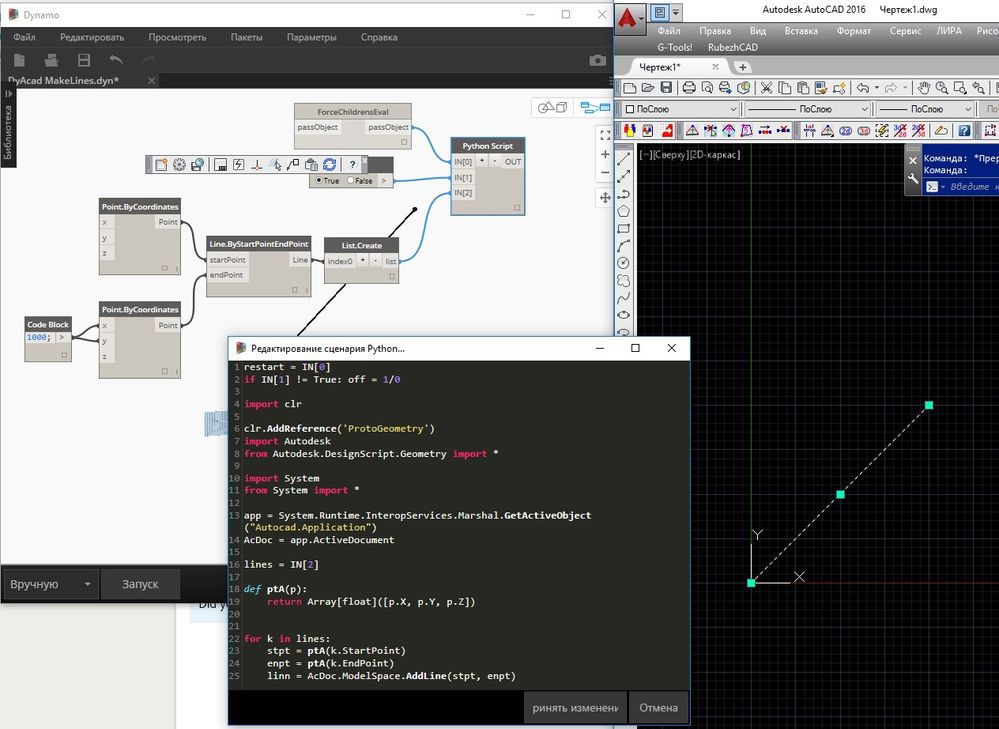
Well, if you do not have a specific task, then I'll show you how to build the line in the open AutoCAD file.

DyAcad MakeLines.jpg


restart = IN[0]
if IN[1] != True: off = 1/0

import clr

clr.AddReference('ProtoGeometry')
import Autodesk
from Autodesk.DesignScript.Geometry import *

import System
from System import *

app = System.Runtime.InteropServices.Marshal.GetActiveObject("Autocad.Application")
AcDoc = app.ActiveDocument

lines = IN[2]

def ptA(p):
	return Array[float]([p.X, p.Y, p.Z]) 


for k in lines:
	stpt = ptA(k.StartPoint)
	enpt = ptA(k.EndPoint)
	linn = AcDoc.ModelSpace.AddLine(stpt, enpt)


I tried to run your code but i found some warning / errors.


jtm2020hyo_0-1670776661165.png


How can I fix this?

0 Me gusta
Mensaje 51 de 52

lukasz_koc2
Contributor
Contributor

@Anonymous 
Do you know any way to combine multiple lines into polyline similarmy as PEDIT in autocad works ? 

0 Me gusta
Mensaje 52 de 52

thsa2501
Enthusiast
Enthusiast

hii,

why this node did not work for me? kindly give a solution for this.i attached the image and drawing .


best regards,

hussainScreenshot (10).png

0 Me gusta