.NET custom command not found when debugging

.NET custom command not found when debugging

Prostang
Advocate Advocate
2,563 Views
8 Replies
Message 1 of 9

.NET custom command not found when debugging

Prostang
Advocate
Advocate

I went to make some minor changes to a DLL that was working previously.  Nothing has changed that I can identify, but when I debug via C3D, NETLOAD the DLL, the custom commands are not found in C3D.


I have verified my resources/references are pointing to 2018.  When I NETLOAD an older build (last month-ish), it works perfectly.  Can anyone suggest where things may have gone south?


Thanks,

Mike

Mike Madrid
Owner, MJM Consulting
0 Likes
2,564 Views
8 Replies
Replies (8)
Message 2 of 9

Keith.Brown
Advisor
Advisor
Are you using the Application Initialize method? If there is an error in the method, then I dont think the command will be found.
0 Likes
Message 3 of 9

Prostang
Advocate
Advocate

<Autodesk.AutoCAD.Runtime.CommandMethod("ip")>
Public Sub ip()
Dim compName As String, compAddr As String
compName = System.Net.Dns.GetHostName
compAddr = System.Net.Dns.GetHostByName(compName).AddressList(0).ToString()

MsgBox("Computer name: " & compName & vbCrLf & "Computer Address: " & compAddr)
End Sub

Mike Madrid
Owner, MJM Consulting
0 Likes
Message 4 of 9

ActivistInvestor
Mentor
Mentor

Be sure that your project is referencing the correct framework version for the AutoCAD version you're using.


If there were an exception being raised when your DLL is NETLOADed, the debugger should break on the exception. You might also check to ensure that your references have their CopyLocal property set to false, and if all else fails, try placing your DLL and PDB files in AutoCAD root folder (where acad.exe is).


@Prostang wrote:

I went to make some minor changes to a DLL that was working previously.  Nothing has changed that I can identify, but when I debug via C3D, NETLOAD the DLL, the custom commands are not found in C3D.


I have verified my resources/references are pointing to 2018.  When I NETLOAD an older build (last month-ish), it works perfectly.  Can anyone suggest where things may have gone south?


Thanks,

Mike


0 Likes
Message 5 of 9

Prostang
Advocate
Advocate

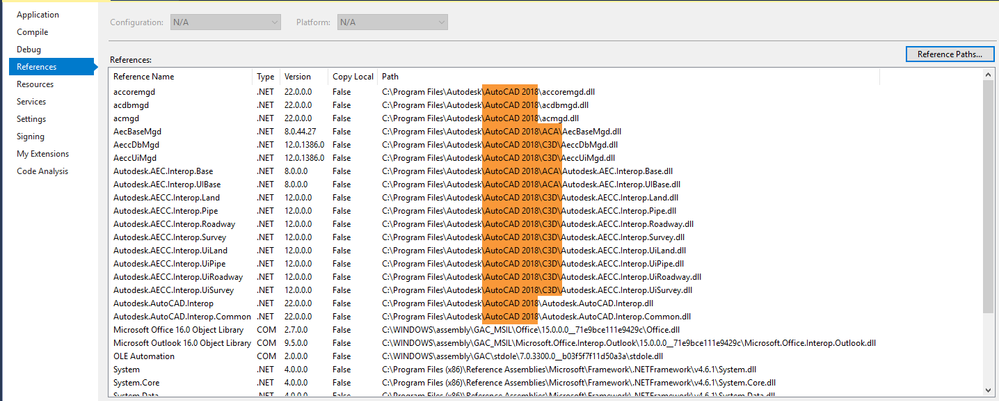
The references are pointing to 2018 and Copy Local is set to False.  .NET framework is set to 4.6.1 (up from 4.6).  I didn't really make any changes that should account for this mystery.  I changed a directory path the app was searching and recompiled.  Prior to that change and recompile, the app was working.


2.png


Imports Autodesk.AutoCAD.Runtime
Imports Autodesk.AutoCAD.EditorInput
Imports Autodesk.AutoCAD.ApplicationServices
Imports System.Windows.Forms


Public Class Class1

<CommandMethod("test1234")>
Public Sub test1234()
MsgBox("New command works.")
End Sub

<CommandMethod("ip")>
Public Sub ip()
Dim compName As String, compAddr As String
compName = System.Net.Dns.GetHostName
compAddr = System.Net.Dns.GetHostByName(compName).AddressList(0).ToString()

MsgBox("Computer name: " & compName & vbCrLf & "Computer Address: " & compAddr)
End Sub

End Class

Mike Madrid
Owner, MJM Consulting
0 Likes
Message 6 of 9

ActivistInvestor
Mentor
Mentor

Two questions you didn't answer.


First, does your assembly have a class that implements IExtensionApplication.


Second. What happens when you load the assembly outside of a debug session, as it would normally be loaded.


@Prostang wrote:

The references are pointing to 2018 and Copy Local is set to False.  .NET framework is set to 4.6.1 (up from 4.6).  I didn't really make any changes that should account for this mystery.  I changed a directory path the app was searching and recompiled.  Prior to that change and recompile, the app was working.


2.png


Imports Autodesk.AutoCAD.Runtime
Imports Autodesk.AutoCAD.EditorInput
Imports Autodesk.AutoCAD.ApplicationServices
Imports System.Windows.Forms


Public Class Class1

<CommandMethod("test1234")>
Public Sub test1234()
MsgBox("New command works.")
End Sub

<CommandMethod("ip")>
Public Sub ip()
Dim compName As String, compAddr As String
compName = System.Net.Dns.GetHostName
compAddr = System.Net.Dns.GetHostByName(compName).AddressList(0).ToString()

MsgBox("Computer name: " & compName & vbCrLf & "Computer Address: " & compAddr)
End Sub

End Class


0 Likes
Message 7 of 9

norman.yuan
Mentor
Mentor

In the same assembly (your DLL project), do you have a class decorated with "CommandClass" attribute, but the other class (the class with CommandMethod not being recognized) is without "CommandClass" flagged? In the same assembly, if a class is flagged as "CommandClass", all other classes that has "CommandMethod" need to be flagged as "CommandClass". Or, you do not use "CommandClass" attribute at all.

Norman Yuan

Drive CAD With Code

EESignature

0 Likes
Message 8 of 9

Prostang
Advocate
Advocate

My apologies.  There are no instances of IExtensionApplication.
When I load it outside of debug, I get the same behavior.  

This project was a copy of another with some changes.  When I load the original project, it works in debug.  The only thing changed was all of the paths to various file calls.

Mike Madrid
Owner, MJM Consulting
0 Likes
Message 9 of 9

Prostang
Advocate
Advocate

I searched the entire project and did not find CommandClass.

Mike Madrid
Owner, MJM Consulting
0 Likes