My model disappears when i select Simulate

My model disappears when i select Simulate

tcorey
Mentor Mentor
7,629 Views
12 Replies
Message 1 of 13

My model disappears when i select Simulate

tcorey
Mentor
Mentor

As soon as I select the Simulate tab of the Timeliner, my model disappears. If I select a different tab before letting the window collapse, the model looks the way I want.


Where should I be looking?


Tim


Tim Corey
MicroCAD Training and Consulting, Inc.
Redding, CA
Autodesk Platinum Reseller

New knowledge is the most valuable commodity on earth. -- Kurt Vonnegut
0 Likes
Accepted solutions (1)
7,630 Views
12 Replies
Replies (12)
Message 2 of 13

tangw
Alumni
Alumni
Accepted solution

Hi Tim,


If your project contained the timeliner data (you could check it in Tasks tab), then you select the Simulate Tab, you would get into the Simulate mode automaticly. And the time is set to the start time of your project. At this time, your project haven't start yet, so that you can't see your model. You could start the simulation by click the "Play" button.


Hope that's helpful to you.


Regards,

Wei Tang


Wei Tang
Software Engineer
Simulate Group
Autodesk, Inc.

0 Likes
Message 3 of 13

tcorey
Mentor
Mentor

Thanks, that helps.


Tim Corey
MicroCAD Training and Consulting, Inc.
Redding, CA
Autodesk Platinum Reseller

New knowledge is the most valuable commodity on earth. -- Kurt Vonnegut
0 Likes
Message 4 of 13

Anonymous
Not applicable

Hello,


I am currently having the same problem but once I hit the play button the model never appears. All it does is run through each task but never shows the model. Any suggestions?

0 Likes
Message 5 of 13

ahocutt
Explorer
Explorer

I'm just starting to play around with Navisworks.  I had the same issue, The only way it worked for me is if the camera is in the same scene as the animations.  The video I saw had a separate camera scene, but I'm not exactly sure how they combined the two.

0 Likes
Message 6 of 13

Anonymous
Not applicable

you must reattach the sets to your tasks.

0 Likes
Message 7 of 13

LyleHardin
Advisor
Advisor

Same issues here.

Items to show in timeline are in Selection Sets. Check.

Selection Sets are attached to Tasks. Check.


Plan view of model shows everything.

I pick the Simulate tab and model disappears.

I pick Run, or pick a date but nothing ever appears.


What's going on?

0 Likes
Message 8 of 13

Anonymous
Not applicable

Same here. Although the simulate tab had been working up until today, now when ever I select the simulate tab the model vanishes regardless of whether or not i'm playing the simulation. Anybody got the answer?

0 Likes
Message 9 of 13

jahnove
Participant
Participant

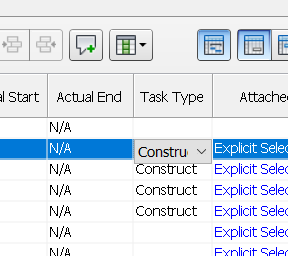
I had the same problem, but found out that I hadn't selected Task Type. It worked when I selected this.

Message 10 of 13

kaitlin.pickett
Explorer
Explorer

Has anybody solved this? I am having the exact same problem in Navisworks Manage 2021. Checked all my far clip settings, done all my selection sets, selected task types, dates included, pressed play, still nothing

0 Likes
Message 11 of 13

e.m.usman13
Explorer
Explorer

It means we are facing this problem from 4 years and still dont have solution. I have same problem in 2022. Autodesk is saying to shift to synchro or other software by not giving us answer

0 Likes
Message 12 of 13

zaawad
Explorer
Explorer

you need to fill the "task type" to construct or demolish or temporary and the tasks will then be visible

zaawad_0-1685957965720.png


Message 13 of 13

kademblack
Observer
Observer
Thank you very much. It worked
0 Likes