Announcements

Announcement: We’re aware of an issue affecting starting a new topic from category pages and creating new blog posts. New topics can still be started directly from the relevant board. Learn more here.

Clash Detection Disappeared and can't be used

Clash Detection Disappeared and can't be used

harbirsi
Observer Observer
4,870 Views
6 Replies
Message 1 of 7

Clash Detection Disappeared and can't be used

harbirsi
Observer
Observer

I've been using Naviswork manage 2016 for a couple of years and I've been able to use the clash detection tool the whole time without any issues. Yesterday when I tried to use it, I realized that the icon is no longer there on the Tools panel. 

 

navis missing.JPGnavis missing.JPG


I tried using the ctrl+f2 command to open it as well, but nothing happened (ctrl+f3 worked though). 


Anyone come across this issue? I need to be able to use clash detection going forward.

0 Likes
4,871 Views
6 Replies
Replies (6)
Message 2 of 7

brettgatti
Collaborator
Collaborator

Is it available from the View >> Windows pull-down?  If not, you might want to make sure that you are in Manage and not Simulate.


I have found that most times that I double click on a Navisworks file to open it (without having Manage open) - it opens in Simulate.

0 Likes
Message 3 of 7

harbirsi
Observer
Observer

Definitely managenavis missing.JPGnavis missing.JPG

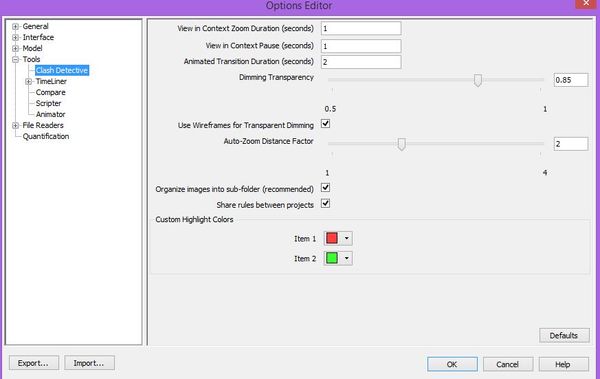
Also, I don't think I even have simulate. I tried View-->Pull Down Window and didn't see Clash detection. The only place I can find it is under options, but there isn't anything I can do in that menu to help it show up.

clash.JPGclash.JPG


Message 4 of 7

brettgatti
Collaborator
Collaborator

Definitely odd.  Does the information available from this Knowledge Network Article help?

0 Likes
Message 5 of 7

harbirsi
Observer
Observer

Tried the default workspace, but Clash Detection didn't appear in any of them.

0 Likes
Message 6 of 7

brettgatti
Collaborator
Collaborator

It sounds to me like Navisworks is running as Simulate instead of Manage - even though it is saying that it is Manage.  Have you tried a repair install and/or an uninstall/reinstall?

0 Likes
Message 7 of 7

halilozcakir
Observer
Observer
Bende aynı dertten muzdaribim.
0 Likes