Clash Detection Disappeared and can't be used

Clash Detection Disappeared and can't be used

harbirsi
Observer Observer
4,871 Views
6 Replies
Message 1 of 7

Clash Detection Disappeared and can't be used

harbirsi
Observer
Observer

I've been using Naviswork manage 2016 for a couple of years and I've been able to use the clash detection tool the whole time without any issues. Yesterday when I tried to use it, I realized that the icon is no longer there on the Tools panel. 

 

navis missing.JPG


I tried using the ctrl+f2 command to open it as well, but nothing happened (ctrl+f3 worked though). 


Anyone come across this issue? I need to be able to use clash detection going forward.

0 Likes
4,872 Views
6 Replies
Replies (6)
Message 2 of 7

brettgatti
Collaborator
Collaborator

Is it available from the View >> Windows pull-down?  If not, you might want to make sure that you are in Manage and not Simulate.


I have found that most times that I double click on a Navisworks file to open it (without having Manage open) - it opens in Simulate.

0 Likes
Message 3 of 7

harbirsi
Observer
Observer

Definitely managenavis missing.JPG

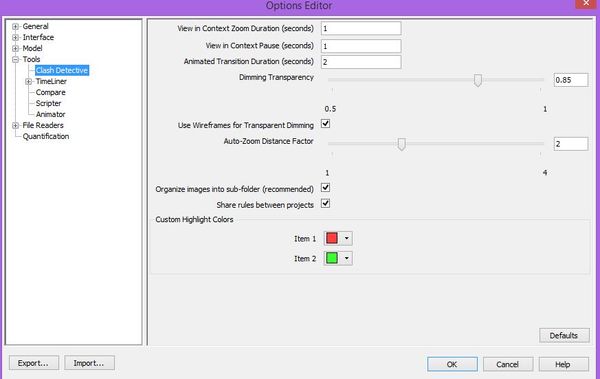
Also, I don't think I even have simulate. I tried View-->Pull Down Window and didn't see Clash detection. The only place I can find it is under options, but there isn't anything I can do in that menu to help it show up.

clash.JPG


Message 4 of 7

brettgatti
Collaborator
Collaborator

Definitely odd.  Does the information available from this Knowledge Network Article help?

0 Likes
Message 5 of 7

harbirsi
Observer
Observer

Tried the default workspace, but Clash Detection didn't appear in any of them.

0 Likes
Message 6 of 7

brettgatti
Collaborator
Collaborator

It sounds to me like Navisworks is running as Simulate instead of Manage - even though it is saying that it is Manage.  Have you tried a repair install and/or an uninstall/reinstall?

0 Likes
Message 7 of 7

halilozcakir
Observer
Observer
Bende aynı dertten muzdaribim.
0 Likes