Heads Up Display (XYZ Corrdinates)

Heads Up Display (XYZ Corrdinates)

Anonymous
Not applicable
1,730 Views
5 Replies
Message 1 of 6

Heads Up Display (XYZ Corrdinates)

Anonymous
Not applicable

This may be an easy one, but I am unable to find a way to turn the XYZ corrdinates off on the bottom left of the ActiveX control for NavisWorks.  I'm looking to export images from a model, to put into a report.  I can export the image and resize it correctly, but the XYZ corrdinates from the control remain the same size and only show half the Corrdinates within the image.


Is there an easy way to hide these corrdinates within the ActiveX control, that I may be missing.  I've dug through the control with no luck so far.


Thanks.

0 Likes
1,731 Views
5 Replies
Replies (5)
Message 2 of 6

xiaodong_liang
Autodesk Support
Autodesk Support

Hi,


I think you can turn it off just by changing registry settings, but you’ll need to make sure the ActiveX control isn’t running when you do it.


e.g. with NW2013 Redistributable control.  


show_position = 0

xyz_triad = 0


in  HKEY_CURRENT_USER\Software\Autodesk\Navisworks ActiveX Redistributable\10.0\GlobalOptions\interface\display\hud


the icons will not appear.


show_position = 3 1

xyz_triad = 3 1


Note, there is a space in between “3” and “1”


The icons will appear.


0 Likes
Message 3 of 6

Anonymous
Not applicable

Dear Xiaodong,


Is it possible to turn on the HUD in .Net Api?


Thanks,

John

0 Likes
Message 4 of 6

xiaodong_liang
Autodesk Support
Autodesk Support
Dear John,

the API for HUD is still a wish. I do not see a way at this moment. Sorry if this is bad news for you.
But for .NET control, it looks to me the HUD is turned on by default.
Message 5 of 6

Anonymous
Not applicable

Dear XiaoDong,


Thanks for your reply.

It is really a bad new for me.Smiley Sad


Nevertheless, I can turn it on in Navisworks and the HUD will be dispalyed in .Net control.


Best Regards,

John

Message 6 of 6

steven.tannerBeca
Contributor
Contributor

steventannerBeca_1-1693383384412.png

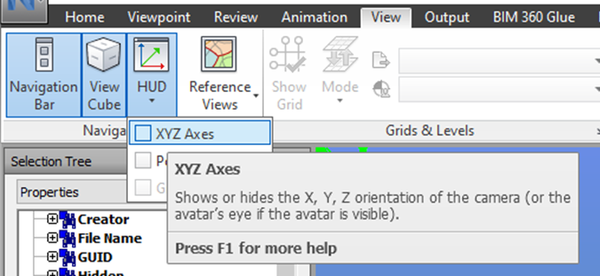
Here you go. Toggle this on and off, and this will fix your problem.


Regards, 

Steven

0 Likes