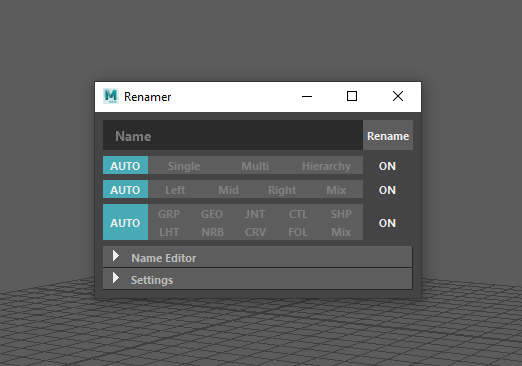
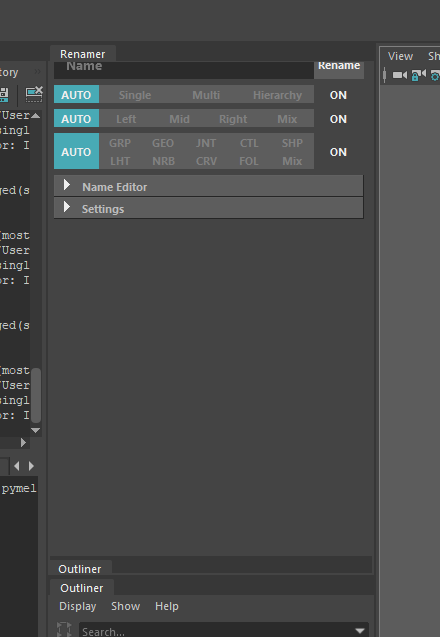
Docking custom windows screw up the contents.

Docking custom windows screw up the contents.

mads.hangaard
Explorer Explorer
2,167 Views
2 Replies
Message 1 of 3

Docking custom windows screw up the contents.

mads.hangaard
Explorer
Explorer

Hi, I'm writing a UI for Maya using PySide2, but I'm having a problem after implementing mayaMixin for the docking feature. After docking the window, it screw up the contents and resizing the window a tiny bit corrects this. I have tried to find an event to call, to try and update the QWidget, but there neither seems to exist an event that reliably calls whenever it is docked ( floatingChanged() seems to be the closest ) and calling some forms of adjustSize(), resize() or updateGeometry() seems to fix the issue. Any ideas on how I can avoid this kind of behavior? I have attached examples of the messed up docked UI and what the UI is supposed to look like. Thank you for your time.

- Mads

Accepted solutions (1)
2,168 Views
2 Replies
  • UI
Replies (2)
Message 2 of 3

mads.hangaard
Explorer
Explorer

Okay after further troubleshooting, the problem seems to be the way I add content to the collapsable frameLayout I create with PyMEL. After creating them with PyMEL, I'd get the Qt object, query it's layout and a widget to it. It seems like it's the adding of the widget, and not what widget is added that is the problem. This is of course a little bit outside of the intended use case, but if anyone can let me know the correct Qt for Python way to add content to these MEL generated collapsible frameLayouts, that'd be much appreciated. If not, I suggest anyone with the same issue to just use another kind of container, like tabs.

0 Likes
Message 3 of 3

mads.hangaard
Explorer
Explorer
Accepted solution

Alright, after some time away from the issue it hit me. The problem is when multiple widgets are parented to the Maya. If anyone else runs into this issue, make sure that only your main widget is parented to the Maya window.