cancel
Showing results for 
Show  only  | Search instead for 
Did you mean: 

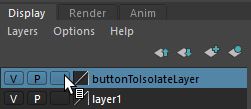
"Isolate select" for Display-Layers (additional button)

"Isolate select" for Display-Layers (additional button)

Wouldn't it be great, if we could "isolate select" the visibility  at the display layers?


These display layers do already store a selection, so why not expand the funcionality.

At the moment we can switch on and off, but it would be even much more versatile if it could isolate the associated layers. And very easy to implement...


It could be with a 4th button or with a middle mouse button click.

(Similar to the vray "light lister" where you can isolate a light with a right click)


8 Comments
BenediZ
Collaborator

Just forgot to mention, this would not be a redundant functionality, because it enables a more versatile workflow than the usage of "Isolate Select", which always demands from you to make an object selection first of the object.

The layers let you change visibility without having to loose a component selection or quitting your tool.


Example:

If you work on a character and have some vertices selected while doing modeling operations:

Then you want just toggle between visibility of everything (clothes, hair, environment) and only the body mesh, on which you are working. If just the body is on a display layer this would be easy enough to switch all other objects off (regardless if they are on a display layer or not).

Currently you have to delete your component selection, go to object selection mode, then "isolate select", then go back to component selection, then do your tedious selction again from scratch (or you have to spend even more time to create a selection set to store it).

Especially when cleaning up dense meshes in wireframe mode and in component mode,  it would help to toggle this way the visibility rest of your scene, without having to interrupt your workflow.


ryanVQGVU
Enthusiast

can't you just put the body in it's own display layer, and the rest of the stuff in a different display layer? Then just turn one off? I don't understand what isolate select means. How is that different from Shift+I or using display layers? 

BenediZ
Collaborator
No. Let's say you have for example 10 elements (and these wouldn't be many for a big scene), so you would need ten display layers, which by the way also wouldn't update when duplicating or creating new elements. But let's pretend would work for you, then you've got for working on layer no.1 to switch off 9(!) other display layers and for quick check toggle, to look at everything again, to switch all other 9 display layers again on. It means: - 18 clicks!! - scrolling in the panel and you destroy your existing state how display layers should be switched on and off, because they have other purposes, too. Now imagine you want to look at element no.3 only: Switch off layer: 1,2,4,5,6,7,8,9,10.... and switch again "on" to see how everything fits together. Again 18 clicks. (And you could also isolate no.3 and no.7 with two clicks only, because you need to see both of them. ) Impossible to work like that: This is way the idea of "isolating a layer" was invented once. You don't have to take care about the time-consuming organization of other stuff, only what you work on currently.
sciallis
Enthusiast
ryanVQGVU
Enthusiast

That's brilliant!

indeed

sciallis
Enthusiast

maya 2020 and still no improvement

Can't find what you're looking for? Ask the community or share your knowledge.

Submit Idea