No text on minimized windows inside Maya 2017 on Windows 10

No text on minimized windows inside Maya 2017 on Windows 10

robogunx
Explorer Explorer
8,846 Views
36 Replies
Message 1 of 37

No text on minimized windows inside Maya 2017 on Windows 10

robogunx
Explorer
Explorer

Hello, my problem is that whenever I minimize a window inside Maya (Hypershade, Node Editor, UV Editor, etc.) they're nested at the bottom-left of the screen but there is no text displayed on them. In short... they're too short. This affects productivity because I'm wasting time finding the window I need.


Do the three window control buttons have to be so far apart? I realize this is the standard for Windows 10 UI design but can't it be overridden by an application? If they were closer together there would be space to render the window text.


This doesn't happen on Windows 7; there's usually at least the first letter of the window displayed which makes it easier to guess what to restore.


A picture to describe my issue is attached.
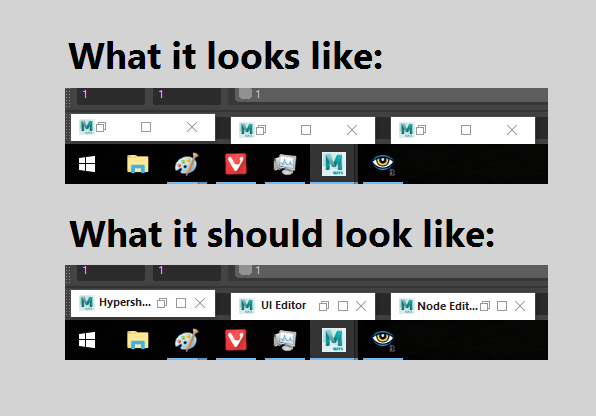
 

minimizedwindows.png

Accepted solutions (1)
8,847 Views
36 Replies
Replies (36)
Message 2 of 37

neilcross
Explorer
Explorer

Having this same issue with 3ds Max. Also running windows 10.

0 Likes
Message 3 of 37

Anonymous
Not applicable

I'm having the same issue...it's annoying. Did you find a solution?

Cheers

0 Likes
Message 4 of 37

robogunx
Explorer
Explorer
Unfortunately, no.
0 Likes
Message 5 of 37

halfstone
Collaborator
Collaborator

This is a GREAT question - and a TREMENDOUSLY aggravating problem.  I don't recall ever having seen these windows labeled in any version or on any OS, but if you say it was there in Windows 7, I believe you.  I'm posting on this question just to elevate it; hopefully someone who can fix it will notice.  


There is nothing worse than having a string of minimized windows - render view, outliner, hypershade, node editor ... and having to sit and try to guess which one is which.  Better to just assign hotkeys to them at this point, or stick them on a shelf.  


As an alternative to the control icon spacing, maybe the windows could have the specific window icon displayed instead of the Maya Icon.  

Message 6 of 37

Anonymous
Not applicable

Minimized Maya windows have of course always had some text on them, otherwise how could you possible differentiate between them.... Oh wait Microsoft says that's not necessary. I hope Autodesk will address this very serious problem immediately.

0 Likes
Message 7 of 37

andreas.olofsson
Enthusiast
Enthusiast

Bumping this BS. Tired of working in the dark.

0 Likes
Message 8 of 37

starcitizen
Explorer
Explorer

This is driving me NUTS! I have finally just stopped minimizing windows and opening them from the menus the old slow way. Fix this Autodesk!

0 Likes
Message 9 of 37

jordan.giboney
Alumni
Alumni

Hi everyone,


Thank you for taking the time to post about this topic. I have gotten in touch with our internal teams and they are aware of this issue and are working towards a resolution. We appreciate you taking the time to provide this feedback, and if you would like to provide any additional details I would recommend posting to our Maya Idea Station.


Thank you again for your time! 


Jordan Giboney
Technical Solutions Engineer | Media & Entertainment
Installation & Licensing forums | Contact product support | Autodesk AREA


0 Likes
Message 10 of 37

stevedavy
Participant
Participant

Great to get a response on this.... AFTER MORE THAN A YEAR. Seriously, this was flagged by me personally well over a year ago when they moved to Windows 10 at the place I was working three jobs ago. This isn't even my original post about this -- someone else has also had to start one to try to get any kind of action. With such a MAJOR problem with the UI that literally prevents users from being able to work in Maya, one would expect Autodesk to escalate a fix for something like this ASAP. Now after a year, we are getting a platitudinous "we're aware of the problem and looking at it". Simply not good enough.

Message 11 of 37

starcitizen
Explorer
Explorer
Can I ask, do you work on laptop, tablet, or desktop? I'm wondering if it might be screen real estate/resolution related. Me, I work on a laptop currently. 3 Jobs ago?! You must work in games huh?
0 Likes
Message 12 of 37

halfstone
Collaborator
Collaborator

Actually, I am a teacher at a university.  This problem has persisted through Maya 2017, 2018, and 2019, and has nothing to do with screen real estate, though that may have been my first thought when I first experienced the problem two years ago.   I seem to remember trying out all sorts of screen resolutions in hopes that that was the problem. 


It's a programming error, as confirmed by Jordan Giboney of Autodesk Support.  


I work on all sorts of machines.  I have a laptop, but I almost never use it for Maya  except to open and look at student work.  At home I have a desktop machine with two monitors and a Cintiq; at school I work on a single monitor with a Cintiq.  

0 Likes
Message 13 of 37

halfstone
Collaborator
Collaborator

Jordan, thank you for finally acknowledging and addressing this problem - it is a major slowdown to have to pick through several identical minimized icons before hitting upon the one for the desired window.  I suppose the smart folks out there bypassed the problem by assigning hotkeys to windows, but even though a workaround is possible, it really shouldn't be. 

I would respectfully request that you do whatever you can to accelerate a fix for this - the problem first appeared in v. 2017, and there have been multiple full- and dot-releases since then.  It should really be a priority for the QC team. 

0 Likes
Message 14 of 37

mspeer
Consultant
Consultant

Hi!

This is a Windows 10 specific issue so people user an older Windows OS may not have this problem.

0 Likes
Message 15 of 37

stevedavy
Participant
Participant

That's why the title of this thread is No text on minimized windows inside Maya 2017 on Windows 10

0 Likes
Message 16 of 37

Anonymous
Not applicable

Hi,

you might solve this problem with a software tool called "Actual Title Button"

https://www.actualtools.com/titlebuttons/


Cheers

Message 17 of 37

stevedavy
Participant
Participant

You gotta be kidding, right?


This is on the software developers at Autodesk to address. And, this problem has now been around for three years.

Message 18 of 37

Anonymous
Not applicable
Hi,


you are right - others wrong...


That's the game of ego, I know it from my own experience


Message 19 of 37

stevedavy
Participant
Participant

If there's any ego involved, it's yours (as you've already pointed out).


It should not be necessary to resort to third party software to fix a glaring user experience error that's been around ever since Windows 10 was released, especially an error that was previously not an issue.


It's also not what this site is intended for.


If you follow your logic to its natural conclusion, we might as well all switch to a different 3D app entirely.

0 Likes
Message 20 of 37

bamorim
Contributor
Contributor

still nothing?


0 Likes