Error: sRGB gamma

Error: sRGB gamma

ilyaz14
Contributor Contributor
7,907 Views
12 Replies
Message 1 of 13

Error: sRGB gamma

ilyaz14
Contributor
Contributor

Hi people. I have a trouble, when i did clearing of my HDD space, i occasionally delete Maya files which is responsible for sRGB gamma in Maya viewport. So look like i have missed files. :


<<Warning: View transform name "sRGB gamma" is not defined in the transform collection. Using default value "sRGB gamma".
Error: Failed to apply color management settings on file open: View transform sRGB gamma is unknown..
Error: View transform sRGB gamma is unknown. >>


So, can somebody give me archive with that files, responsible for sRGB, or can i download missed files, without reinstall Maya?

mayaError.jpgmayaError1.jpg

0 Likes
Accepted solutions (1)
7,908 Views
12 Replies
Replies (12)
Message 2 of 13

mspeer
Consultant
Consultant

Hi!


If Maya installation files have been deleted i recommend a re-installation for 2 reasons:


1. To make sure not to miss any files.

2. Security (source) and file/version compatibility.

Message 3 of 13

ilyaz14
Contributor
Contributor

Hi, thanks. I did reinstall of Maya, but immediately after launch the same error, like on screenshot, so, somehow the files which was responsible for sRGB has not restored

error.jpg

0 Likes
Message 4 of 13

ilyaz14
Contributor
Contributor

Error: working_space menu selection is not available: scene-linear Rec 709/sRGB

Error: working_space menu selection is not available: scene-linear Rec 709/sRGB
Warning: View transform name "sRGB gamma" is not defined in the transform collection. Using default value "sRGB gamma".
Error: Failed to apply color management settings on file open: View transform sRGB gamma is unknown..
Error: View transform sRGB gamma is unknown.


and from CommandPanel in Maya:


// Error: line 1: Exception occurred during the execution of default callback 'TrenderBasket::colorMgtPostSceneReadCallback'. Default callback mode: 5. //
// Error: file: C:/Program Files/Autodesk/Maya2018/scripts/startup/rememberViewportSettings.mel line 29: working_space menu selection is not available: scene-linear Rec 709/sRGB //
// Warning: file: C:/Program Files/Autodesk/Maya2018/scripts/startup/rememberViewportSettings.mel line 29: Active stereo does not work with Aero enabled. Active stereo has been disabled. //
// Error: file: C:/Program Files/Autodesk/Maya2018/scripts/others/createColorManagementSection.mel line 100: Item not found: sRGB gamma //
// Error: file: C:/Program Files/Autodesk/Maya2018/scripts/startup/rememberViewportSettings.mel line 29: working_space menu selection is not available: scene-linear Rec 709/sRGB //
// Error: file: C:/Program Files/Autodesk/Maya2018/scripts/others/createColorManagementSection.mel line 100: Item not found: sRGB gamma //
// Error: file: C:/Program Files/Autodesk/Maya2018/scripts/startup/rememberViewportSettings.mel line 29: working_space menu selection is not available: scene-linear Rec 709/sRGB //
// Error: file: C:/Program Files/Autodesk/Maya2018/scripts/others/createColorManagementSection.mel line 100: Item not found: sRGB gamma //
// Error: file: C:/Program Files/Autodesk/Maya2018/scripts/startup/rememberViewportSettings.mel line 29: working_space menu selection is not available: scene-linear Rec 709/sRGB //
// Error: file: C:/Program Files/Autodesk/Maya2018/scripts/others/createColorManagementSection.mel line 100: Item not found: sRGB gamma //
// Error: file: C:/Program Files/Autodesk/Maya2018/scripts/others/texturePanel.mel line 59: working_space menu selection is not available: scene-linear Rec 709/sRGB //
// Error: file: C:/Program Files/Autodesk/Maya2018/scripts/others/renderWindowPanel.mel line 4509: working_space menu selection is not available: scene-linear Rec 709/sRGB //
// Error: file: C:/Program Files/Autodesk/Maya2018/scripts/paintEffects/dynPaintPanel.mel line 56: working_space menu selection is not available: scene-linear Rec 709/sRGB //
// Warning: line 1: View transform name "sRGB gamma" is not defined in the transform collection. Using default value "sRGB gamma". //
// Error: line 1: Failed to apply color management settings on file open: View transform sRGB gamma is unknown.. //

0 Likes
Message 5 of 13

Anonymous
Not applicable

This is so weird, if you already re-installed Maya then we should look somewhere else, IMO.


What did you exactly do to "free up" some space in your HDD?

0 Likes
Message 6 of 13

ilyaz14
Contributor
Contributor

I just used 360 Total Security, and then manually delete some old files and scenes, nothing special.

0 Likes
Message 7 of 13

ilyaz14
Contributor
Contributor
Accepted solution
Message 8 of 13

Anonymous
Not applicable

Hiii,

Even I have the same problem.

How did you exactly fix this issue


0 Likes
Message 9 of 13

Anonymous
Not applicable

Hiii,

Even I have the same problem.

How did you exactly fix this issue


0 Likes
Message 10 of 13

Anonymous
Not applicable

Hello,

Even I have the same problem.

How did you exactly fix this issue?


0 Likes
Message 11 of 13

Lindsey_Robbins
Advocate
Advocate

The link the OP posted above fixes it, but here:


"

Issue:

When launching Maya, either through a remote render node, or through traditional application startup, the following error is displayed: 
 
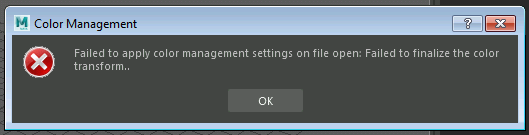
// Error: line 1: Failed to apply color management settings on file open: Failed to finalize the color transform. 
 
error message

This error can cause an issue with headless machines in render farms, which prevents them from rendering fully. This can also prevent rendering on individual machines.

Environment:

Windows 10, Linux CentOS 7.2 or higher.

Solution:

To avoid this error, please try the following workarounds:
  1. Use a different remote PC monitoring software, such as Team Viewer or RealVNC
    • Note: If logging into the render node using Windows Remote Desktop, the software will show a "virtualized desktop" representation of that render node's operating system. The OpenGL viewport display setting drivers do not provide all of the extensions that Maya requires.
  2. Set viewport renderer to be DirectX not OpenGL
    • To change this setting, navigate to Windows > Settings/Preferences > Preferences > Display > Scroll down, and select DirectX from the Rendering Engine drop-down menu
    • Note: Direct X is not supported by Linux devices.
menu path
To view a larger version of the image, right click on the picture and select "Open in new tab"
  1. Set the following Environment Variables either through a system variable or through the maya.env file found in the preferences folder:
    • MAYA_CM_DISABLE_ERROR_POPUPS=1
    • MAYA_COLOR_MGT_NO_LOGGING=1
      • On Windows, locate the .env file by navigating to C:/Users/USERNAME/Documents/maya/VERSION/Maya.env
      • On Linux, the .env files can still be found within the .../Maya folder directory.
      • Clicking on the file will open a blank document (unless other variables are already set). Copy and paste the above variables into the file and re-save the file.


"
0 Likes
Message 12 of 13

logan.benderECB88
Explorer
Explorer

I make games, so I do not care at all about Maya color policy. This error has hit me multiple times over the years.

I dearly wish Maya  had an opt-out for  systems  (and plugins ) I needn't care about, so they cannot produce errors


So I edited my userPrefs.mel


searched for the line:

-sv "colorManagementPolicyFileName" "c:/blah/blah/blah.xml"
-sv "colorManagementPolicyFileNameHold" "c:/blah/blah/blah.xml"

and changed it to 


-sv "colorManagementPolicyFileName" ""

 removing the second line. 

Now, Maya no longer bothers me about non existent legacy color management policy

0 Likes
Message 13 of 13

FelipeFierro
Observer
Observer

Hi!


It looks like you probably deleted some of the OCIO/color management configuration files that Maya uses for viewport color transforms. The “sRGB gamma” transform is usually defined inside the color management config files, not as a standalone Maya file.

You can try this before reinstalling Maya:

  1. Go to:
    Documents/maya//prefs/colorManagement

or

C:\Program Files\Autodesk\Maya20XX\resources\OCIO-configs\

  1. Check if the default OCIO config files are missing.

  2. In Maya:
    Windows → Settings/Preferences → Preferences → Color Management

Set the OCIO Config Path back to the default Autodesk config, or reset Color Management preferences.

  1. You can also try deleting your Maya prefs folder so Maya regenerates fresh defaults on startup:
    Documents/maya//prefs

(rename it first as backup)

Usually this fixes the “View transform sRGB gamma is unknown” error.

If the OCIO files themselves were deleted from the installation directory, the easiest fix is running a Maya Repair installation from Autodesk Access instead of a full reinstall.

Felipe Fierro
Film Director


0 Likes