Suppress Solid Bodies, using iLogic

Suppress Solid Bodies, using iLogic

Anonymous
Not applicable
3,911 Views
6 Replies
Message 1 of 7

Suppress Solid Bodies, using iLogic

Anonymous
Not applicable

Hi all,


in addition to this question

 http://forums.autodesk.com/t5/Autodesk-Factory-Design-Suite/Suppress-Solid-Body/td-p/3110970


I would like to have some help with the code for hiding different Solid Bodies:


with the User Parameter type, I want to select a certain type of Shackle and suppress / hide the other Solid Bodies


Gerben
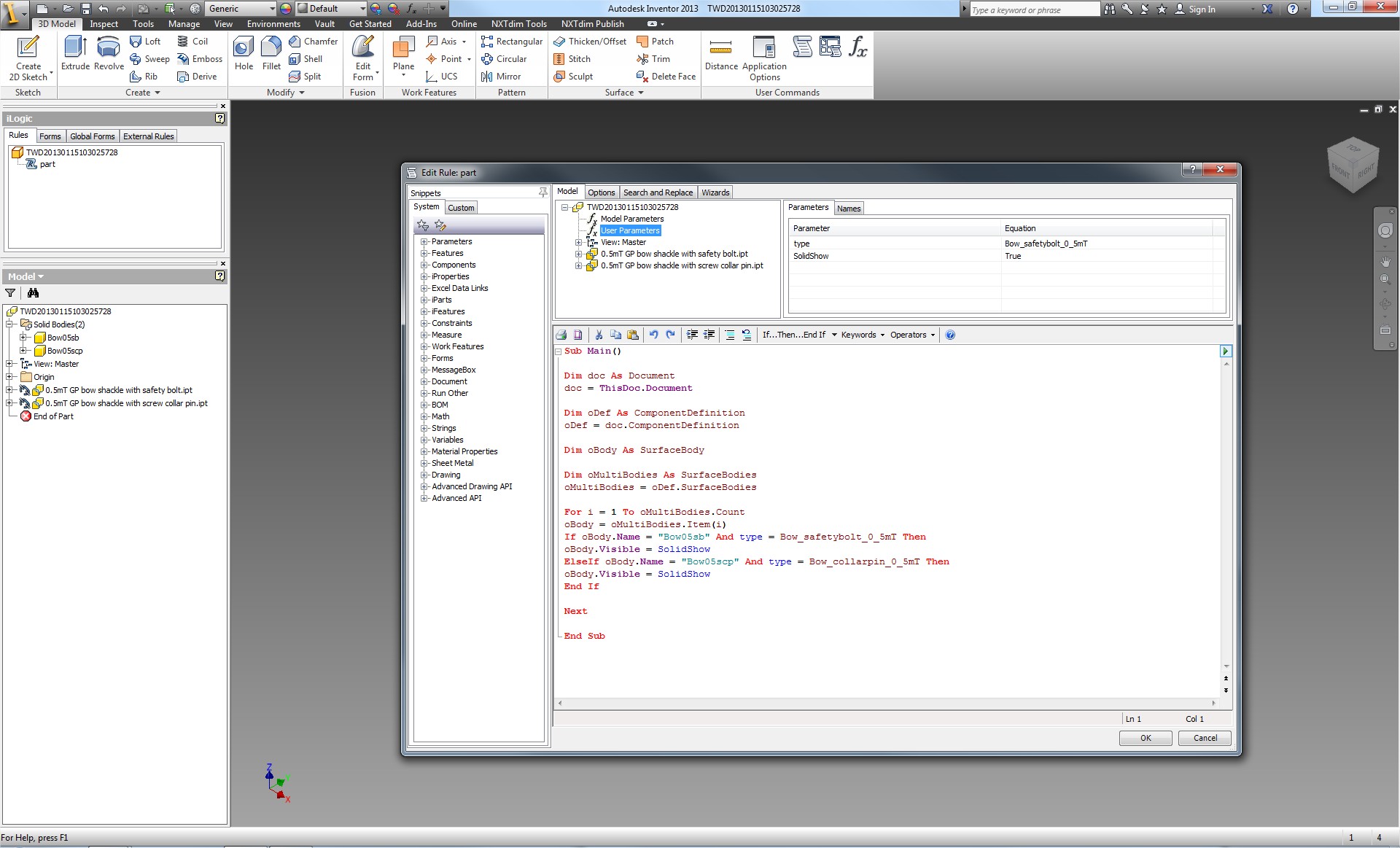
 

TWD20130115104216705.jpg

3,912 Views
6 Replies
Replies (6)
Message 2 of 7

Curtis_Waguespack
Consultant
Consultant

Hi TWD_Gerben,


There is some example code at this link that might help:

http://inventortrenches.blogspot.com/2013/01/ilogic-solid-body-visibility.html


I hope this helps.
Best of luck to you in all of your Inventor pursuits,
Curtis
http://inventortrenches.blogspot.com

EESignature

Message 3 of 7

Alexrose1942
Advocate
Advocate

@Curtis_Waguespack how do I call a specific body on a multibody part. I'm trying to manipulate one body but  i don't see it under ilogic. 

any recommendation on ilogic  list of features definition, with some explanation of what each one do? seems like there's not too many resources over this subject, 

im NOT trying to create an add-in , just a way to learn iLogic and other functions that available through the API  


Thank you

0 Likes
Message 4 of 7

Curtis_Waguespack
Consultant
Consultant

Hi Alexrose1942,


This code, based on the example from the previous link, has not been tested, but I think this should provide you an example of how to look for a solid body by name. Also here is a link that should show you how to learn Inventor's pragramming methods:


http://inventortrenches.blogspot.com/2013/10/ilogic-how-to-learn-inventors.html


I hope this helps.
Best of luck to you in all of your Inventor pursuits,
Curtis
http://inventortrenches.blogspot.com


'define the document as a component definition
Dim oCompDef as ComponentDefinition
oCompDef = ThisDoc.Document.ComponentDefinition

'define the solidbody
Dim oBody as SurfaceBody

'define the solid body name to look for
Dims body as String
sBody = "Solid 1"

'compare solid body names
'and turn off the visibility for the one that matches (if any)
i = 1
For Each SurfaceBody in oCompDef.SurfaceBodies
	oBody = oCompDef.SurfaceBodies.Item(i)
	If sBody = oBody.Name Then
   		oBody.Visible = False
	End If
i = i +1
Next


EESignature

0 Likes
Message 5 of 7

Alexrose1942
Advocate
Advocate

Thanks, ill take a look. 

BTW 

ive posted another post im trying to learn from. your code from blog is there

http://forums.autodesk.com/t5/inventor-customization/delete-sick-joints-constraint/td-p/6374838 

0 Likes
Message 6 of 7

Anonymous
Not applicable

You don't actually need any ilogic to suppress the solid. 

You have a user parameter that tells which solid should be active, so you can put the feature(first feature of solid) to be suppressed with controlling parameter. Suppress options are found from feature properties(model browser->rigth click on feature->properties).

Suppressing the first feature of solid will suppress also depending features so there should not be any errors. Also mass properties will update.

0 Likes
Message 7 of 7

marcin_bargiel
Advocate
Advocate

Why the order of the feature (displayed in the tree) is not the same as that of the loop ("for")?

I mean features no. 15 (in the tree) is not the same as oBody = oCompDef.SurfaceBodies.Item(15) !!!


How does inventor make this order?  Looks like it is make randomly, you can not control it 😕 

This is pointless because you have to do the loops through all features - as you have hundreds of them...

Vote for REPLACE VARIES !
REPLACE VARIES
0 Likes

