Announcements
Attention for Customers without Multi-Factor Authentication or Single Sign-On - OTP Verification rolls out April 2025. Read all about it here.

Quick idea to run ilogic rule on view representation change

yvandelafontaine
Advocate

Quick idea to run ilogic rule on view representation change

yvandelafontaine
Advocate
Advocate

Anyone got a quick brilliant idea to run a rule every time a view representation is changed??


(it's a very complicated assembly with lots of sub-ass'y, iassembly and ilogic part talking to each other and i want to spare the user the need to open different view rep and run the rule for each of them.)


Thanx in advance!


0 Likes
Reply
770 Views
4 Replies
Replies (4)

sajith_subramanian
Autodesk Support
Autodesk Support

HI yvandelafontaine,


The one way I can think of, to achieve this, is by using the RepresentationEvents.OnActivateDesignView Event.


Below is a sample piece of code that may help you get started.


Copy the below code into a code module.


Dim oRepCls As cRepEvents ' Create a new cRepEvents object

Sub StartEvents()
    Set oRepCls = New cRepEvents
End Sub
 
Sub StopEvents()
    Set oRepCls = Nothing
End Sub


Create a new class module called cRepEvents and copy below code into it, since VB only supports events within a class module


Private WithEvents RepEvents As RepresentationEvents
Private Ilogicaddin As Object
 
Private Sub Class_Initialize()
    Set RepEvents = ThisApplication.RepresentationEvents
    Set Ilogicaddin = ThisApplication.ApplicationAddIns.ItemById("{3BDD8D79-2179-4B11-8A5A-257B1C0263AC}").Automation ' Get ilogic addin to run the rule
End Sub
 
Private Sub Class_Terminate()
    Set RepEvents = Nothing
End Sub
 
Private Sub RepEvents_OnActivateDesignView(ByVal DocumentObject As Document, ByVal Representation As DesignViewRepresentation, ByVal BeforeOrAfter As EventTimingEnum, ByVal Context As NameValueMap, HandlingCode As HandlingCodeEnum)
    
Ilogicaddin.RunRule DocumentObject, "Rule0" ' The rule name that needs to be executed
End Sub


Let me know if this helps.


Regards,

Sajith


Sajith Subramanian
Autodesk Developer Network
0 Likes

DeerSpotter
Collaborator
Collaborator

I really am intrigued by this, i have learned ilogic and this is the first time that i am seeing such code that is run in this matter.

Could you please help me in a similar action?

I am trying to run a rule after Visibility Change in the model. Yet there is nothing on the web that will help me learn and understand how to do this. I believe after stumbling on this, that you may be able to help me. 

Looking forward to your comments. 

Image and video hosting by TinyPic
..........................................................................................................................
Did you find this reply helpful ? If so please use the Accept as Solution or Kudos button below.
..........................................................................................................................


See My LinkedIn Profile
0 Likes

sajith_subramanian
Autodesk Support
Autodesk Support

Hi @DeerSpotter,


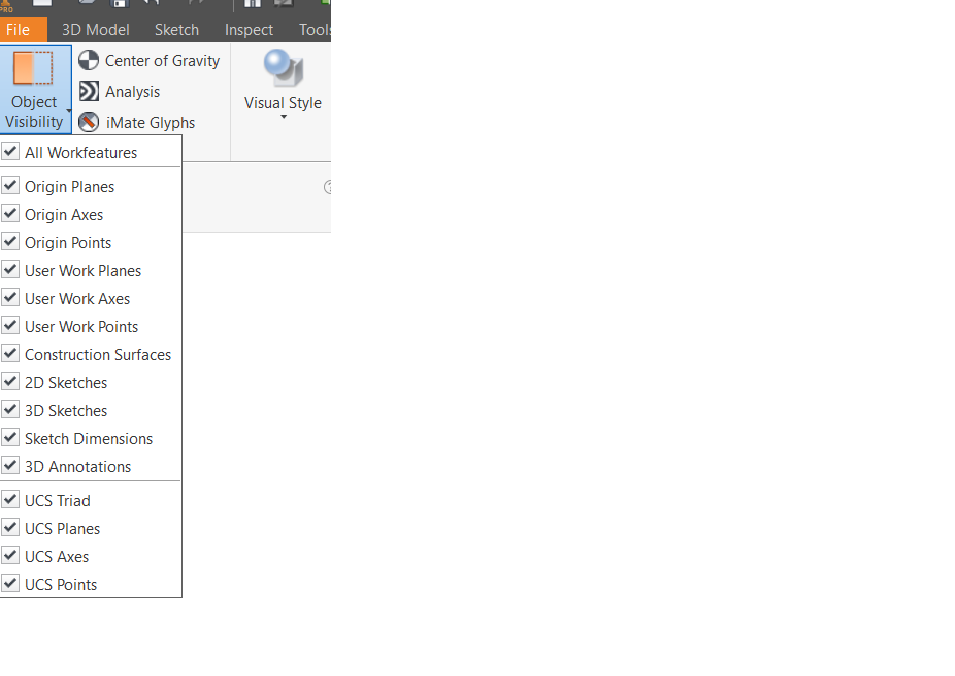
By Visibility change in the model, I assume you mean the below?


insetr.png

So you are looking to execute a ilogic rule whenever a user changes the above options? 


Regards,

Sajith


Sajith Subramanian
Autodesk Developer Network
0 Likes

yvandelafontaine
Advocate
Advocate

Or do you mean Component.visibility = False or True ???

0 Likes