Tolerance Prefix

Tolerance Prefix

Anonymous
Not applicable
977 Views
7 Replies
Message 1 of 8

Tolerance Prefix

Anonymous
Not applicable
Dear all

I want to get the prefix of an General Dimension Tolerance object.
How can i do this.

Kind regards,

JesG
0 Likes
978 Views
7 Replies
Replies (7)
Message 2 of 8

Anonymous
Not applicable
I'm not sure what you mean by the prefix of a General Dimension tolerance.
A general dimension has the dimension value and you can prefix or suffix
text to this value. In addition you can add a tolerance, which is appended
after everything. The API provides access to all of this. To get the text
you can use the Text property of the GeneralDimension object. This returns
a DimensionText object. From this object you can use the Text or
FormattedText properties to get the text of the dimension including any
prefix and suffix. In either case you'll need to extract the bits you need
from the returned string since it combines everything together. The
FormattedText property returns a string that fully defines the dimension
text, including any formatting.

The tolerance information is seperate and is accessed through the Tolerance
property of the GeneralDimension object. This returns a Tolerance object.
It supports several properties that will allow you to determine the type of
tolerance and get the tolerance values. Hopefully this helps.
--
Brian Ekins
Autodesk Inventor API


wrote in message news:[email protected]...
Dear all

I want to get the prefix of an General Dimension Tolerance object.
How can i do this.

Kind regards,

JesG
0 Likes
Message 3 of 8

Anonymous
Not applicable
Dear Brian,

sorry for the bad description.
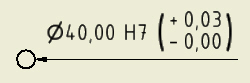
I wont to get the prefix of the tolerance shown in the drawing.
In the moment i get the dimension Value and the associated tolerance ( H7/ ) i also get the lower and upper tolerance now i want to get the associated prefix.

Kind regards,

JesG
0 Likes
Message 4 of 8

Anonymous
Not applicable
I'm sorry but I'm still not sure what you're trying to get. Can you post a
picture of an example dimension with the information you want to extract
identified?
--
Brian Ekins
Autodesk Inventor API

wrote in message news:[email protected]...
Dear Brian,

sorry for the bad description.
I wont to get the prefix of the tolerance shown in the drawing.
In the moment i get the dimension Value and the associated tolerance ( H7/ )
i also get the lower and upper tolerance now i want to get the associated
prefix.

Kind regards,

JesG
0 Likes
Message 5 of 8

Anonymous
Not applicable
Dear Brian,

sorry that I bother you agian.
I need to get the prefix in ( + / - ) in the brackets.
See the attached image.

Kindest regards,

JesG
0 Likes
Message 6 of 8

Anonymous
Not applicable
Here's some code that dumps out all of the dimension values. Remember that
the API returns values using database units, so in this case everything is
returned in centimeters.

Public Sub DimInfo()
On Error Resume Next
Dim oDim As DrawingDimension
Set oDim = ThisApplication.ActiveDocument.SelectSet.Item(1)
If Err Then
MsgBox "A dimension must be selected."
Exit Sub
End If
On Error GoTo 0

Debug.Print "Dim Value: " & oDim.ModelValue
Debug.Print "Hole Tolerance: " & oDim.Tolerance.HoleTolerance
Debug.Print "Tolerance Value: +"; oDim.Tolerance.Upper & _
"/-" & oDim.Tolerance.Lower
End Sub

--
Brian Ekins
Autodesk Inventor API

wrote in message news:[email protected]...
Dear Brian,

sorry that I bother you agian.
I need to get the prefix in ( + / - ) in the brackets.
See the attached image.

Kindest regards,

JesG
0 Likes
Message 7 of 8

Anonymous
Not applicable
Dear Brian,

thank you for your quick answer.
The problem is that I don't want to set the + and - via code.
I need a way to get this information from the objects.
In the most cases the code you have posted will work but in the case where the sign' s are switched not. How does Inventor the job ?

Kindest regards,

JesG
0 Likes
Message 8 of 8

Anonymous
Not applicable
I looked at this again and the program I sent you earlier wouldn't provide
the desired result. Whether the value is + or - is indicated in the value
itself. It's not a seperate prefix. For example any + values will be
returned as positive values and any - values will be returned as negative
values. Since you get these values using the Upper and Lower properties you
also know what the value represents.

The reason the program is incorrect is because it adds the "-" symbol. If
the Lower property returned a negative value it would have displayed as
"--.02". For negative numbers you'll automatically get the "-" sign. For
positive numbers you'll have to add the "+" sign to it if you want it.
--
Brian Ekins
Autodesk Inventor API

wrote in message news:[email protected]...
Dear Brian,

thank you for your quick answer.
The problem is that I don't want to set the + and - via code.
I need a way to get this information from the objects.
In the most cases the code you have posted will work but in the case where
the sign' s are switched not. How does Inventor the job ?

Kindest regards,

JesG
0 Likes