printing with apprentice

printing with apprentice

Anonymous
Not applicable
2,895 Views
12 Replies
Message 1 of 13

printing with apprentice

Anonymous
Not applicable

Hello all,

   I have some C# code that uses Apprentice to print some idw files.  I am having issues that some sheets get printed with a big black splotch on them. I have attached a screenshot of one of these files.  If I open it in Inventor View 2014 and print it from there, it prints fine.Does anybody have any clue as to what could be going on?


Regards,

   Lorne Martin


0 Likes
2,896 Views
12 Replies
Replies (12)
Message 2 of 13

Vladimir.Ananyev
Alumni
Alumni

Could you please upload

  1. the dataset (model + drawing) and
  2. the samplest buildable code 

that could help to recreate this effect on our side?


Thanks,


Vladimir Ananyev
Developer Technical Services
Autodesk Developer Network

0 Likes
Message 3 of 13

Anonymous
Not applicable
I will have to put some sample code together once I have a chance. Right now it is part of a complex program that I can't provide you with easily. I am busy with other things at the moment, but I will try to get at this soon. I just thought if this was a common problem with an easy solution I may as well try this first before I put together a test program.

Regards,
Lorne Martin CNC Programming and Setup
Horst Welding Tel: (866) 567-4162 / Fax: (519) 291-5388 / www.horstwelding.com
[cid:[email protected]][cid:[email protected]][cid:[email protected]]


______________________________________________________________________
This email has been scanned by the Symantec Email Security.cloud service.
For more information please visit http://www.symanteccloud.com
______________________________________________________________________
0 Likes
Message 4 of 13

Anonymous
Not applicable

I'm finally back at this project again.  I'm actually creating pdfs with Apprentice and for a while I thought it might be the PDF printer that's causing the issues but I just switched to a different PDF Printer and it didn't clear it up so I'm assuming now that it is an Apprentice issue for sure. 


The worst thing about this issue is that it'll work fine for a few days, and then just at random it'll act up again. And it's not repeatable.  A drawing that has an issue now might print fine the next time I try it. In fact I have never been able to duplicate the problem manually. My code is part of a Job Processor extension that automatically prints pdfs from the Vault, and it always acts up when it's running unattended. I am attaching my one routine for reference, but I'm not sure how to provide a complete example that will definitely produce the issue I'm having.  Any suggestions for doing this are welcome.


public Boolean printToPDF(string idw, string outputFolder)
        {
            try
            {
                using (StreamWriter logFile = new StreamWriter(outputFolder + "PrintPDFlog.txt", true))
                {
                    //Boolean fileExists = false;
                    Inventor.ApprenticeServerComponent oApprentice = new ApprenticeServerComponent();
                    Inventor.ApprenticeServerDrawingDocument drgDoc;
                    drgDoc = (Inventor.ApprenticeServerDrawingDocument)oApprentice.Document;
                    oApprentice.Open(idw);
                    drgDoc = (Inventor.ApprenticeServerDrawingDocument)oApprentice.Document;
                    Inventor.ApprenticeDrawingPrintManager pMgr;
                    pMgr = (Inventor.ApprenticeDrawingPrintManager)drgDoc.PrintManager;
                    pMgr.Printer = "Bullzip PDF Printer";
                    int pageCount = 1;
                    List<string> assemblyFileNameList = new List<string>();

                    foreach (Sheet sh in drgDoc.Sheets)
                    {
                        if (sh.DrawingViews.Count > 0)
                        {
                            string modelName;
                            string modelExtension;
                            modelName = sh.DrawingViews[1].ReferencedDocumentDescriptor.DisplayName;
                            modelExtension = System.IO.Path.GetExtension(modelName);
                            modelName = System.IO.Path.GetFileNameWithoutExtension(modelName);

                            switch (sh.Orientation)
                            {
                                case PageOrientationTypeEnum.kLandscapePageOrientation:
                                    pMgr.Orientation = PrintOrientationEnum.kLandscapeOrientation;
                                    break;
                                case PageOrientationTypeEnum.kDefaultPageOrientation:
                                    pMgr.Orientation = PrintOrientationEnum.kDefaultOrientation;
                                    break;
                                case PageOrientationTypeEnum.kPortraitPageOrientation:
                                    pMgr.Orientation = PrintOrientationEnum.kPortraitOrientation;
                                    break;
                            }
                            pMgr.SetSheetRange(pageCount, pageCount);
                            pMgr.PrintRange = PrintRangeEnum.kPrintSheetRange;
                            pMgr.ScaleMode = Inventor.PrintScaleModeEnum.kPrintBestFitScale;

                            string newName = "";
                            if (modelExtension == ".iam")
                            {
                                newName = outputFolder + modelName + ".pdf";
                                if (System.IO.File.Exists(outputFolder + modelName + ".pdf"))
                                {
                                    assemblyFileNameList.Add(newName);
                                    newName = outputFolder + modelName + "~" + 1 + ".pdf";
                                    System.IO.File.Move(outputFolder + modelName + ".pdf", newName);
                                    assemblyFileNameList.Add(newName);
                                }
                            }
                            else
                            {
                                System.IO.File.Delete(outputFolder + modelName + ".pdf");
                            }

                            string psFileName = outputFolder + modelName + ".ps";
                            string pdfFileName = outputFolder + modelName + ".pdf";

                            // for some reason if a ps filename contains a comma it doesn't want to print.
                            // we'll replace it with a tilde.
                            if (psFileName.Contains(","))
                            {
                                psFileName = psFileName.Replace(',', '~');
                            }

                            pMgr.PrintToFile(psFileName);
                            pageCount++;


                            Process oProc = new Process();
                            // need the full path to the program if we want to set UseShellExecute to false
                            ProcessStartInfo startInfo = new ProcessStartInfo(@"C:\Program Files\gs\gs9.14\lib\ps2pdf.bat");
                            startInfo.WorkingDirectory = @"C:\Program Files\gs\gs9.14\bin\";
                            startInfo.Arguments = @"""" + psFileName + @"""" + " " + @"""" + pdfFileName + @"""";
                            startInfo.CreateNoWindow = true;
                            oProc.StartInfo = startInfo;
                            oProc.StartInfo.UseShellExecute = false;
                            oProc.Start();
                            oProc.WaitForExit();

                            System.IO.File.Delete(psFileName);

                            if (assemblyFileNameList != null)
                            {

                                if (assemblyFileNameList.Count > 1)   // combine multiple assembly drawings into one pdf file
                                {


                                    // Open the input files
                                    PdfDocument inputDocument1 = PdfReader.Open(assemblyFileNameList[0], PdfDocumentOpenMode.Import);
                                    PdfDocument inputDocument2 = PdfReader.Open(assemblyFileNameList[1], PdfDocumentOpenMode.Import);

                                    // Create the output document
                                    PdfDocument outputDocument = new PdfDocument();

                                    // Show consecutive pages facing. Requires Acrobat 5 or higher.
                                    outputDocument.PageLayout = inputDocument1.PageLayout;

                                    int count = Math.Max(inputDocument1.PageCount, inputDocument2.PageCount);
                                    for (int idx = 0; idx < count; idx++)
                                    {
                                        PdfPage page1 = new PdfPage();
                                        PdfPage page2 = new PdfPage();

                                        if (inputDocument1.PageCount > idx)
                                        {
                                            page1 = inputDocument1.Pages[idx];
                                            page1 = outputDocument.AddPage(page1);
                                        }

                                        if (inputDocument2.PageCount > idx)
                                        {
                                            page2 = inputDocument2.Pages[idx];
                                            page2 = outputDocument.AddPage(page2);
                                        }
                                    }

                                    // Save the document...
                                    string filename = assemblyFileNameList[0];
                                    outputDocument.Save(filename);

                                    // delete the temp file and clear the list
                                    System.IO.File.Delete(assemblyFileNameList[1]);
                                    assemblyFileNameList.Clear();
                                }
                            }

                        }

                    }
                    logFile.WriteLine("Done with File " + System.IO.Path.GetFileName(idw) + DateTime.Now + "\n");
                    logFile.WriteLine("");
                    logFile.Close();
                    return true;
                }
            }
            catch (Exception)
            {
                return false;
            }
        }


0 Likes
Message 5 of 13

xiaodong_liang
Autodesk Support
Autodesk Support
Hi,

Job Processor reminded me it might be helpful if you simply put your code within a loop locally and check if the problem would happen in/from specific index. In addition, I assume this problem can occur with one drawing only, right? i.e. if the Job Processor handles one drawing many times, the problem would occur? or it happened with a series of drawings?
0 Likes
Message 6 of 13

Anonymous
Not applicable
I'm assuming it will happen with only one drawing as well as with different ones but I don't know for sure. I had thought of doing a local loop too but thought I'd throw it out there see what ideas all come up.

Regards,
Lorne Martin CNC Programming and Setup
Horst Welding Tel: (866) 567-4162 / Fax: (519) 291-5388 / www.horstwelding.com
[cid:[email protected]][cid:[email protected]][cid:[email protected]]


______________________________________________________________________
This email has been scanned by the Symantec Email Security.cloud service.
For more information please visit http://www.symanteccloud.com
______________________________________________________________________
0 Likes
Message 7 of 13

Anonymous
Not applicable

I have been doing some additonal testing here. So far I have not been successful in reproducing the problem locally.  I am starting to wonder if it has something to do with copying and re-naming files to reflect multiple views of the same assembly.

0 Likes
Message 8 of 13

Anonymous
Not applicable

I've finally come up with some code that can be used to re-produce this problem. The code itself is very simple. I have copied it in full below.

I have also attached the file that I used. It is an idw with 3 sheets. You will need to modify the file path in the code to point to where you save the file on your system. Also you will need to have some sort of PDF printer installed on your system that will automatically save each sheet of every drawing to a unique file name. I used  the Bullzip printer (download here).  (I have tried different PDF printers as I originally thought the problem was in the printer but I ruled that out by trying a few different ones). You will notice that my code is set up to loop 700 times, so it produces 700 copies of each sheet in the idw. In my testing I find that the first 200 or so iterations through the loop everything works fine.  But after a certain point, it starts corrupting the output, (in this example only the sheet with the shaded view although I have seen it corrupting files without shaded views as well). I have attached one of these corrupted pdfs for reference. For your information I am running 32 bit Windows 7 on an Intel i3 running at 2.93 Ghz with 4 GB memory.  I am hoping somebody else can at least reproduce the problem and hopefully find a solution!


using System;
using System.Collections.Generic;
using System.ComponentModel;
using System.Data;
using System.Drawing;
using System.Linq;
using System.Text;
using System.Threading.Tasks;
using System.Windows.Forms;
using Inventor;

namespace PDFPrintSplotchDebug
{
    public partial class Form1 : Form
    {
        public Form1()
        {
            InitializeComponent();
        }

        private void button1_Click(object sender, EventArgs e)
        {
            Inventor.ApprenticeServerComponent oApprentice = new ApprenticeServerComponent();
            Inventor.ApprenticeServerDrawingDocument drgDoc;
            drgDoc = (Inventor.ApprenticeServerDrawingDocument)oApprentice.Document;
            oApprentice.Open(@"C:\Vault Workspace\Designs\Main\Adapters\Alo Adapter\ADAO600 - ALO\ADAO600 - AO 990\ADAO600 - AO990 - Assemblies.idw");
            drgDoc = (Inventor.ApprenticeServerDrawingDocument)oApprentice.Document;
            Inventor.ApprenticeDrawingPrintManager pMgr;
            pMgr = (Inventor.ApprenticeDrawingPrintManager)drgDoc.PrintManager;
            pMgr.Printer = "Bullzip PDF Printer";
            

            for (int i = 0; i < 700; i++)
            {
                int pageCount = 1;
                foreach (Sheet sh in drgDoc.Sheets)
                {
                    if (sh.DrawingViews.Count > 0)
                    {
                        switch (sh.Orientation)
                        {
                            case PageOrientationTypeEnum.kLandscapePageOrientation:
                                pMgr.Orientation = PrintOrientationEnum.kLandscapeOrientation;
                                break;
                            case PageOrientationTypeEnum.kDefaultPageOrientation:
                                pMgr.Orientation = PrintOrientationEnum.kDefaultOrientation;
                                break;
                            case PageOrientationTypeEnum.kPortraitPageOrientation:
                                pMgr.Orientation = PrintOrientationEnum.kPortraitOrientation;
                                break;
                        }
                        pMgr.SetSheetRange(pageCount, pageCount);
                        pMgr.PrintRange = PrintRangeEnum.kPrintSheetRange;
                        pMgr.ScaleMode = Inventor.PrintScaleModeEnum.kPrintBestFitScale;

                        pMgr.SubmitPrint();
                    }
                    pageCount++;
                }
            }
        }
    }
}


0 Likes
Message 9 of 13

xiaodong_liang
Autodesk Support
Autodesk Support

Hi Martin,


I installed "Bullzip PDF Printer" and tried to print. It always pops out a dialog. I have no idea how to mute it when running batch with your code. 


is there any trick?


Thank you.


ADNTest.jpg


0 Likes
Message 10 of 13

Anonymous
Not applicable

Hi,

  If you open the options dialog (just type BullZip PDF Printer Options in the start menu of Win7) you can set this. I have mine set as follows. The <guid> option chooses a unique name for every file. It does insert a watermark for the free version but this will not matter for our application.


Capture.JPG


Capture2.JPG

0 Likes
Message 11 of 13

xiaodong_liang
Autodesk Support
Autodesk Support

Hi Martin, 

Sorry for my late response! I was on a holiday.  

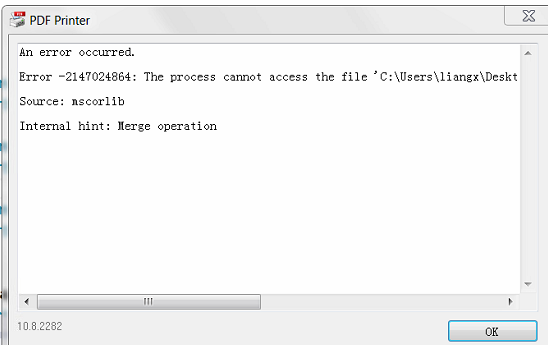
I disabled the dialogs of Bullzip PDF. I chose the mode: Append if output file exists. Most iterations printed out the pages smoothly, while occasionally, an error message will pop out to pause the process (as the figures below). I had to click OK manually. And the code will fail for one iteration, the index is not specific. I tested three times. The first time I got 140 pages, the second time 89 pages, the third 110 pages. Although all pages look well, I have not got more than 200 iterations so far.

It looks there are some tricks to reproduce the scenario?


2014-10-06_1745.png


2014-10-06_1811.png


0 Likes
Message 12 of 13

Anonymous
Not applicable

Hi,

   I can't quite make out the text in your screenshot but i am wondering if there is a problem writing to the pdf file if the previous operation isn't quite done. That is one of the reasons why I chose to create a separate pdf for each drawing.(See my screenshots in the previous post). Also I never did mention, we are still on Inventor 2014 here, I don't know if the Autodesk.Inventor.Interop.dll has changed since that or not.

0 Likes
Message 13 of 13

xiaodong_liang
Autodesk Support
Autodesk Support

Hi Martin,


sorry for the unclear image. The first image tells the error occurs in the stage of merging file. While the second image is just an error which does not tell any useful information.


I followed the setting and printed the PDF files with GUID name. About 2000 PDF are generated. All looks well. The problem did not reproduce at my side. I am using Inventor 2014 + SP1, but I do not think the problem is relevant with Inventor version, but some settings on specific machines.


The below is my test video:

https://db.tt/ldpBb6w2


0 Likes