- Home
- /
- Product Design & Manufacturing
- /
- Inventor Forums
- /
- Inventor Programming Forum
- /
- Re: change browser folder icon
change browser folder icon
- Subscribe to RSS Feed
- Mark Topic as New
- Mark Topic as Read
- Float this Topic for Current User
- Bookmark
- Subscribe
- Mute
- Printer Friendly Page
change browser folder icon




- Mark as New
- Bookmark
- Subscribe
- Mute
- Subscribe to RSS Feed
- Permalink
- Report
Hi,
I'm not sure I understand the question. The folder icon of what and where exactly?
I think it would be useful to provide an image of what the current situation is vs. what you'd like to get.
Cheers,

Adam Nagy
Autodesk Platform Services
- Mark as New
- Bookmark
- Subscribe
- Mute
- Subscribe to RSS Feed
- Permalink
- Report
Please find attached, The browser folder inside assembly document, To replace the standard icon with a custom icon
- Mark as New
- Bookmark
- Subscribe
- Mute
- Subscribe to RSS Feed
- Permalink
- Report
Hi,
Changing the icon of a native browser node is similar to setting the icon of your own panel's client node, but you work with NativeBrowserNodeDefinition and set the OverrideIcon property instead.
Sub ChangeIcon()
    Dim bps As BrowserPanes
    Set bps = ThisApplication.ActiveDocument.BrowserPanes

    ' e.g. if you want to change the root node's icon
    ' in the assembly "Model" panel
    Dim bp As BrowserPane
    Set bp = bps("AmBrowserArrangement")

    Dim bmp As IPictureDisp
    Set bmp = LoadPicture("C:\Bitmap1.bmp")

    Dim cnr As ClientNodeResource
    ' Only Bitmaps are supported by the Add method
    ' and it should be 16x16
    Set cnr = bps.ClientNodeResources.Add( _
      "MyResource", 2, bmp)

    Dim nbnd As NativeBrowserNodeDefinition
    Set nbnd = bp.TopNode.BrowserNodeDefinition

    nbnd.OverrideIcon = cnr
End Sub
I hope this helps.
Cheers,
Adam Nagy
Autodesk Platform Services
- Mark as New
- Bookmark
- Subscribe
- Mute
- Subscribe to RSS Feed
- Permalink
- Report
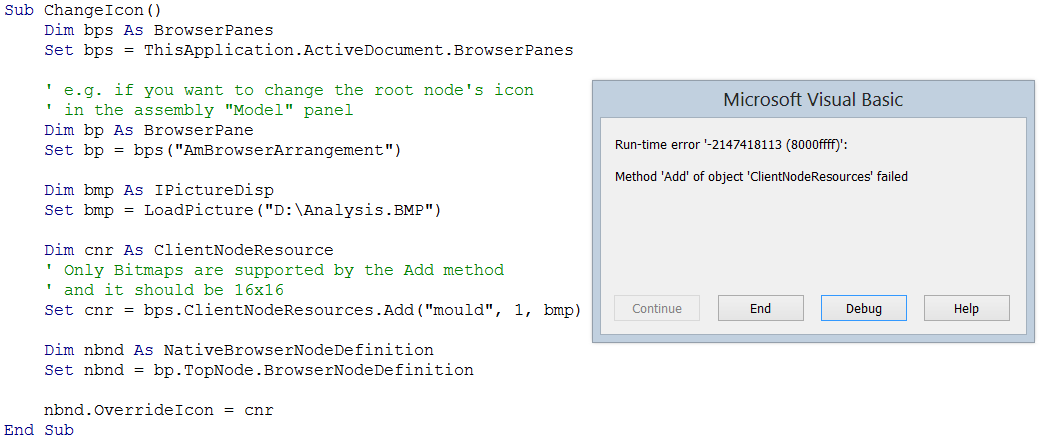
Gives Add Method Error. See Attachment


- Mark as New
- Bookmark
- Subscribe
- Mute
- Subscribe to RSS Feed
- Permalink
- Report
Hi,
I believe this code is unlikely to succeed on 64-bit because VBA is running out of process. You would need either to use 32-bit VBA or try the same from a VB.Net/C# add-in. The way to load resources if different however in .Net.
You can refer to the following articles:
http://adndevblog.typepad.com/manufacturing/2012/08/change-the-browser-node-icon.html
Regards,
Philippe.

Philippe Leefsma
Developer Technical Services
Autodesk Developer Network


- Mark as New
- Bookmark
- Subscribe
- Mute
- Subscribe to RSS Feed
- Permalink
- Report
Attached is an iLogic rule that will work for an assembly or part document.
Mike Deck
Software Developer
Autodesk, Inc.