C# Print to PDF without PDF AddIn.SaveCopyAs

C# Print to PDF without PDF AddIn.SaveCopyAs

Anonymous
Not applicable
4,070 Views
18 Replies
Message 1 of 19

C# Print to PDF without PDF AddIn.SaveCopyAs

Anonymous
Not applicable

I would like to use Drag2PDF to create my PDF, and I want to automate the printing process. I want to print all sheets as a one PDF file. I have created a simple C# code, which prints to PDF, but I have one problem... When I submit the print a dialogue will appear (from the Drag2PDF) which asks for the file to be saved (location and name) How can I automate this?

I may not use pdfAddIn.SaveCopyAs, it makes my PDF not good.


public void PrintDrawingToPDF()

        {

Inventor.DrawingPrintManager oPrintMgr = (Inventor.DrawingPrintManager)InventorOpen._invApp.ActiveDocument.PrintManager;

oPrintMgr.Printer = "Drag2PDF";

oPrintMgr.PaperSize = PaperSizeEnum.kPaperSizeA3;

oPrintMgr.PrintRange = PrintRangeEnum.kPrintAllSheets;

oPrintMgr.SubmitPrint();

}

0 Likes
4,071 Views
18 Replies
Replies (18)
Message 2 of 19

adam.nagy
Autodesk Support
Autodesk Support

Hi,


Did you try DrawingPrintManager.PrintToFile() ?


Adam Nagy
Autodesk Platform Services
0 Likes
Message 3 of 19

Anonymous
Not applicable

Hi

Yes I have tried DrawingPrintManager.PrintToFile(), but it gives not god result. It makes PDF file, which I cannot open afterward.

Lilia

0 Likes
Message 4 of 19

adam.nagy
Autodesk Support
Autodesk Support

Hi,


Just to avoid misuderstandings...

So you tried this and you could not open the pdf that this created?

public void PrintDrawingToPDF()
        {
Inventor.DrawingPrintManager oPrintMgr = (Inventor.DrawingPrintManager)InventorOpen._invApp.ActiveDocument.PrintManager;
oPrintMgr.Printer = "Drag2PDF";
oPrintMgr.PaperSize = PaperSizeEnum.kPaperSizeA3;
oPrintMgr.PrintRange = PrintRangeEnum.kPrintAllSheets;
oPrintMgr.PrintToFile("c:\\mypdf.pdf");
}

I'm asking because e.g. this worked fine for me in Inventor 2013 using VBA

Sub PrintTest()
    Dim dpm As DrawingPrintManager
    Set dpm = ThisApplication.ActiveDocument.PrintManager
    
    dpm.Printer = "Microsoft XPS Document Writer"
    dpm.PaperSize = kPaperSizeCSheet
    dpm.PrintRange = kPrintAllSheets
    dpm.PrintToFile "c:\my.xps"
End Sub

So if the exact same does not work with the Drag2PDF driver, then maybe there is some problem with that driver and you should contact its creator.


Cheers,


Adam Nagy
Autodesk Platform Services
0 Likes
Message 5 of 19

Anonymous
Not applicable

And now years later in inventor 2016/2017 I encounter exactly the same problem. The generated pdf can't be opened. Is there a solution for this problem. In other words, if I dont want to use the embedded PDF print option but want to use my own pdf printer like cutepdf or pdfcreator, how can I make a readable pdf file ?

0 Likes
Message 6 of 19

adam.nagy
Autodesk Support
Autodesk Support

Hi Remy,


1) Does the problem only occur when using the API?

2) Can you try to use the same printer programmatically from another application, like Word?


It could be that the printer's UI works fine, but its programmatic access does something funny. As far as I know Inventor does not do anything printer specific, just using Windows calls to do the print. So if one printer works programmatically and one does not, then it seems to be pointing at a printer driver issue.


Cheers,


Adam Nagy
Autodesk Platform Services
0 Likes
Message 7 of 19

Anonymous
Not applicable

Hi Adam,


Thanks for the quick reply.

I am working in inventor 2016/2017 with C#.

I used several pdf printers. Manually it works but through the API I get PDF's that can't be opened., 


I use the same pdf printer (pdfcreator) with Revit 2014/2015/2016/2017 in the API and it never gave any problems and I get pdfs that can be openend.


 It really seems an inventor problem.


0 Likes
Message 8 of 19

adam.nagy
Autodesk Support
Autodesk Support

Can you provide a link to the exact PdfCreator you are using? - just to make sure I'm testing with the correct one. 


Adam Nagy
Autodesk Platform Services
0 Likes
Message 9 of 19

Anonymous
Not applicable
0 Likes
Message 10 of 19

adam.nagy
Autodesk Support
Autodesk Support

Thanks.


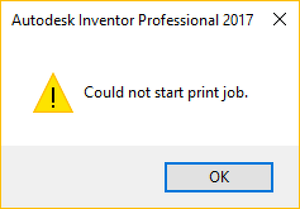
I use the below code but does not even get to printing the pdf in Inventor 2017:

Sub PrintTest()
    Dim dpm As DrawingPrintManager
    Set dpm = ThisApplication.ActiveDocument.PrintManager
    
    dpm.Printer = "PDFCreator"
    dpm.PaperSize = kPaperSizeCSheet
    dpm.PrintRange = kPrintAllSheets
    dpm.PrintToFile "c:\my.pdf"
End Sub

I keep getting this message:


PdfCreator.png


Do I have to change some settings of the PdfCreator to get to at least producing a PDF? Or do I have to register it or something?

I could print through the UI but PdfCreator showed many popup dialogs I had to wade through. 


Adam Nagy
Autodesk Platform Services
0 Likes
Message 11 of 19

Anonymous
Not applicable

I never saw this message. I did some settings in order to automate the printing. 

I have attached a word document (in dutch) whoch highlights the settings I did. (marked in red, so I think the language won't be a problem).

0 Likes
Message 12 of 19

adam.nagy
Autodesk Support
Autodesk Support

Thank you.

I'm still getting the same message.


Could you give my code a try and see what happens?


Adam Nagy
Autodesk Platform Services
0 Likes
Message 13 of 19

Anonymous
Not applicable

I use simular code in c# and the pdf gets made (without error messages), only it can't be opened.


0 Likes
Message 14 of 19

adam.nagy
Autodesk Support
Autodesk Support

The problem was that I tried to save to "C:\" (which is a protected location on Win10) if I change it to "C:\temp" then it's working - and produces a corrupt PDF.


Adam Nagy
Autodesk Platform Services
0 Likes
Message 15 of 19

Anonymous
Not applicable

Okay, and now for the million dollar question, Why is it corrupt ???

What is Inventors grudge against PDF 🙂

0 Likes
Message 16 of 19

adam.nagy
Autodesk Support
Autodesk Support

I've logged this in our system as #163748


I cannot tell when exactly it will be investigated (and dealt with, hopefully) because of other priorities, but at least now it can be tracked.


Adam Nagy
Autodesk Platform Services
0 Likes
Message 17 of 19

Anonymous
Not applicable

Thanks Adam,


I am anxious to know if it can be fixded.


Another odd thing I encountered that although I tell inventor to print black/white, 3D shaded objects are always printed in colour. So the black/white option only seems to apply to '2D" line work, dimension ect. This is even the case when printing manually. 


0 Likes
Message 18 of 19

Anonymous
Not applicable

Was this ever fixed...? I am having the exact same problem. Windows PDF creator is outputting files correctly but when i use a third party pdf creator the file is always corrupt... This wouldn't be an issue except that Widows PDF does not print to A1 😞

0 Likes
Message 19 of 19

adam.nagy
Autodesk Support
Autodesk Support

This is the feedback that was provided for the issue:

>>>>>
Instead of using PrintToFile, use SubmitPrint.
Using PrintToFile for PDF Creator creates a file that is actually the postscript instructions. It is not valid PDF format.

https://stackoverflow.com/questions/42430236/print-to-pdf-printer-creates-corrupted-file 

Changing the line

dpm.PrintToFile "c:\temp\my.pdf"

to
dpm.SubmitPrint

was able to create a valid PDF file.


To avoid the PDFCreator Save dialog and create the file directly, From PDF Creator, select "Profile Settings". For Auto-Save, check "Enable automatic saving".

<<<<<


Adam Nagy
Autodesk Platform Services
0 Likes