API problem with Revolve Feature property extent and other properties

API problem with Revolve Feature property extent and other properties

Anonymous
Not applicable
1,199 Views
10 Replies
Message 1 of 11

API problem with Revolve Feature property extent and other properties

Anonymous
Not applicable
I have noticed a problem with the API for the revolvefeature when trying to access the extent and extenttype properties of a revolvefeature. I am using Inventor 11 SP2.

The extenttype property of the revovle feature returns 20481 (Which is not an Angle or Full Sweep extent type). It is a enum specifying that a join was used to create object. I suspect this is the problem. I also noticed that the operation parameter does not return 20481.

When you try to get the extent properties or even set an object to the extent of the revolve feature, you get the following run-time error:

"Run-Time error '-2147467259 (80004005)': Method 'Extent' of object '_IRxRevolveFeature' failed"

Thanks for your help.

Regards,

Jim
0 Likes
1,200 Views
10 Replies
Replies (10)
Message 2 of 11

Anonymous
Not applicable
Jim,

I was unable to reproduce this problem. I created a simple part that
contained two revolved features; one was a full revolved and the other was
defined with an angle. The ExtentType and Extent properties worked as
expected in both cases. Can you post a part that demonstrates this problem?
--
Brian Ekins
Autodesk Inventor API

wrote in message news:5324509@discussion.autodesk.com...
I have noticed a problem with the API for the revolvefeature when trying to
access the extent and extenttype properties of a revolvefeature. I am using
Inventor 11 SP2.

The extenttype property of the revovle feature returns 20481 (Which is not
an Angle or Full Sweep extent type). It is a enum specifying that a join was
used to create object. I suspect this is the problem. I also noticed that
the operation parameter does not return 20481.

When you try to get the extent properties or even set an object to the
extent of the revolve feature, you get the following run-time error:

"Run-Time error '-2147467259 (80004005)': Method 'Extent' of object
'_IRxRevolveFeature' failed"

Thanks for your help.

Regards,

Jim
0 Likes
Message 3 of 11

Anonymous
Not applicable
Brian,

I appreciate the prompt response.
I have added an attachment containing a screenshot of the problem and a sample ipart. Just to let you know a few more details: My code still works for finding Extrusions and Sweeps extents. It only fails on revolve features. I added some code to the ipart and checked on some other users computers at SP2 and see the same problem occurring. Thank you again.

Regards,

Jim
0 Likes
Message 4 of 11

Anonymous
Not applicable
I tested the file you posted and I'm not seeing the problem. Using the
program below

Public Sub RevolveExtent()
Dim oDoc As PartDocument
Set oDoc = ThisApplication.ActiveDocument

Dim oRev As RevolveFeature
Debug.Print "kAngleExtent = 20738, kFullSweepExtent = 20739"
For Each oRev In oDoc.ComponentDefinition.Features.RevolveFeatures
Debug.Print oRev.Name & ", Extent Type: " & oRev.ExtentType
Next
End Sub

I get the following results:

kAngleExtent = 20738, kFullSweepExtent = 20739
Revolution1, Extent Type: 20738
Revolution2, Extent Type: 20738

Can you try that file again on your computer? I'm running Inventor 11 SP2.
--
Brian Ekins
Autodesk Inventor API

wrote in message news:5325081@discussion.autodesk.com...
Brian,

I appreciate the prompt response.
I have added an attachment containing a screenshot of the problem and a
sample ipart. Just to let you know a few more details: My code still works
for finding Extrusions and Sweeps extents. It only fails on revolve
features. I added some code to the ipart and checked on some other users
computers at SP2 and see the same problem occurring. Thank you again.

Regards,

Jim
0 Likes
Message 5 of 11

Anonymous
Not applicable
Brian,

I copied and pasted your code into a new ipt and have found that it works on Inventor 11 (No service pack installed), Inventor 11 (SP1) and then on upgrade to SP2 I found that it stopped working and starts giving you the incorrect entitytype 20481 instead of 20738 or 20739. Please advise. It is now occurring on qty (3) seats updated from liveupdate.

Regards,

Jim
0 Likes
Message 6 of 11

Anonymous
Not applicable
I did all my testing on Inventor 11 SP2. I used the part you posted to test
with. Do you see problems with this part?
--
Brian Ekins
Autodesk Inventor API

wrote in message news:5326483@discussion.autodesk.com...
Brian,

I copied and pasted your code into a new ipt and have found that it works on
Inventor 11 (No service pack installed), Inventor 11 (SP1) and then on
upgrade to SP2 I found that it stopped working and starts giving you the
incorrect entitytype 20481 instead of 20738 or 20739. Please advise. It is
now occurring on qty (3) seats updated from liveupdate.

Regards,

Jim
0 Likes
Message 7 of 11

Anonymous
Not applicable
Brain,

I tried both that part and a newly created part on various computers at SP2 all with the same result of it functioning prior to applying SP2 on both SP0 and SP1. Upon going from SP1 to SP2 on a clean Inventor 11 install and using liveupdate to apply SP1 and SP2 it works up until SP2 is applied then it starts giving the run time error when trying to grab hold of the extent object or the extenttype returns an invalid enum. It is strange that it doesn't have problems with the sweep feature extents or extrusion feature extents. I guess I will just keep trying on other machines. Is there a way to remove a service pack if I need to?

Thanks again,

Jim
0 Likes
Message 8 of 11

Anonymous
Not applicable
Jim,

I don't know what the problem could be. I just installed the initial
release of Inventor 11 on another machine and the pulled SP1 and SP2 from
autodesk.com. I tested getting the extents from the revolved features with
each version and it worked in all cases. I'm not sure what else to try.
--
Brian Ekins
Autodesk Inventor API
0 Likes
Message 9 of 11

Anonymous
Not applicable
Brian,

Thanks for all of the time that you put into this, we appreciate it. I have tried it on both windows XP and windows 2000 machines and at this point with the same results of it not working. I am going to just have our IT department reformat a computer and start from scratch and try it from a clean computer not hooked into our company policy setup or domain and see if I can at least see it working when we transition from SP1 to SP2. I will post another reply with the results.

Regards,

Jim
0 Likes
Message 10 of 11

Anonymous
Not applicable
Brian,

We did some further testing on a couple other machines and have the following results for your information:

The problem occurs between SP1 and SP2 when installed using the liveupdate (Which is from the communication center link) that installs while Inventor is running. In all cases where this is used, the error with the revolve extent occurs.

The problem does not occur when you install downloaded service packs from the autodesk website and install them without inventor running.

Please advise. Is there a way to uninstall a service pack (or can they be re-installed)? Thanks

Jim
0 Likes
Message 11 of 11

Anonymous
Not applicable
Hi Jim,

I would have never figured out that one. Good job. I think the best
solution is to uninstall SP2 and reinstall it using the version you get from
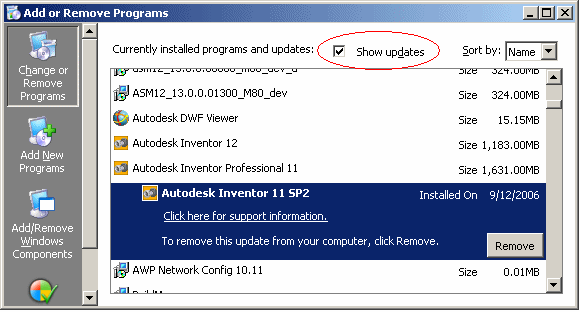
the Autodesk website. You can uninstall service packs by using the "Add or
Remove Programs" utility and checking the "Show Updates" button at the top
of the dialog. This is shown in the attached image.
--
Brian Ekins
Autodesk Inventor API
0 Likes