Nastran-in-CAD unable to finish analysis

Nastran-in-CAD unable to finish analysis

Anonymous
Not applicable
1,043 Views
7 Replies
Message 1 of 8

Nastran-in-CAD unable to finish analysis

Anonymous
Not applicable

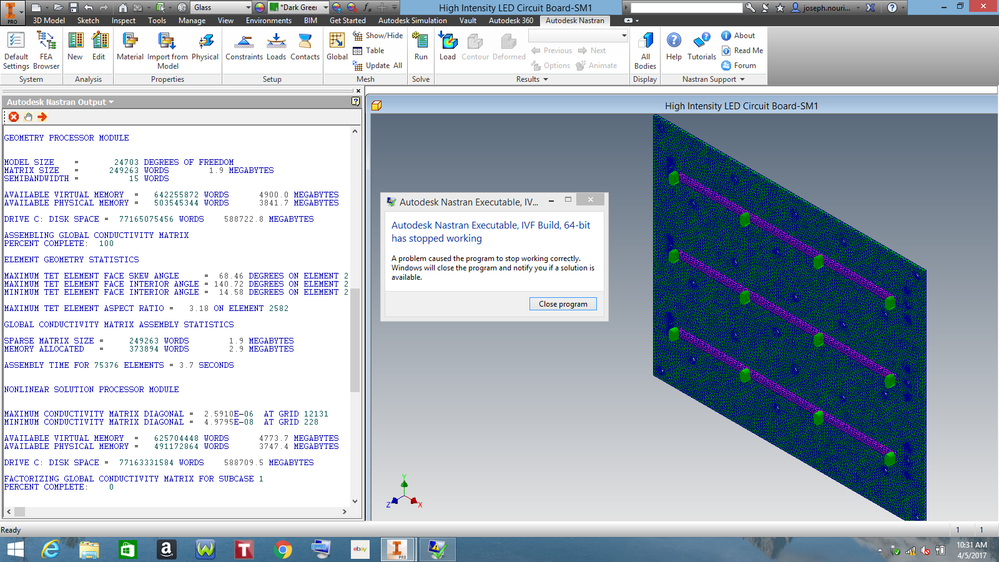
I have the following problem, as shown in the screenshot below, with Nastran-in-CAD when I am performing any type of simulation analysis. Thanks for helping me to solve this problem.


1.png

0 Likes
1,044 Views
7 Replies
Replies (7)
Message 2 of 8

John_Holtz
Autodesk Support
Autodesk Support

Hi @Anonymous


Sorry to read about the problem with the solver. What type of analysis are you performing? Some type of nonlinear?


Does the same "IVF Build" problem occur if you run a linear static stress analysis?


My guess is that the version of InCAD that you are using (2015? Go to the "About" command on the right end of the ribbon and give the build number in your reply) is not compatible with Windows 10. But I will ask if anyone else has some ideas.


John Holtz, P.E.

Global Product Support
Autodesk, Inc.


If not provided, indicate the version of Inventor Nastran you are using.
If the issue is related to a model, attach the model! See What files to provide when the model is needed.
0 Likes
Message 3 of 8

Anonymous
Not applicable
Hi John,

Thanks for your response to my Nastran in-CAD problem. I have
both Inventor and Nastran in-CAD 2015 versions and I am running these
program using Windows 8.1 operating system. I have tried different models
with different types of analysis including Linear Static or Thermal
analysis. The program never finishes any type of analysis. I searched the
internet and I was hoping to find a solution to my problem. It seems other
users have a similar problem like mine. Please see the screenshot below:

Problem with Autodesk Nastran Executable, IVF Build, 64-bit


265 Views, 7 Replies
02-22-2015 11:57 AM

Hello community,

I have a big problem with Autodesk Nastran IN-CAD.

It doesn't work.

As start with this Add-in i tried do make the tutorial 1, but everytimes i
get an error.

I deinstalled Inventor and Nastran IN-CAD and reinstalled it.

The same problem.


Is there anybody, who can help?


The solution that other users gave to the above user, was related to
Inventor Shelby Beta and Nastran in-CAD beta. I have no idea how to solve
my Nastran in-CAD problem using their suggested solution. Again, I
appreciate for helping me in this regard.

Joseph Nouri.
0 Likes
Message 4 of 8

John_Holtz
Autodesk Support
Autodesk Support

Hi Joseph,


Check your version of InCAD (using the "Nastran Support > About" command in the ribbon).


If it is older than Build 2015.0.1.8, then try downloading and installing Service Pack 1. As far as I can tell, SP1 was the latest update to 2015. The link to download it is at the bottom of this read me page.


John Holtz, P.E.

Global Product Support
Autodesk, Inc.


If not provided, indicate the version of Inventor Nastran you are using.
If the issue is related to a model, attach the model! See What files to provide when the model is needed.
0 Likes
Message 5 of 8

Anonymous
Not applicable
Hi John,

Thanks for your suggestion. I had an older version of Nastran
in-CAD 2015. So, I downloaded Nastran in-CAD SP1 after updating my Inventor
2015 to SP2 Updates 6. Now, both Inventor and Nastran in-CAD 2015
have latest service packs. Then, I performed a Linear Static Analysis of a
simple model. I ran the analysis, and the same message showed up on the
monitor before finishing the analysis. Please let me know if you have any
other suggestions. Thanks.

Joseph Nouri
0 Likes
Message 6 of 8

John_Holtz
Autodesk Support
Autodesk Support

I will check to see what to try next Smiley Frustrated


John Holtz, P.E.

Global Product Support
Autodesk, Inc.


If not provided, indicate the version of Inventor Nastran you are using.
If the issue is related to a model, attach the model! See What files to provide when the model is needed.
0 Likes
Message 7 of 8

John_Holtz
Autodesk Support
Autodesk Support

Hi @Anonymous


There appears to be some issues with the latest version of Win 10 (the "Creators Update" -- not sure how you would check if you have that update for Win 10.). If your problem is the same, then the solution is to uninstall and reinstall Visual C++ runtime libraries as explained in this article:


How to remove and reinstall Microsoft Visual C++ Runtime Libraries


Let us know if that fixes your problem.


John Holtz, P.E.

Global Product Support
Autodesk, Inc.


If not provided, indicate the version of Inventor Nastran you are using.
If the issue is related to a model, attach the model! See What files to provide when the model is needed.
0 Likes
Message 8 of 8

John_Holtz
Autodesk Support
Autodesk Support

Hi @Anonymous


I wanted to check if you have tried reinstalling the Visual C++, and if so, did it help.


I just realized that you are using Windows 8.1 but I keep thinking that you are using Windows 10. Smiley Frustrated So even though this solution was brought to my attention because customers have been having problems with Win 10, I think the solution is probably the same in your case. 


John Holtz, P.E.

Global Product Support
Autodesk, Inc.


If not provided, indicate the version of Inventor Nastran you are using.
If the issue is related to a model, attach the model! See What files to provide when the model is needed.
0 Likes