Auto-suggest helps you quickly narrow down your search results by suggesting possible matches as you type.
Showing results for
Show only
|
Search instead for
Did you mean:
This page has been translated for your convenience with an automatic translation service. This is not an official translation and may contain errors and inaccurate translations. Autodesk does not warrant, either expressly or implied, the accuracy, reliability or completeness of the information translated by the machine translation service and will not be liable for damages or losses caused by the trust placed in the translation service.Translate
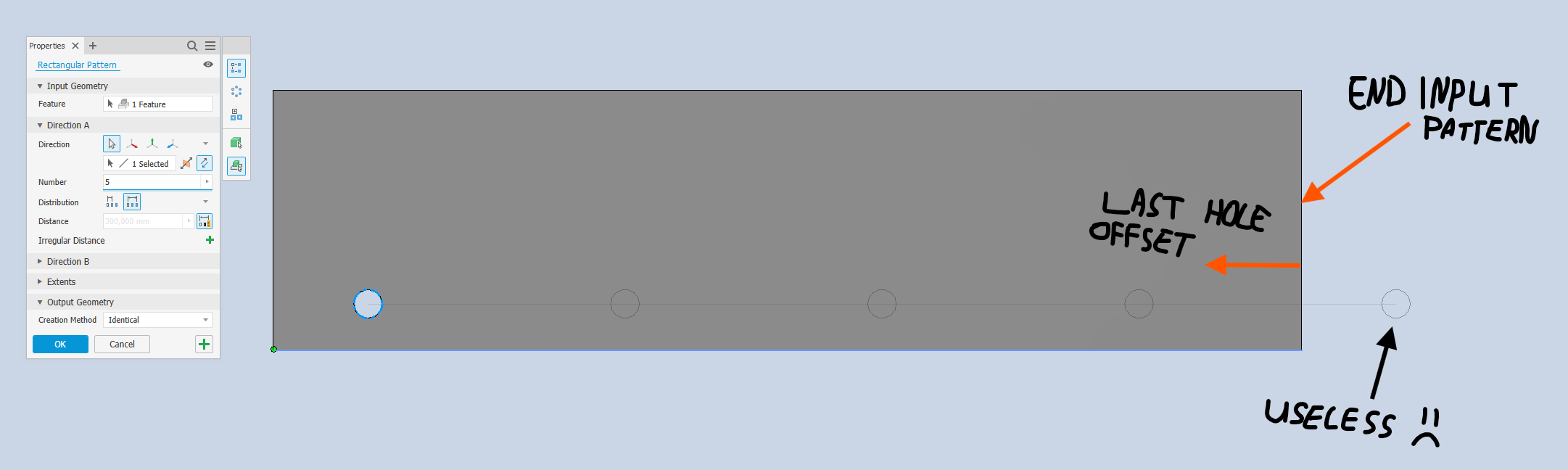
Fitted rectangular pattern with end offset to plane or vertex
For example, when making a rectangular hole pattern along an edge of a part, it would be nice to be able to input an end offset to a plane or vertex when using the "fitted" option. So the last hole of the pattern isn't on or past the edge of the part but a certain distance before the edge of the part (which most people want 9/10 times).
Yes, i'm aware of the new irregular distances feature. But that isn't what we're looking for.
It's about creating a simple evenly spaced pattern where we can define a starting point, an end point, and then evenly space an X amount of holes in between it. But the functionality of defining an end point is missing.
@RajSchmidt didn't know it was possible to attach the pattern to a sketch, so that's a nice workaround, but still feels like it should be easier to accomplish this.