Planetary gear

Planetary gear

Anonymous
Not applicable
4,944 Views
7 Replies
Message 1 of 8

Planetary gear

Anonymous
Not applicable

Hello everyone,


I'm new to the Inventor 2019 (Solidworks user) and I want to ask you how to make a planetary gearbox with 3 planets and a fixed internal gear?


Thank you.

0 Likes
4,945 Views
7 Replies
Replies (7)
Message 2 of 8

JDMather
Consultant
Consultant

Fortunately gears in Inventor are much easier than gears in SolidWorks.

But both create simplified "cosmetic" gears using the Wellman's Odontograph technique.

However, in Inventor you can set to create precise involute curve gears.


To get started:

Start a new Assembly file.

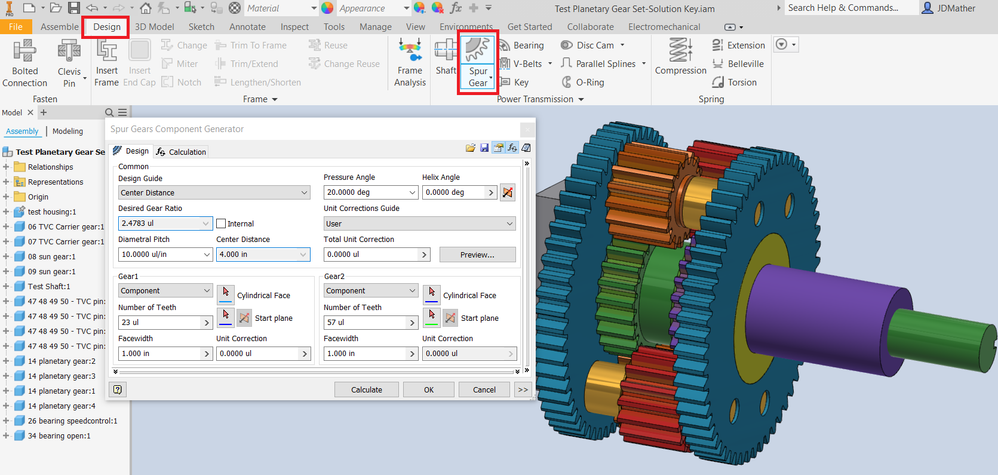
On the Design tab select the Spur Gear Design Accelerator...

Gear Generator.png


In this video  I am holding a Planet and rotating around it rather than the Sun to create a spirograph effect, but of course you can set to any desired logical motion.


-----------------------------------------------------------------------------------------
Autodesk Inventor 2019 Certified Professional
Autodesk AutoCAD 2013 Certified Professional
Certified SolidWorks Professional


Message 3 of 8

Anonymous
Not applicable

Thank you for your answer. In Spur Gear Design Accelerator i can only add two gears! How to insert more gears in the system so i can make the planetary gearbox?

0 Likes
Message 4 of 8

JDMather
Consultant
Consultant

You can add additional gears in two ways:


1: Run the Gear Generator again and this time set to No Model for gear 1 or 2. (see image)

or

2. Create in pairs and, uhm, simply delete extra gear(s).


One Gear.png


If you need geometrically precise gears (for manufacture or 3D printing - post back after you have your design).


-----------------------------------------------------------------------------------------
Autodesk Inventor 2019 Certified Professional
Autodesk AutoCAD 2013 Certified Professional
Certified SolidWorks Professional


0 Likes
Message 5 of 8

Anonymous
Not applicable

Oh ok thank you very much! And then how I pair them, so I can achieve the motion of the gearbox? With regular constraints?

0 Likes
Message 6 of 8

JDMather
Consultant
Consultant

How much SolidWorks training/experience do you have?

The process is essentially identical in Inventor - just a matter of finding your way around the Assembly Constraints.

Make sure sub-assemblies are set to Flexible, just like in SolidWorks.


-----------------------------------------------------------------------------------------
Autodesk Inventor 2019 Certified Professional
Autodesk AutoCAD 2013 Certified Professional
Certified SolidWorks Professional


0 Likes
Message 7 of 8

Anonymous
Not applicable

In Solidworks, there is the gear mate. I can't find any similar contain in inventor that's why I asked!

0 Likes
Message 8 of 8

JDMather
Consultant
Consultant

@Anonymous 

There are two ways in Inventor.

I recommend that as a beginner you start out with the Motion assembly constraints.

As you get more experience you can then move into the Dynamic Simulation Joints. (Advanced Motion Analysis in SolidWorks.)


Motion Constraints.png


Once we have mastered the basics - we can get into more sophisticated gear mechanisms...


Differential.PNG


-----------------------------------------------------------------------------------------
Autodesk Inventor 2019 Certified Professional
Autodesk AutoCAD 2013 Certified Professional
Certified SolidWorks Professional


0 Likes