MEASUREMENT BETWEEN TWO SOLID PARTS

MEASUREMENT BETWEEN TWO SOLID PARTS

baliasM74U3
Advocate Advocate
2,143 Views
7 Replies
Message 1 of 8

MEASUREMENT BETWEEN TWO SOLID PARTS

baliasM74U3
Advocate
Advocate

Hi All


Can anyone suggest the best method to mesure center to center distance between members "A" and "B". A is a thick plate and B is a SHS.


Thanks

Basil

0 Likes
Accepted solutions (1)
2,144 Views
7 Replies
Replies (7)
Message 2 of 8

Xun.Zhang
Alumni
Alumni

Hello @baliasM74U3,

Create an assembly, place the part in, Measure, select the middle filter and pick those two, now you are all set.

Untitled.png

Hope it helps!


Xun
Message 3 of 8

Sergio.D.Suárez
Mentor
Mentor
Accepted solution

Hi, You should clarify a little better what you are trying to measure. Remember that you are in space and point-to-point measurement can sometimes not be exactly what we are looking for. Check the model if the entities you are looking to measure are parallel or if there are angles between them. In the video I show you a simple example with the measure tool, with the "M" keyboard. There are two models in the video, one as a structural member and another modeled as normal solid. Sometimes it is necessary to take a reference face of another component and make two plant measurements with this third reference component with respect to each entity that we need. I hope you can solve your problem. regards


Please accept as solution and give likes if applicable.

I am attaching my Upwork profile for specific queries.

Sergio Daniel Suarez
Mechanical Designer

| Upwork Profile | LinkedIn

Message 4 of 8

baliasM74U3
Advocate
Advocate

Wonderfull lesson on a monday mornging.


Heaps of Thanks

0 Likes
Message 5 of 8

baliasM74U3
Advocate
Advocate

Sorry, its not working for me.


I just wanted to measure the distance from the center of the 2 RHS using some option in "MEASURE" rather than finding and measuring the distance between the center planes of each components.


Thanks Basil

0 Likes
Message 6 of 8

baliasM74U3
Advocate
Advocate

Hi Sergio D.Suárez


Let me put it like  this. i want to measure the distance between the midplanes planes (parallel) of two components. How can i do that with the measure tool without selecting the midplanes of the components.?


Thanks

Basil

0 Likes
Message 7 of 8

ksanger
Participant
Participant

Your video looks exactly like what i do.  Randomly click things to try and figure out how to make a specific measurement.  Not helpful at all.   A voice description and slowing down your actions such that we may actually figure out what measurement you are making would be nice.


For instance.   In Inventor 2022 when I select a first face it gives me the area.   When I then select a second face it is giving me the length of the second part and NOT the distance between the two faces.   I would swear here but that would not help.

0 Likes
Message 8 of 8

SBix26
Consultant
Consultant

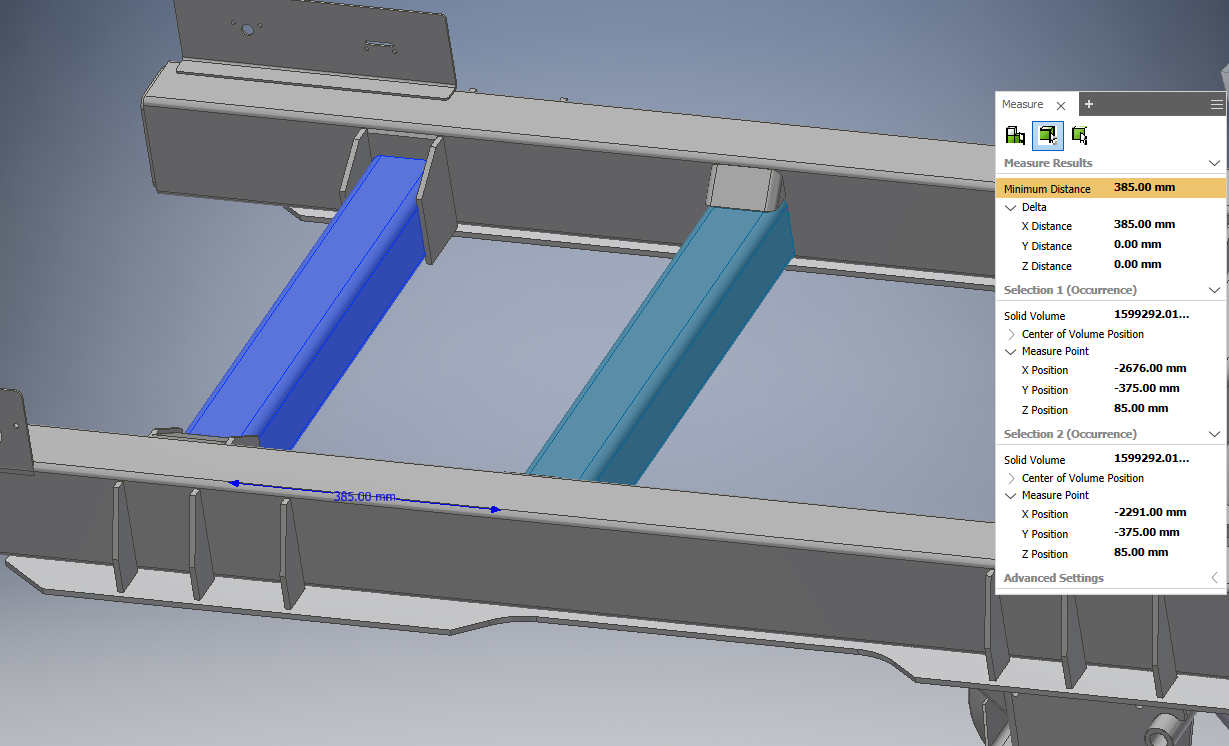
Not the perfect solution for all situations, but in many cases measuring from a midpoint to another midpoint and using the Delta measurements gives the desired information:

SBix26_0-1643814043391.png

Edge midpoints are available to the Measure tool without any special options (keep selection priority on the default Faces and Edges).  Expanding the Delta measurements and then selecting any of the three shows all of them in the graphics area, color coded to match the coordinate system indicator.  The limitation, though, is this only works for measurements that are aligned with the coordinate system.


Sam B

Inventor Pro 2022.2.1 | Windows 10 Home 21H2

autodesk-expert-elite-member-logo-1line-rgb-black.png


0 Likes