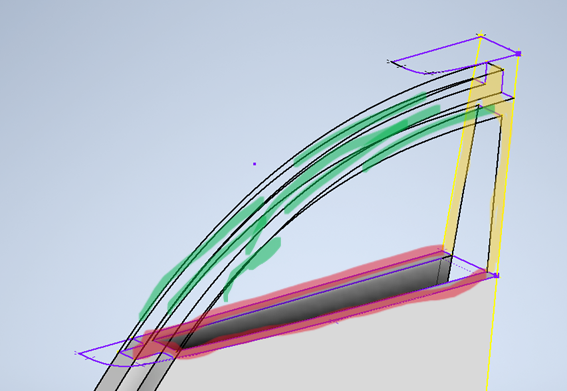
Loft adjacent sections with rails.

Loft adjacent sections with rails.

a.sanchez-quinones
Participant Participant
2,066 Views
9 Replies
Message 1 of 10

Loft adjacent sections with rails.

a.sanchez-quinones
Participant
Participant

Hello, I got two sections, both of them with a diferent outline. They touch eachother on the base, 90 degrees separated. I have multiple rails and I believe all the points and everything is correct. However it says it doesnt display a meaningful result. 

In the picture you can see on red one section, and yellow the other one. On green the rails.
help please

0 Likes
Accepted solutions (1)
2,067 Views
9 Replies
Replies (9)
Message 2 of 10

CCarreiras
Mentor
Mentor

Hi!


It's hard to say something just looking for the image...


Can you share the part?

CCarreiras

EESignature

Message 3 of 10

JDMather
Consultant
Consultant

@a.sanchez-quinones 

Sketches do not appear to be fully defined.

The sketch on the face of the part is not needed.

Attach your *.ipt file here and end all doubt.


-----------------------------------------------------------------------------------------
Autodesk Inventor 2019 Certified Professional
Autodesk AutoCAD 2013 Certified Professional
Certified SolidWorks Professional


Message 4 of 10

johnsonshiue
Community Manager
Community Manager

Hi! I could be wrong but this case might be better modeled using Guide Rail Sweep. Please share the file here. The forum experts and I can help take a look.

Many thanks!


Johnson Shiue ([email protected])
Software Test Engineer
0 Likes
Message 5 of 10

a.sanchez-quinones
Participant
Participant

Thank you for your help in advance. Please find attach the ipt. 


asanchezquinones_0-1708647218933.png


0 Likes
Message 6 of 10

a.sanchez-quinones
Participant
Participant

I have figgered that if on the vertical section I put two lines so both sections are not in contact, it can loft, however, it makes of course a weird solid on the base. Sorry for my english, I think you will understand better with the pics:

asanchezquinones_2-1708653127627.png

asanchezquinones_3-1708653177620.pngasanchezquinones_4-1708653187208.png

So I guess I am doing something wrong where both sections touch eachother. Not sure what it is but I guess it the mistake must be there. 

THANK YOU AGAIN FOR YOUR HELP GUYS


0 Likes
Message 7 of 10

JDMather
Consultant
Consultant

@a.sanchez-quinones 

Let's go back to the very beginning.

Is this line highlighted green supposed to be Horizontal?

JDMather_0-1708692419979.png

Does Manage tab >Rebuild All return any errors?

JDMather_0-1708692651790.png


None of your sketches are properly defined.

Would you like to learn how to do all of this correctly with step-by-step instructions?


-----------------------------------------------------------------------------------------
Autodesk Inventor 2019 Certified Professional
Autodesk AutoCAD 2013 Certified Professional
Certified SolidWorks Professional


0 Likes
Message 8 of 10

a.sanchez-quinones
Participant
Participant

I just attached same file but completed, as much as I could. 

When I click on rebuild all under manage, it doesnt give me any problems. In fact, it doesn't seem to do anything.

About your question, on the skecth SLICE 1, the line you highlighted it is not supposed to be Horizontal.

And yes, I would love to learn how to do it step by step. 

Again, THANK YOU for your help.

0 Likes
Message 9 of 10

johnsonshiue
Community Manager
Community Manager
Accepted solution

Hi! I took a quick look at the part. I would use a different modeling technique. You try building the solid body by using the detail profiles. It makes the geometry unnecessarily complicated. This part is better modeled using Surface Modeling technique.

Please take a look at the attached part. I used some of the rails to create a smooth Loft surfaces. The detail geometry can be created after the surfaces become a solid body. The key point here is to reuse existing geometry as much as possible. Avoid recreating geometry as much as possible.

Many thanks!

Loft.png


Johnson Shiue ([email protected])
Software Test Engineer
0 Likes
Message 10 of 10

a.sanchez-quinones
Participant
Participant

you are so right! Many many thanks!!

0 Likes