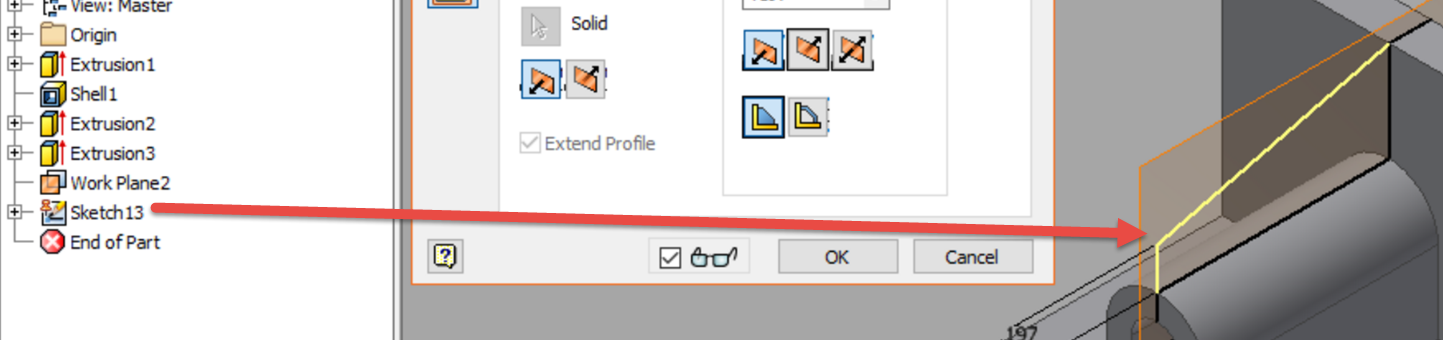
how to make this rib ?

how to make this rib ?

Anonymous
Not applicable
1,452 Views
8 Replies
Message 1 of 9

how to make this rib ?

Anonymous
Not applicable

I want to make a rib from the Autodesk inventor learn by doing tutorial :

rib.jpg


I can't get a preview of the rib and this is what I do :


Screenshot 2016-07-25 19.10.08.png

0 Likes
1,453 Views
8 Replies
Replies (8)
Message 2 of 9

Binga
Advisor
Advisor

First, If you draw the piece symetry you don't need to create a plane to use to the rib. See:

Capturar.JPG

It was ok for me:

Capturar.JPG

Check if the lines is touching your body.

Can you share your part?


Gilberto Binga
Engenheiro Mecânico - Engenheiro Mecatrônico
deLearning - YouTube Channel
Facebook | LinkedIn
LOUCO POR AUTODESK
A resposta resolve seu problema? Ajude outros usuários marcando "Aceitar como Solução"
Does the answer solve your problem? Help others checking "Accept as Solution"
Curtidas são apreciadas caso tenha gostado da informação
Likes are appreciated if you liked the information.

0 Likes
Message 3 of 9

JDMather
Consultant
Consultant

Attach your *.ipt file here and end all doubt.


-----------------------------------------------------------------------------------------
Autodesk Inventor 2019 Certified Professional
Autodesk AutoCAD 2013 Certified Professional
Certified SolidWorks Professional


0 Likes
Message 4 of 9

Anonymous
Not applicable

I don't know why it doesn't work for me.

Here it is.

0 Likes
Message 5 of 9

JDMather
Consultant
Consultant

Uhmm, you don't have a sketch for the Rib feature in the file that you attached.

Also, you don't need the workplane that you created as it is simply a duplication of the existing YZ Plane.


Rib Sketch.png


Rib Feature.png


Also, I recommend that you install the Service Packs and Updates.


-----------------------------------------------------------------------------------------
Autodesk Inventor 2019 Certified Professional
Autodesk AutoCAD 2013 Certified Professional
Certified SolidWorks Professional


Message 6 of 9

Anonymous
Not applicable

I don't know what's wrong !1


So can you share your file of the complete part with the rib. 

0 Likes
Message 7 of 9

JDMather
Consultant
Consultant

In your initial post you have a Sketch13 in the image that isn't in the file that you attached.

I know what you have done wrong - but I want you to add that sketch to your file and attach it here again.


Sketch13.png


-----------------------------------------------------------------------------------------
Autodesk Inventor 2019 Certified Professional
Autodesk AutoCAD 2013 Certified Professional
Certified SolidWorks Professional


0 Likes
Message 8 of 9

Anonymous
Not applicable

Hope you tell me what I am doing wrong :] 

0 Likes
Message 9 of 9

JDMather
Consultant
Consultant

Are you working on your own personal machine or are you working on a school machine?

If you own machine - install the Service Packs and Updates for 2015.


Make sure to set these selections.

Rib Selections.png


-----------------------------------------------------------------------------------------
Autodesk Inventor 2019 Certified Professional
Autodesk AutoCAD 2013 Certified Professional
Certified SolidWorks Professional


0 Likes