How to change spacing of arrange dimension function (ordinate dimensions)

How to change spacing of arrange dimension function (ordinate dimensions)

mfoster9TD82
Advocate Advocate
1,500 Views
5 Replies
Message 1 of 6

How to change spacing of arrange dimension function (ordinate dimensions)

mfoster9TD82
Advocate
Advocate

Like the title says, how do I change the spacing between dimensions with the arrange dimensions function (if possible)? When I use it they are too far apart for my liking.


Thanks!

0 Likes
Accepted solutions (2)
1,501 Views
5 Replies
Replies (5)
Message 2 of 6

admaiora
Mentor
Mentor
Accepted solution

Hi:


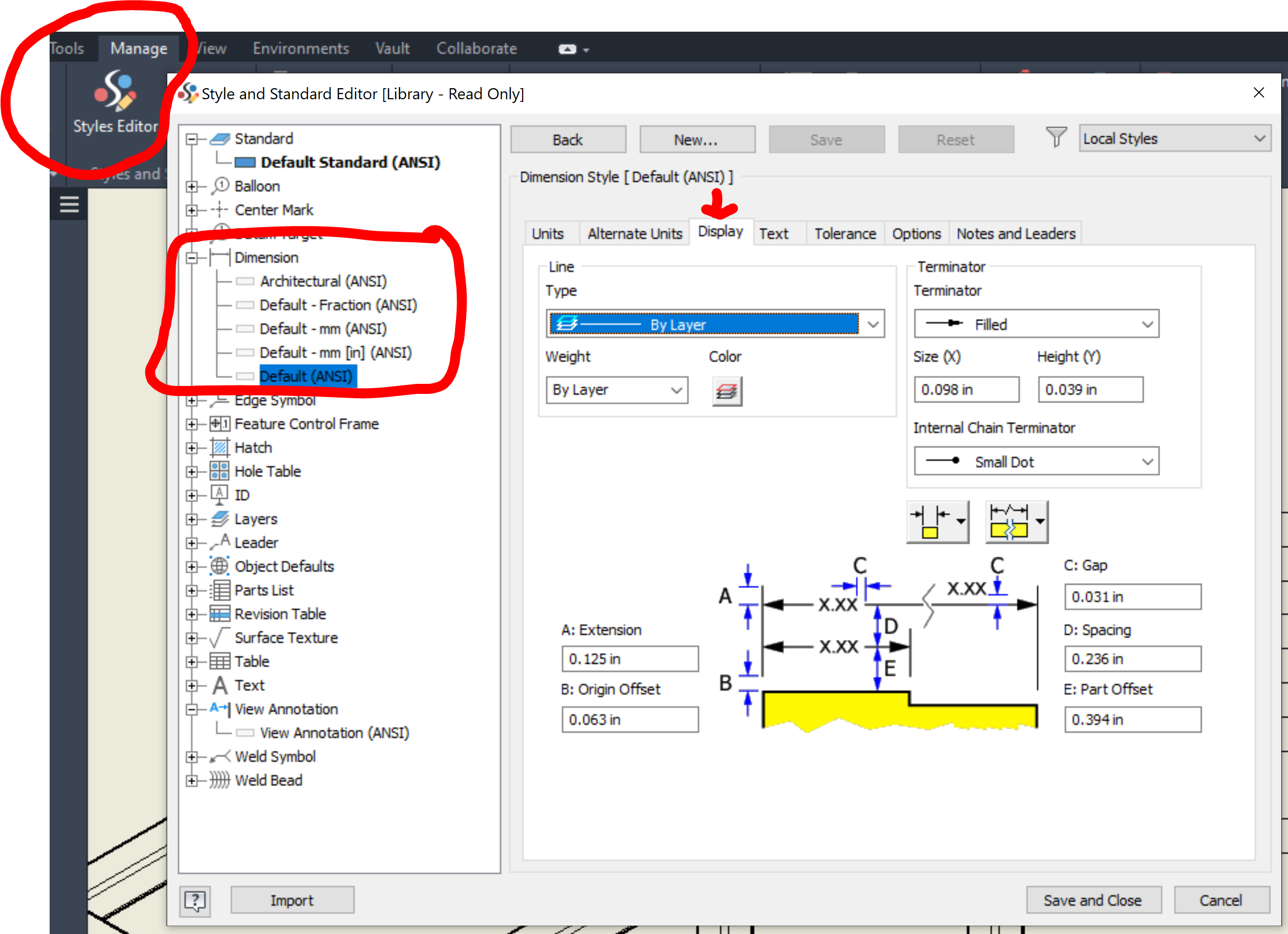
Manage>Style and Standard Editor>Dimension>Display>D: xx mm

Admaiora
Did you find this post helpful? Feel free to Like this post.
Did your question get successfully answered? Then click on the ACCEPT SOLUTION button.

_____________________________________________________________________________
Facebook | Twitter | Youtube

Message 3 of 6

shane.maxwell
Explorer
Explorer

Styles and Standards does not have a Dimension option.  I see dimension option in Styles Editor, but there is not a Display option under that Dimension tab.

0 Likes
Message 4 of 6

kacper.suchomski
Mentor
Mentor

@shane.maxwell wrote:

Styles and Standards does not have a Dimension option.  I see dimension option in Styles Editor, but there is not a Display option under that Dimension tab.


@admaiora is right. He provided the exact path to changing this setting.


Kacper Suchomski

EESignature


YouTube - Inventor tutorials | LinkedIn | Instagram

Did you find this post helpful? Feel free to Like this post.
Did your question get successfully answered? Then click on the ACCEPT SOLUTION button.


0 Likes
Message 5 of 6

CGBenner
Community Manager
Community Manager
Accepted solution

@shane.maxwell 

Welcome to the Community! I think this may help guide you to the path mentioned above: Note that you need to select a specific Dimension Style first.  Good luck!

Did you find a post helpful? Then feel free to give likes to these posts!
Did your question get successfully answered? Then just click on the 'Accept solution' button.  Thanks and Enjoy!


Chris Benner

Community Manager - NAMER / D&M


Message 6 of 6

shane.maxwell
Explorer
Explorer

Kacper Suchomski

The path provided by Admaiora is excluding a few things and is confusing


@ Chris Brenner  

Thank you for a response that was actually helpful.

0 Likes