Error in Inventor Undo Folder

Error in Inventor Undo Folder

jlendermanT8SLL
Observer Observer
604 Views
2 Replies
Message 1 of 3

Error in Inventor Undo Folder

jlendermanT8SLL
Observer
Observer

jlendermanT8SLL_0-1677186564829.png

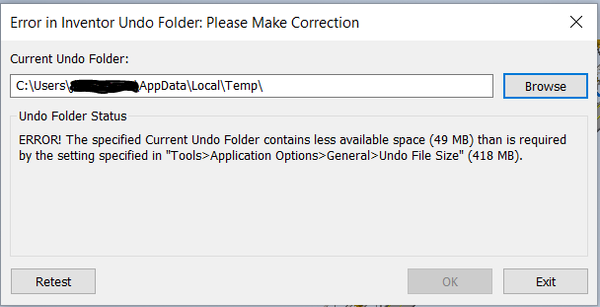
This error keeps popping up and I don't know how to fix this issue. When I search the folder AppData/Local/Temp in my file explorer, I am not able to find it. Any suggestions? 

0 Likes
Accepted solutions (2)
605 Views
2 Replies
Replies (2)
Message 2 of 3

SBix26
Consultant
Consultant
Accepted solution

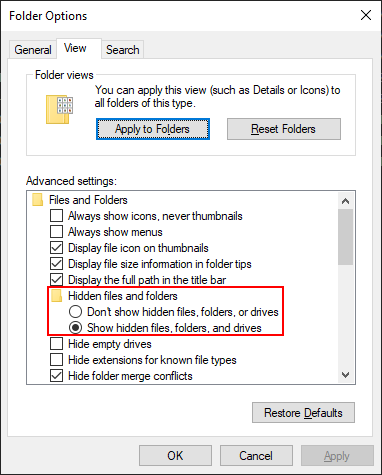
AppData and the folders under it are Hidden.  You'll have to change your File Explorer options so that Hidden files/folders are visible (see below).  Or just type the whole path in the address bar and Enter.

SBix26_0-1677191822427.png


It looks as if your C: drive is almost full, which should be causing you problems in other ways, too.  Maybe the first thing to do is close all applications, then go to the Temp folder noted in that message, select all files and delete them.  If you've never done that, there could be many GB worth of junk there.


Sam B

Inventor Pro 2023.2.1 | Windows 10 Home 22H2
autodesk-expert-elite-member-logo-1line-rgb-black.png

Message 3 of 3

pcrawley
Advisor
Advisor
Accepted solution

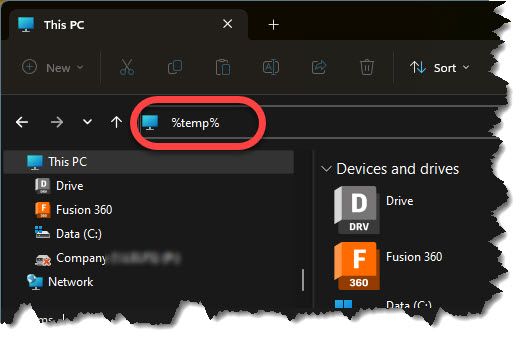
When you start your computer up - and before you open any applications - Open Windows File explorer and enter %temp% in the address bar:  (It also works if the folder is hidden.)
1.jpg

Delete everything you find in that folder.  Don't worry - it's as the name suggests, a "temp" folder where all your applications dump temporary information and rarely clean up when they're finished.  (Inventor and especially Vault will leave thousands of files in the %temp% folder.)


Depending on the age of your computer and when the folder was last emptied, there may be a LOT of files in there.


Reboot and you should be sorted.  (You might also consider upgrading your hard disk if you are that tight on space.)

Peter