- Mark as New
- Bookmark
- Subscribe
- Mute
- Subscribe to RSS Feed
- Permalink
- Report
Hello All,
I have just transferred over to a new computer and it seems to have made a slight issue pop up.
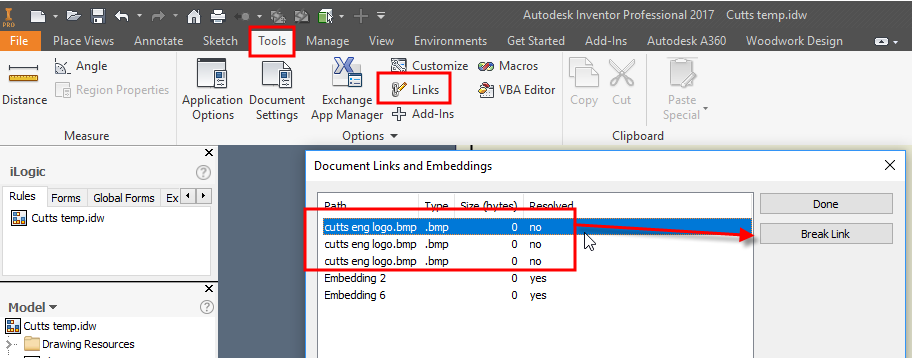
In my .idw template title block i have a logo (.bmp). and when I start a new .idw and even open a existing .idw It pops up with the resolve link dialog box for the image (asks to resolve link to each sheet) (on my old computer it wouldn't need the resolve link dialog box).
In an attempt to solve the problem I went to my template (C:\Users\Public\Documents\Autodesk\Inventor 2017\Templates) opened my .idw template, edit definition, deleted image, insert image, unchecked the link, inserted the image, save, close. Opened a new or existing .idw and it still asked to resolve the link. I also tried moving the location of the image and re inserting/embedding to the title block and trying to open a .idw only to have the resolve link issue.
In a second attempt I went back into the template, followed all the same steps as before including unchecking link box, but i also saved the styles (manage tab, styles and standards tab, save) and then (file, save as, save copy as template) opened this new .idw same problem as before with the resolve link dialog box.
I can click skip or skip all in the dialog box and the image will still show up in the .idw. but it is painful to have to have extra steps every time I need open a .idw and i often need to send things to other people in .idw format who don't have the logo saved so having the image embedded in the template is helpful for my situation (we don't use vault)
I have attached a copy.
does anybody have any clues to how I can solve this.
Thank you all.
Solved! Go to Solution.