Content center locked out

- Mark as New
- Bookmark
- Subscribe
- Mute
- Subscribe to RSS Feed
- Permalink
- Report
Hi there good people,
My issue is to do with editing the content center files, a common issue I’m sure, but it has only become an issue for me in the 2018 release.
Usually, for the benefit of the BOM, I edit the title and description of the ‘CC’ files. Now in INVT 2018 when I open and a project file the file named ‘Lockfile.lck’ is generated in the CC file location (See picture 1)
This file prevents editing the CC files, and cannot be deleted whilst the project/assembly/part file is open. Once you close down Inventor the file disappears and you are free to edit the files in CC using windows explorer.
I thought it may something to do with libraries as you get this message:
‘Cannot modify the library file C:\users\...’
when trying to edit the CC files inside INVT.
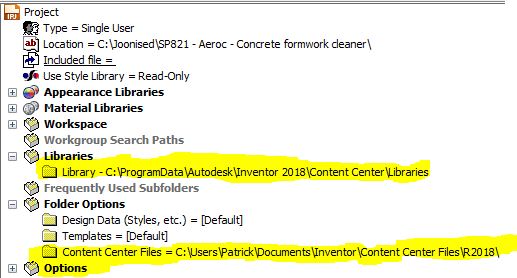
However, I have not set my library to this location as depicted in image 2.
I am now at a loss what to do, any thoughts or suggestions would be appreciated.
Thanks