3ds max 2017 mental ray install issue.

3ds max 2017 mental ray install issue.

Anonymous
Not applicable
12,649 Views
9 Replies
Message 1 of 10

3ds max 2017 mental ray install issue.

Anonymous
Not applicable

Hi,

Does anyone know why if installing 3ds Max 2017 via the 'AutoCAD Design Suite Premium' package I wouldn't get an option to install Mental Ray and IRay? it seems the check box is missing rather than greyed out. shown in the attache image.

Once installed there is no option to switch renderer to Mental Ray or IRay in the render setup dialog.

does this mean mental ray and IRay is only included in non suite versions of Max 2017?


Any guidance would be much appreciated. thanks!


Installing on windows 7 pro 64 bit as administrator.

0 Likes
Accepted solutions (1)
12,650 Views
9 Replies
Replies (9)
Message 2 of 10

Otto
Alumni
Alumni
Hello specialprojekt and welcome to the Autodesk community!

It looks like you’re having trouble with continuing the installation process because one or more buttons are not available. Community members with similar questions found the following posts useful:

AUTOCAD 2014 Install button is not enabled

Install Option Greyed out when trying to install AutoCAD.

Maya 2012 - Network License Server Option Greyed Out

If this information was helpful, please consider marking it as an Accepted Solution by clicking on the "Accept as Solution" link, below. Taking a moment to do this will help others with similar questions find useful answers. Thank you!

Kudos (click on the link or the "thumbs-up!" icon), are also gratefully received! (Even a bot likes praise.)

If this answer missed the mark, please let us know so that other community members can lend a hand. Any additional details might help, too: consider including relevant screenshots, log files, error messages, or system specs.


I'm a software-based HelpBot, designed to provide the information you need to get up and running with Autodesk products—any time, day or night. Your feedback will help train me to deliver more accurate and helpful answers. Thanks in advance! Also, please note that I'm only set up to respond to the first post of a topic, not to any replies. Thank you!

Helpful links: Find Serial Numbers and Product Keys | Find Downloads and Service Packs | Activate Autodesk software
0 Likes
Message 3 of 10

Mark.Lancaster
Consultant
Consultant

@Anonymous


Welcome to the community and hopefully my (or someone else) reply will be beneficially to you.

As a reminder, this is a world wide (public) user forum where users are assisting others. In addition do not post, attach screen shots, or share any personal information (such as your serial #) here.


I might suggest that you post this question over in the 3DS Max forum for a better results.

Mark Lancaster


  &  Autodesk Services MarketPlace Provider


Autodesk Inventor Certified Professional & not an Autodesk Employee


Likes is much appreciated if the information I have shared is helpful to you and/or others


Did this resolve your issue? Please accept it "As a Solution" so others may benefit from it.

0 Likes
Message 4 of 10

Anonymous
Not applicable

I have the same problem here!!


Waiting for a solution...

0 Likes
Message 5 of 10

Anonymous
Not applicable

@Anonymous


yeh seems like this is a similar issue too. but no solution either.

MentalRay dll not loading-MAX17


out of interest did you install with a suite or standalone 3ds max liscence?


0 Likes
Message 6 of 10

Anonymous
Not applicable

Installed from web AutoCAD Design Suite Premium 2017

0 Likes
Message 7 of 10

ghotihook
Explorer
Explorer

Mental Ray is an available option within the stand alone Max installer. I have attached screenshots of the Design Suite Premium and stand alone 3DS Max 2017 installers. I will be submitting a ticket to AutoDesk tomrrow and I will post back when I get an answer. It usually takes a few days.


Also to be noted, the install MSIs and files required for Mental Ray ARE in the Design Suite Premium folders. Under "x64>Mentalray"

0 Likes
Message 8 of 10

Anonymous
Not applicable
Accepted solution

Hi!!

I found this thread on the forums: http://forums.autodesk.com/t5/installation-hardware-os/mentalray-dll-not-loading-max17/td-p/6282811

There is a guy named tony.su that posted for donwload the instalation archives of Mental Ray plugin 2017. 

This worked for me perfectly!

Message 9 of 10

Anonymous
Not applicable

great thanks for the link, seems to fix the issue!

I've not fully tested with network rendering etc. but looks promising!

0 Likes
Message 10 of 10

Anonymous
Not applicable

Hello everyone!


I am facing a critical problem. Just trying my hands on new 3d studio max 2017. After doing a full installation, I noticed that the Mental Ray renderer was missing from the render list :


00000_1Yb9CWHD7mo_600x450.jpg


Also, please note that while installing the 3d studio max 2017, I DID NOT got any option for installing mental ray plugin (which usually shows up in the install list) :

initial_setup.jpg


I did some research and came across the following threads highlighting similar problems:


http://forums.autodesk.com/t5/installation-licensing/3ds-max-2017-mental-ray-install-issue/m-p/62864...

http://forums.autodesk.com/t5/installation-licensing/mentalray-dll-not-loading-max17/td-p/6282811/hi...

http://forums.autodesk.com/t5/3ds-max-forum/how-do-i-install-mentalray-render-engine-in-3ds-max-2017...


And as one of the solutions in the above threads, I downloaded the Mental Ray folder and tried doing a standalone install on mental ray, 

but unfortunately I get the following message in the end: 
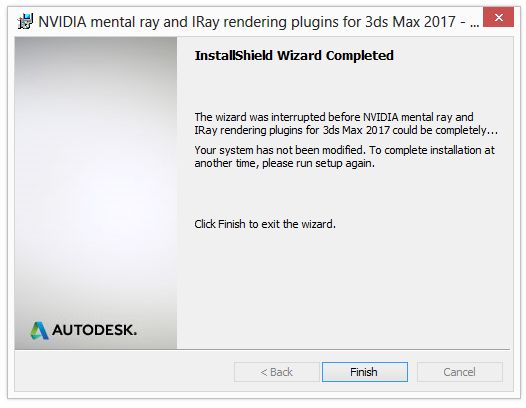
 

Untitled-1.jpg


And I noticed that NO files are copied in the installation folder after this message. Which clearly means that nothing is installed.


However, I would also like to state that when installing from the MentalrayPlugin Folder (by clicking the MentalrayPlugins2017.msi file, the package gets installed fully but Mental Ray DOES NOT shows up in the render settings.


I am not sure why I am not able to install from Mentalray2017.msi file and get the above error!


I am on Windows 8 (not 8.1), could it be because of that?


I have disabled/uninstalled ALL the anti-virus, spam-ware programs.


Hope to receive some help on this!

0 Likes
