Student License or Subscription of Sketchbook

Student License or Subscription of Sketchbook

Anonymous
Not applicable
2,184 Views
14 Replies
Message 1 of 15

Student License or Subscription of Sketchbook

Anonymous
Not applicable

hi,


i recently signed in to autodesk sketch with my school email as followed by this link (https://www.sketchbook.com/education), but it always says in the windows program that i only have 90days left (indicating that it still thinks as trial account)


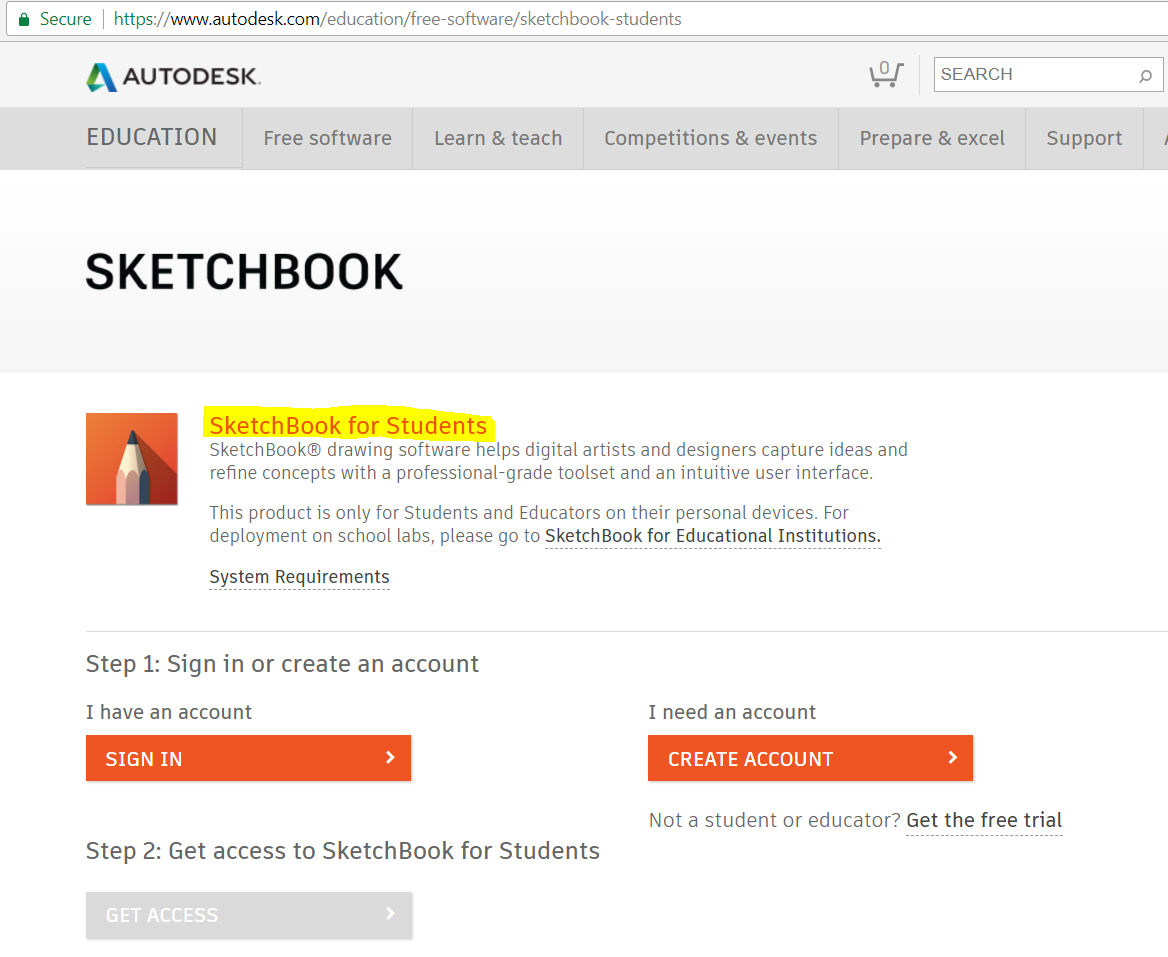
i also have activated the access through this link (https://www.autodesk.com/education/free-software/sketchbook-students)


is there any way to fix this?


cheers.


< Edited Content for better support. > 

0 Likes
2,185 Views
14 Replies
Replies (14)
Message 2 of 15

Mark.Lancaster
Consultant
Consultant

@Anonymous


Welcome to the Autodesk User's Community..


Trials are only free for 30 days.  Are you 100% sure its stating 90 days?  Can you share of screen shot of what you're seeing? 


Update:  One more thing..  Subscription means you are subscribing to a commercial license.  Student license are free for 3 years.

Mark Lancaster


  &  Autodesk Services MarketPlace Provider


Autodesk Inventor Certified Professional & not an Autodesk Employee


Likes is much appreciated if the information I have shared is helpful to you and/or others


Did this resolve your issue? Please accept it "As a Solution" so others may benefit from it.

0 Likes
Message 3 of 15

Anonymous
Not applicable

This entire process is poorly designed and very confusing. Mine also states that I have a 90 day free trial for Pro, even though I'm using the student email and student version. "3 year access" is no where to be seen.

0 Likes
Message 4 of 15

lynn_zhang
Alumni
Alumni

Hi @anon485764298474839472897432


Sorry to hear you have the same issue. Did you get the student access from Education Community page?


Lynn Zhang
Community Manager


0 Likes
Message 5 of 15

Anonymous
Not applicable

It's happening to me, too.

 1.png2.png3.png

In the first picture, there no option to download the software from Autodesk Education (https://www.autodesk.com/education/free-software/sketchbook-students). The only available link is "download the app " at the botton. It brings me to the sketchbook website. I have 90 day trial also. (https://www.sketchbook.com/thankyou/?utm_source=students)


In the third picture, the option are shown but I can't select anything (https://www.autodesk.com/education/free-software/sketchbook)

0 Likes
Message 6 of 15

lynn_zhang
Alumni
Alumni

Hi @lams482


Could you sign out from your account and then click this link again? This should bring you to the Education Community page where it says "SketchBook for Students". From there, sign in your account and you should be able to get the access to student version. See the screenshot below:


Lynn Zhang
Community Manager


0 Likes
Message 7 of 15

lynn_zhang
Alumni
Alumni

Hi @lams482


Did you try the above suggestion? Were you able to get the access to SketchBook for students? Let us know if you still need help.


Lynn Zhang
Community Manager


0 Likes
Message 8 of 15

Anonymous
Not applicable

I tried again with the link provided. It shows me the same scenario as the first shot I uploaded. There is no buttons to download the software, but only the external link to SketchBook website.


I also went to autodesk.com, then from the right top menu to "Students and Educators". Then I clicked "Free Sofware" to get the complete list of available software.  I can download any software except SketchBook.


Message 9 of 15

Anonymous
Not applicable

@Anonymous @lynn_zhang


@Anonymous your screenshots are EXACTLY what is happening to me! +1 Thanks for sharing and doing the work of posting the screenshots.


I did the exact same thing that @Anonymous did and it's still showing up as grey, I've tried logging in and out several times, I tried changing my email and making a new account with my school email, etc. What is going on? I now have two 87 day free trials for pro. I don't want those, I just want the student edition.


A hasty resolution to this problem is desired, it looks like several users are running into this exact same problem. Also, when I downloaded the sketchbook app from that link, it never asked me for a serial number and license number. I have yet to receive these numbers... it has been at least 3 days for me (closer to 4).

Message 10 of 15

Anonymous
Not applicable

@Anonymous the support here has no idea what they are talking about, they don't realize that you already tried all of that stuff. They need to update their FAQs or simplify their website, tbh, it's a bloated mess. I figured out the solution, I posted here:


https://forums.autodesk.com/t5/sketchbook-forum/activation-of-students-license-not-working/m-p/79094...


Please note you might have to wait a few days before your management portal shows a list of products. It's pretty dumb, but hey, it's working now, so I am happy.

0 Likes
Message 11 of 15

Anonymous
Not applicable

It worked. Thanks to everybody.

Message 12 of 15

Mark.Lancaster
Consultant
Consultant

@Anonymous wrote:

@Anonymous the support here has no idea what they are talking about,


Most who do support this forum are users like yourself who volunteer their own time free of charge to help others.  Perhaps instead of making false statements like that you spend a few days helping out..  Smiley Wink   We don't always have the answers and/or have the time to review every thing that everybody has to say or what they did.  We try our best but sometimes we don't always hit the mark.  Smiley Very Happy

Mark Lancaster


  &  Autodesk Services MarketPlace Provider


Autodesk Inventor Certified Professional & not an Autodesk Employee


Likes is much appreciated if the information I have shared is helpful to you and/or others


Did this resolve your issue? Please accept it "As a Solution" so others may benefit from it.

Message 13 of 15

Anonymous
Not applicable

Perhaps instead of making false statements like that you spend a few days helping out..  Smiley Wink 


If I see something wrong, I say it. If I see the solution, I help people. I don't know about you, but that's my price, and I'm happy to be a part of the forums. Hopefully the high number of upset individuals in the forums encourages a better, more concise website design. If you need hundreds of FAQ pages, it means you're doing something wrong Smiley LOL Good design doesn't need to be explained.


 

Speak of the devil! "Announcement: The forums will be unavailable starting 1 p.m. on Friday, April 6 (Pacific time) while we implement the forum redesign. We will be back online at 9 a.m. on Monday, April 9, or sooner." 


It's a good place to start! I would also recommend making @natasha.l statement about waiting 48-72 hours more visible! This one piece of information could have saved many people of needless frustration. Hope that gets incorporated into the student sign up process.

0 Likes
Message 14 of 15

lynn_zhang
Alumni
Alumni

Hi @lams482 & @anon485764298474839472897432 


Glad to hear you've set up the student license for SketchBook! We apologize for the confusion and inconvenience the process has caused.


Special thanks to @anon485764298474839472897432 for sharing the step-by-step solution! I'm sure the other students will benefit from your post. We appreciate your feedback on the process of accessing student license for SketchBook. We will forward to the internal team to work on improving the website content and FAQ for this process. 


Thank you all for posting and sharing in the Community!


Lynn Zhang
Community Manager


0 Likes
Message 15 of 15

natasha.l
Alumni
Alumni

Hello @Anonymous, 


So sorry for the frustration. The steps for setting up student licensing for Sketchbook is outlined here, click here.


Let us know if you have any more questions. 


Please "Accept As Solution" if a reply or replies have helped resolve the issue or answered your question, to help others in the community.

0 Likes