Problem with second instalation

Problem with second instalation

Anonymous
Not applicable
473 Views
1 Reply
Message 1 of 2

Problem with second instalation

Anonymous
Not applicable

 Good day,

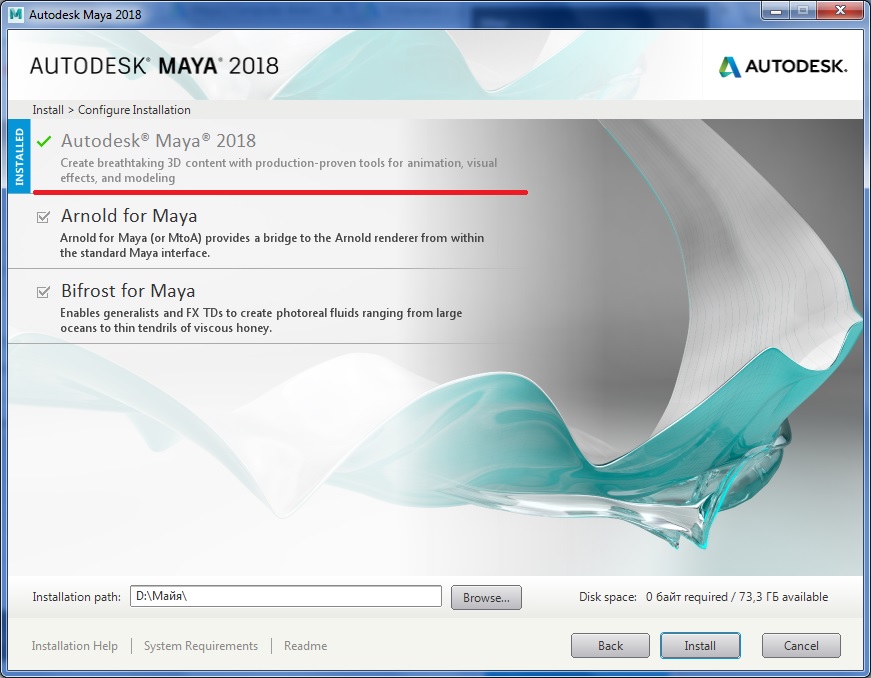
  My name is Bohdan.I have istalled the student version or Maya 2018. Some functions weren't working and my computer had some problems with productivity. I decided to delete and renstall Maya. After uninstalling I have downloaded installation file. The installer made decision , that Maya is already installed and proposed to install Arnold and Bifrost. But I haven't any folders or files with Autodesk Maya.

      Thank you for reply.

0 Likes
474 Views
1 Reply
Reply (1)
Message 2 of 2

Mark.Lancaster
Consultant
Consultant

@Anonymous


Welcome to the Autodesk User's Community..


I would recommend that you perform a clean uninstall per these instructions.   Make sure to use the Microsoft Fixit tool as indicated in that article.


NOTE: The information within the article is solely based on you performing a clean uninstall of all "core" Autodesk products on your machine.  In certain situations, you will most likely not be removing all of your Autodesk products to resolve a given issue.  If that's the case, you'll need to adjust those settings and locations within the article to make sure you are not impacting those other Autodesk products you plan on leaving on your machine.


Mark Lancaster


  &  Autodesk Services MarketPlace Provider


Autodesk Inventor Certified Professional & not an Autodesk Employee


Likes is much appreciated if the information I have shared is helpful to you and/or others


Did this resolve your issue? Please accept it "As a Solution" so others may benefit from it.