License manger

License manger

Anonymous
Not applicable
739 Views
7 Replies
Message 1 of 8

License manger

Anonymous
Not applicable

We have 2019 AutoCAD and are getting script errors, activation button greyed out, Says The License manger is not functioning or improperly installed, tried measures noted in the troubleshooting section of website.  We tried all of the troubleshooting items on https://knowledge.autodesk.com/support/autocad/troubleshooting/caas/sfdcarticles/sfdcarticles/AutoCA... but nothing worked.  Turned Norton off...nothing.

0 Likes
740 Views
7 Replies
Replies (7)
Message 2 of 8

leowarren34
Mentor
Mentor

What kind of license do you have, educational, commercial, network, standalone?

Leo Warren
Autodesk Student Ambassador Diamond
Please accept as solution and give likes if applicable.
0 Likes
Message 3 of 8

Anonymous
Not applicable
My certificate says that they are stand alone commercial.
0 Likes
Message 4 of 8

mdavis22569
Mentor
Mentor

Can you share a screenshot of the error message you're seeing prior to the Licensing Manager error.


However don't show the serial number in it?


It could the Contact your Admin / Renew your lic


Did you find this reply helpful ? If so please use the Accept as Solution or Kudos button below.

---------
Mike Davis

EESignature

0 Likes
Message 5 of 8

michele.mk
Alumni
Alumni

Hello @Anonymous,


Are you trying to activate one license on one computer or different licenses on different computers? Do you have more than one user?


In this case you need to make sure that every user is created in the Account of the Contract manager (the person who subscribes to the product), and assigned to the product before trying to activate.

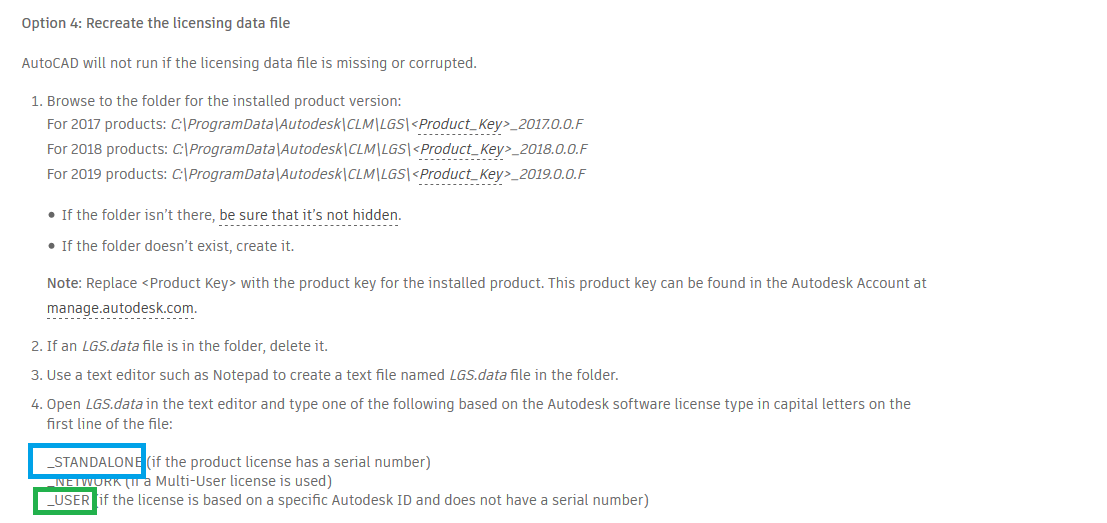
Once done you can reset the license one more time by following the steps under point 4 from the link that you have already found


Choose _STANDALONE if you have a license with serial number and _USER if you have one without serial number.


I hope this is helpful.


Best regards,

Michèle.

-------------------------------------------------------------------------------------------------------
Ihr fandet einen Beitrag hilfreich? Dann vergebt dafür Likes!
Eure Anfrage wurde erfolgreich gelöst? Dann einfach auf den 'Als Lösung akzeptieren'-Button klicken!


Michèle Matzeck-Kunstman
Community Manager
0 Likes
Message 6 of 8

michele.mk
Alumni
Alumni

Hello @Anonymous,


I wanted to follow up on your issue. Were you able to install and activate the licenses?


Best regards,

Michèle.

-------------------------------------------------------------------------------------------------------
Ihr fandet einen Beitrag hilfreich? Dann vergebt dafür Likes!
Eure Anfrage wurde erfolgreich gelöst? Dann einfach auf den 'Als Lösung akzeptieren'-Button klicken!


Michèle Matzeck-Kunstman
Community Manager
0 Likes
Message 7 of 8

Anonymous
Not applicable

Thank you everyone.  It started working all by itself.  Appears as though it just needed some time to initiate the licenses for some reason.


thanks again!

0 Likes
Message 8 of 8

leowarren34
Mentor
Mentor

Anytime,

Happy to help,

Have a nice day!

Leo Warren
Autodesk Student Ambassador Diamond
Please accept as solution and give likes if applicable.
0 Likes