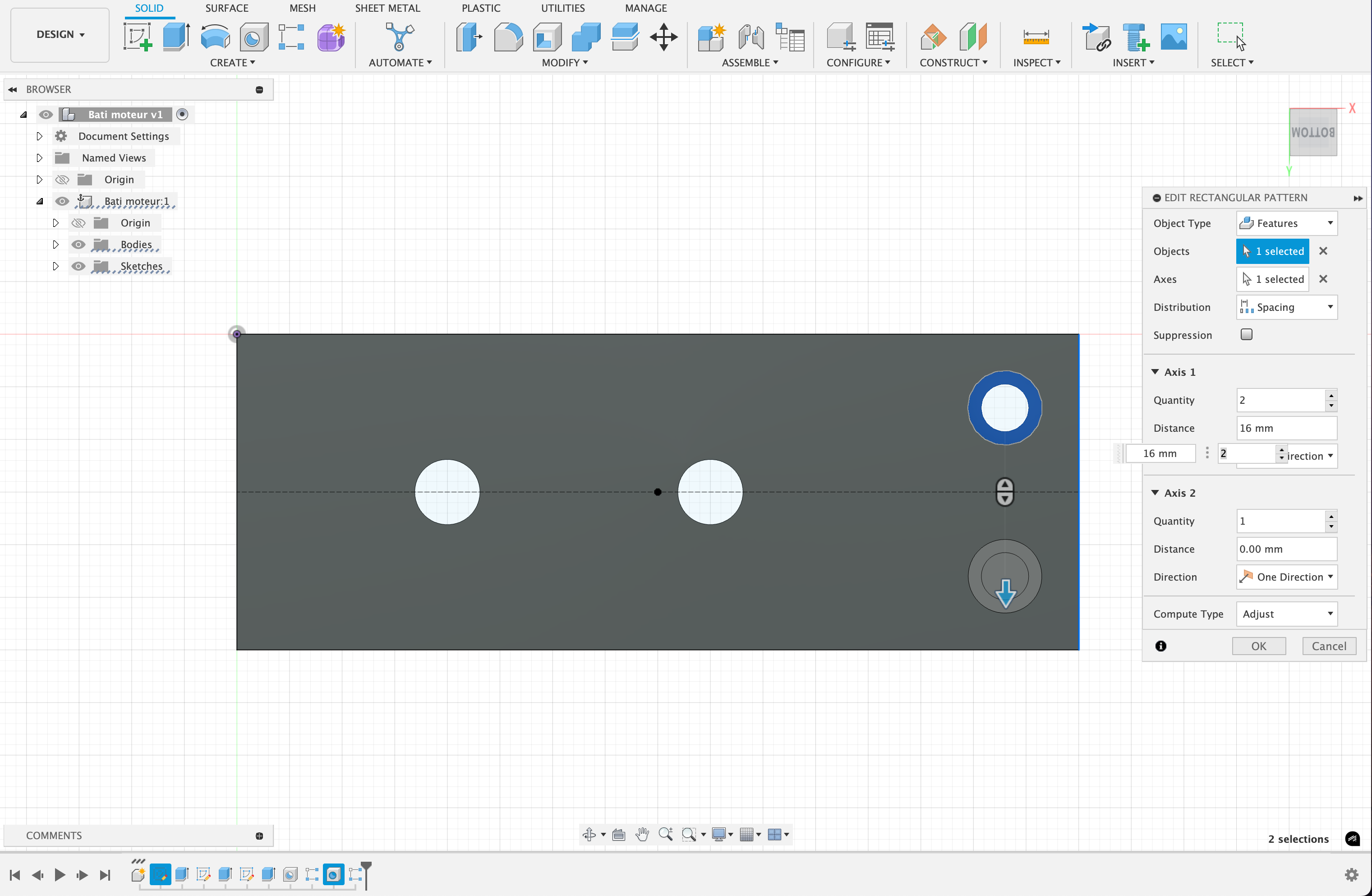
Rectangular pattern result is not the same as preview / does not update after moving source

- Mark as New
- Bookmark
- Subscribe
- Mute
- Subscribe to RSS Feed
- Permalink
- Report
Hi everyone,
I'm a new user to Fusion. So far I have loved the program but one of the "buggiest" features that's constantly driving me mad is rectangular patterns.
After creating them, I sometimes need to modify the placement of the source material, and expect the rectangular pattern to change accordingly. Nothing fancy and I hope this is expected behaviour from Fusion. BUT, often it doesn't change and creates a problem like below. Then, I go and try to edit the rectangular pattern, and the preview shows where the repetition should actually be. But after confirming, even if I try changing something in the dialog, the generated placement is still wrong.
These two images are before and after clicking "Okay". I have modified the placement of the whole in the top right corner, shifted to the right. But the generated repetition still has in memory the old placement, somehow.
This has not been an isolated issue. Rectangular patterns are way more stable in Creo where I'm coming from.
I hope it is me who does not understand something and it is not a problem with the software.
Is there some kind of command to "update" or "regenerate" the component so it gets fixed, like in Creo?
Thank you for your help!
Simon