- Mark as New
- Bookmark
- Subscribe
- Mute
- Subscribe to RSS Feed
- Permalink
- Report
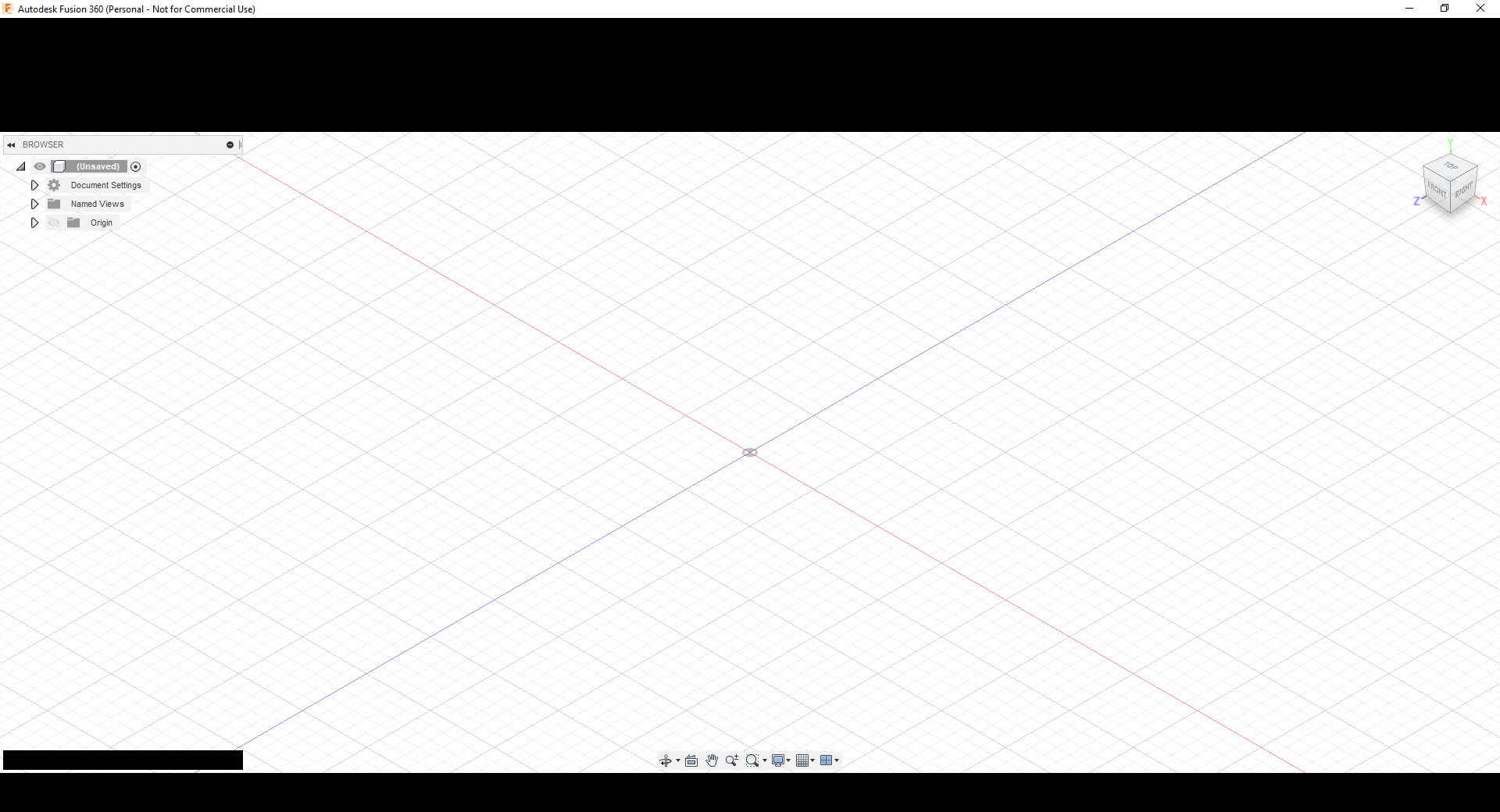
After using Fusion 360 for over a year, turned the computer on today and the application started up with the menu area at the top of the window completely blacked out. No changes were made to the machine or environment (that I am aware of). The drawing area was visible and appeared normal - but the menus were not visible. If the mouse pointer was hovered over the area where the buttons and hyperlinks are located on the menu, then the tooltips appear through the black band. No controls are visible in the menu area. Updated the graphic drivers with no apparent effect. The splash screen displays normally as the application is starting.
After signing out the problem is different - the ENTIRE Fusion 360 window is solid black (not just the menu). When signed out, the mouse pointer will not show tool tips when hovered over buttons.
Once signed out, there seems to be no way to sign back in within Fusion 360 as it is currently behaving. Removed Fusion 360 completely from the machine using the cleaning tool provided by Autodesk. Then reinstalled a fresh copy of fusion and deleted the cached files - unfortunately with the same exact behavior after install as before. Took advice from other posts and installed AutoCAD trial version merely to permit me to sign back into my Autodesk account successfully. Once signed in using AutoCAD, then Fusion 360 will go back to showing black bands over the menu (as shown in attached screenshot). However, once signed out the entire window is jet black and unresponsive to any user input.
The application is running on a new Lenovo laptop with an I7 processor and running Windows 10 with an Intel UHD 620 graphics chip. It is not a solid modeling "powerhouse", but has worked great and been very responsive. All was fine until today when these "blackout" problems started. It does not appear to be anything related to graphics drivers even though nearly all posts suggest that driver updates are the answer. It appears to be related to some account sign in malfunction within Fusion 360. Fusion will not even present a sign in dialog box. Perhaps the most recent update had an unintended negative effect on sign in? The logs show that sign in operation is occurring during application startup, but is returning a status of zero (which may mean a failure?).
Seems like I am 'dead in the water'. Any help appreciated...
Solved! Go to Solution.