Combining body with complex material component...

Combining body with complex material component...

Unicacher
Explorer Explorer
650 Views
5 Replies
Message 1 of 6

Combining body with complex material component...

Unicacher
Explorer
Explorer

I am designing a chess board.  I started with a component that simulates the original wood stock comprised of random dark and light woods.  I am creating the chess pieces using a single body.  I'm trying to combine the solid chess piece body with the material component so that the result is the chess piece made from the random wood component.


If I combine the bodies of the material stock, I lose the appearance; the whole thing turns to one material.  When I do an intersection with the pawn as the target and the material bodies as the tools, I get the pawn with its original material.


Any ideas?


Here's the material:

This is the material block.This is the material block.

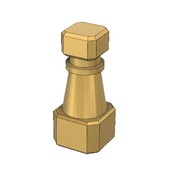
Here's the pawn:

This is the solid pawn.This is the solid pawn.Here's the combination.  I want to make an intersection of the two so that the pawn looks like random wood.

I want to intersect the pawn with the material so the pawn looks like random wood.I want to intersect the pawn with the material so the pawn looks like random wood.

 
0 Likes
651 Views
5 Replies
Replies (5)
Message 2 of 6

TrippyLighting
Consultant
Consultant

I am not surprised, but I'd like to experiment with this. Can you share your design (provide the public link to it available through the data panel)


EESignature

0 Likes
Message 3 of 6

Unicacher
Explorer
Explorer

Thanks for your interest.

Here's the link:

https://a360.co/30ivjNz

I copied the two components into a public project so I can keep working without causing confusion or interference.

Another solution I tried was creating a negative mold of the pawn to try to use as a cutting tool for the wood stock.  Problem is that it only wants to cut a single body and the wood has around 20 because of the different appearance materials.

Eagerly awaiting a creative solution to this.  Of course at the end of the day, I'm more interested in the CAM and final product.  This is only for rendering... and CAD practice.


0 Likes
Message 4 of 6

TrippyLighting
Consultant
Consultant

@Unicacher wrote:


I copied the two components into a public project so I can keep working without causing confusion or interference.


that's only needed if you would be inviting me to your project. The link allows me to view and also download the model.


When using the Combine/Intersect tool the final product will inherit the appearance of the target body.

Look through the timeline in the attached .f3d model and see if that makes sense.


I also am wondering whether I've found a bug or inconsistency. Even when I activate the pawn component before I combine the bodies, the end result will not be created in the pawn component.
The resulting boy will be created in the component that has the target body in it, which is undesirable in his case. @ryan.bales could you or Jeff shed some light on this pease ?


Screen Shot 2019-09-23 at 1.06.10 PM.png


EESignature

Message 5 of 6

ryan.bales
Autodesk Support
Autodesk Support

I'd expect the resulting body to be created in the activated component but combine is body driven and this might explain why its not, additionally we are trying to 'keep tool' which is very much preserving some structure.


So while it is keeping the target body in its respective component rather than moving it to the tool component for, why that is i don't know. I'd be speculating if i said any more. 


It is the same in reverse if you activate the stock component and then combine. The Pawn remains in its body - keep tools is likely that culprit. If i had to guess- i'd say this is why 'new component' is an option in the dialog - although it creates at the top level. 


Ryan Bales
Fusion 360 Product Support
Message 6 of 6

TrippyLighting
Consultant
Consultant

Ahh... yes that makes sense and I'll have to experiment with it. 


EESignature

0 Likes