2D Pocket Recognition - Bug

2D Pocket Recognition - Bug

shopSUAKZ
Explorer Explorer
694 Views
2 Replies
Message 1 of 3

2D Pocket Recognition - Bug

shopSUAKZ
Explorer
Explorer

Just saw the update about 2d Hole recognition, fantastic feature, though there are 2 bugs I noticed while playing around to see how it worked.


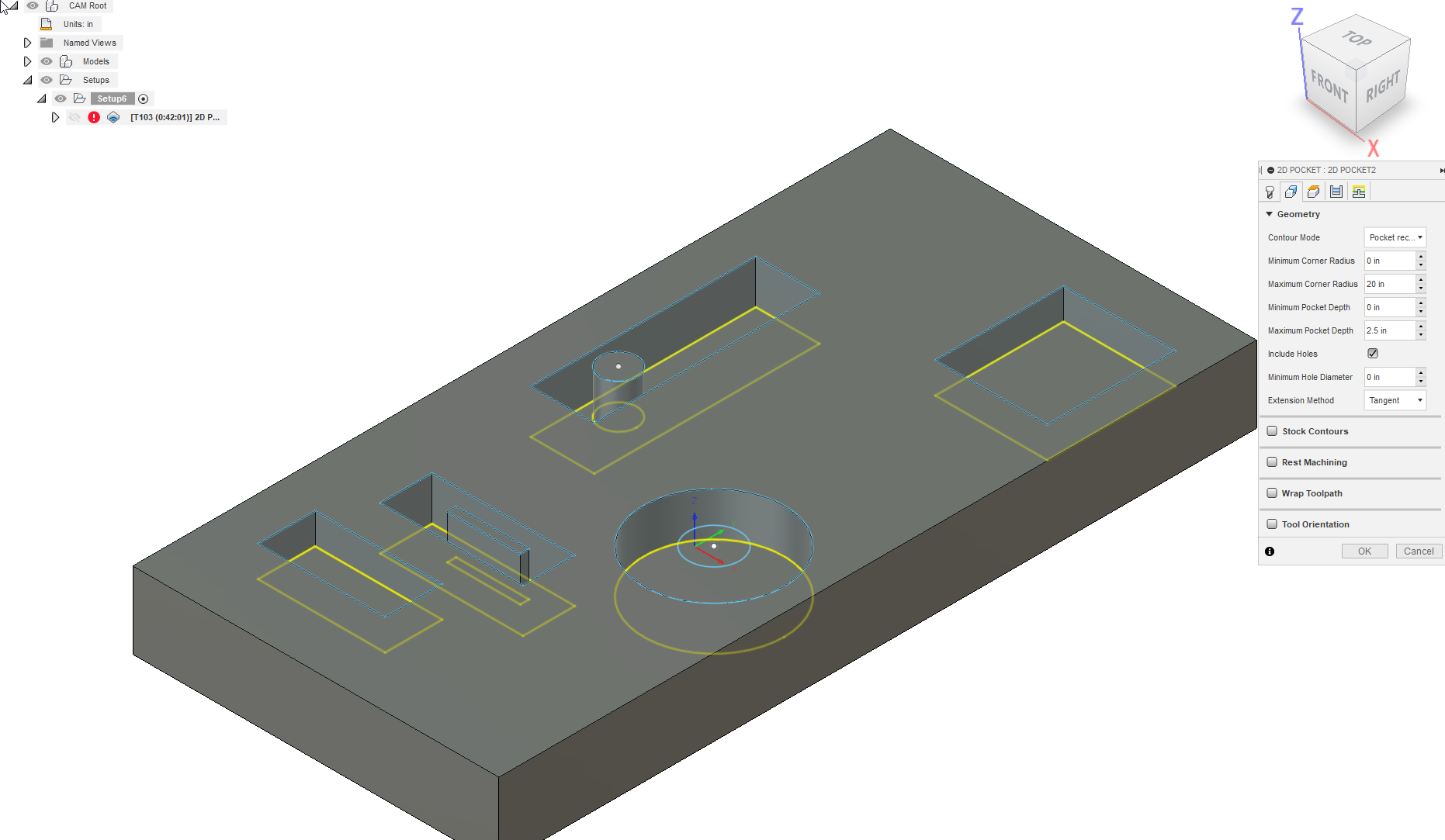
1. While I get from the guide that if its a circular hole/pocket to make sure hole recognition is checked, if there is an island inside of a circle pocket it will not recognized the circular hole at all. (see 2 photos)


2. Not sure if it has anything to do with the hole recognition or is strictly about the tool path previewer, but you don't get an appropriate preview of the pockets sometimes for all of the pockets. If you notice the 2 pockets without islands preview properly what will happen, while the 2 with islands preview as a hollow cutting. Meaning the tool path is there, but the preview doesnt show a top layer being machined away. 

0 Likes
695 Views
2 Replies
Replies (2)
Message 2 of 3

jhackney1972
Consultant
Consultant

You should attach your model showing this issue.  Screen captures do not help diagnose the issue.  If you do not know how to attach your Fusion 360 model follow these easy steps. Open the model in Fusion 360, select the File menu, then Export and save to your hard drive. Then use the Attachments section of a forum post to attach it.


Attachment.jpg

John Hackney, Retired
Did you find this post helpful? Feel free to Like this post.
Did your question get successfully answered? Then click on the ACCEPT SOLUTION button.

EESignature

0 Likes
Message 3 of 3

shopSUAKZ
Explorer
Explorer

This wasn't a real model of anything I just quickly created a mock up and noticed those bugs. Already closed it out so I cant post it. Just issues I noticed while playing around. But I believe my screen shots show the issues I was describing fairly well.

0 Likes