Tool library al bonkers..

Tool library al bonkers..

Anonymous
Not applicable
487 Views
1 Reply
Message 1 of 2

Tool library al bonkers..

Anonymous
Not applicable

After the latest update, a few weird things started happening..


It crashed a number of times on me in CAM, but mostly the new "Tool Library" as all gone crazy..


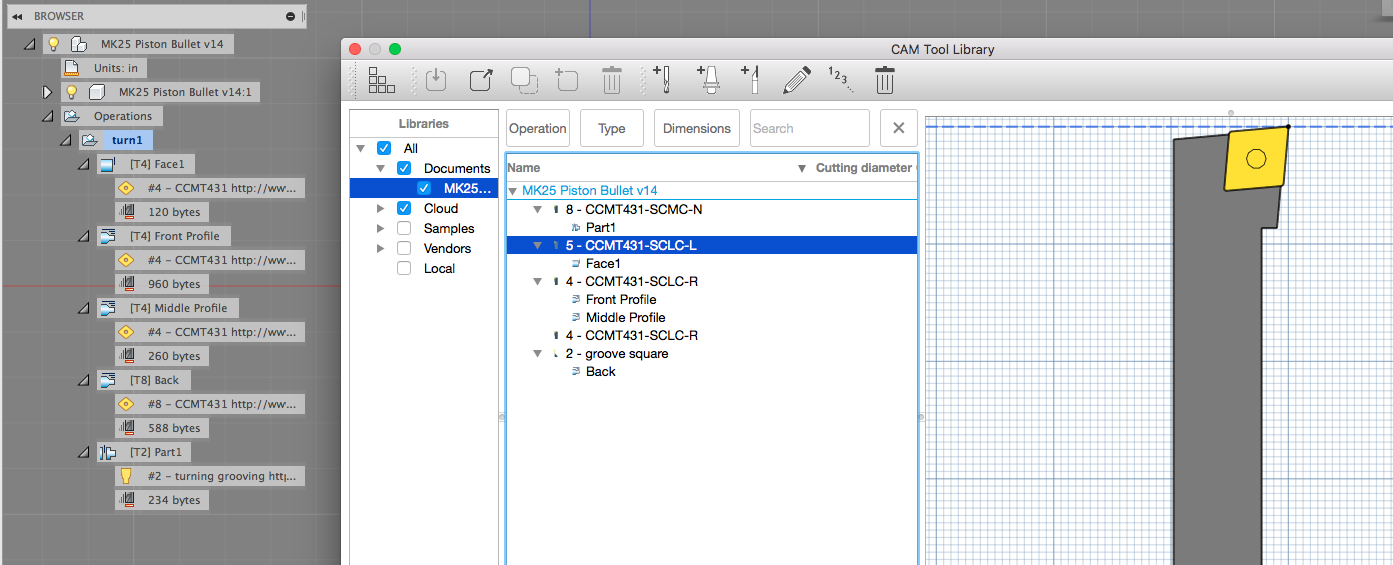
It seems to think im using tools in the CAM thats not even in the project..  


for example the actual CAM has a tool No2 (parting/grooving tool) as the the parting op called "Part1"


But the tool library seems to think its tool No8, which is a completely different tool..


the best one yet, its trying to face off with a LEFT hand tool thats not even used anywhere in the project.. 


(SEE SCREENSHOT 1)


But then,  when I select the "Remove unused tools"  it scrambles the tools around and assigns different tools to different ops.. (Still not the right ones)


(SEE SCREENSHOT 2)


VERY WEIRD!!


0 Likes
Accepted solutions (1)
488 Views
1 Reply
Reply (1)
Message 2 of 2

balsmen
Alumni
Alumni
Accepted solution

Hi @Anonymous,


Sorry you are having this problem - it was reported by another user and we logged it in our bug tracking system as CAM-4536. It has already been fixed and will be included in the August 24th update of Fusion.


In the mean time, a (really annoying) workaround would be to open and close the editor for each tool where you notice the problem. The other (even more annoying) is to restart Fusion completely.


The good news though is that this is only a problem in what is visible on screen, not actually a problem with the model or any of the operations.


Hope this helps for now and luckily a fix isn't far off.


Thanks,

Noah


Noah Balsmeyer

Fusion Mfg Software Engineer
0 Likes