Pencil toolpath cuts too deep?

Pencil toolpath cuts too deep?

dansemur
Enthusiast Enthusiast
654 Views
4 Replies
Message 1 of 5

Pencil toolpath cuts too deep?

dansemur
Enthusiast
Enthusiast

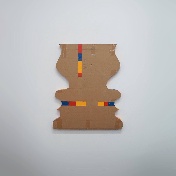
not sure what im doing wrong, ive never been able to use pencil toolpath because it always does this on all my attempts.


IMG_9294.JPGIMG_9295.jpg34 06-06 mini 1 (1) v18.png34 06-06 mini 1 (1) v183.png

0 Likes
655 Views
4 Replies
Replies (4)
Message 2 of 5

a.laasW8M6T
Mentor
Mentor

Hi


This doesn't look like a problem with the toolpath, it looks like more of an issue with the tool length not being set correctly.


To get two tools toolpaths to blend together successfully you must have an accurate and repeatable method of setting tool lengths.


I'm not sure how you set tools on your particular machine but I would start there.

Andrew Laas
Senior Machinist, Scott Automation


EESignature

0 Likes
Message 3 of 5

dansemur
Enthusiast
Enthusiast

I have a sensor with a ground that measure the tools, it works very well. I don’t have issues changing tools and have done many multi tools jobs.


I don’t understand why it won’t work, I can see in the simulation that the toolpath seem fine.. maybe this one tool isn’t playing well with the sensor.


i guess i can try a known strategy with this tool to see if it works.

0 Likes
Message 4 of 5

programming2C78B
Mentor
Mentor

I don't see fasteners near your part. The material may just be relaxing and bowing up as it is relieved. 

Please click "Accept Solution" if what I wrote solved your issue!
0 Likes
Message 5 of 5

seth.madore
Community Manager
Community Manager

Looking at the prior toolpath, I'm wondering if perhaps you're leaving too large a radius and amount of material in place for the tapered mill to machine out. What is your machine and controller; is it possible you're overloading the tool and making it deflect more than expected/desired?


Seth Madore
Customer Advocacy Manager - Manufacturing


0 Likes



