CAM Beta mode

CAM Beta mode

al.whatmough
Alumni Alumni
11,903 Views
18 Replies
Message 1 of 19

CAM Beta mode

al.whatmough
Alumni
Alumni

Fusion users looking to offer input into beta functions in our software can now do so by enabling BETA mode.


It is important to note, you must manually turn beta mode off.  


Beta mode is only suggest for short term testing of new functionality.


Learn more about how to enable beta mode here:


http://manufacturinglounge.com/hsm-beta-mode-hsmwork-inventor-hsm-fusion/


When comment on CAM beta functions please do so in the CAM Beta forum to avoid confusion to users not using beta mode.


http://forums.autodesk.com/t5/beta-testing-english-deutsch/bd-p/219


---------
AL Whatmough
Director Product Management - Manufacturing

Note, I love to engage on the forums. However, I spend a lot of time in meetings trying to help clear the path for our amazing team of Developers working on Manufacturing at Autodesk. So, if I don't respond immediately, it's not that I don't care.
Accepted solutions (1)
11,904 Views
18 Replies
Replies (18)
Message 2 of 19

Anonymous
Not applicable

EDIT: Never mind, like a silly person I skimmed the instructions....I didn't have txt selected when I entered the command...thanks..Smiley Embarassed


Hi @al.whatmough!


I was looking for this just the other day Smiley Very Happy


I got an error trying to enable it though....


Screen Shot 2016-06-17 at 2.55.07 PM.png


What did I do wrong?


Thanks!

Message 3 of 19

LibertyMachine
Mentor
Mentor

Well this is pretty cool. Is there any documentation on what is in the Fusion CAM Beta so we can look out for new features we wouldn't otherwise be aware of?


Seth Madore
Owner, Liberty Machine, Inc.
Good. Fast. Cheap. Pick two.
0 Likes
Message 4 of 19

al.whatmough
Alumni
Alumni

As we release things in beta we let users know in the BETA Forum.


---------
AL Whatmough
Director Product Management - Manufacturing

Note, I love to engage on the forums. However, I spend a lot of time in meetings trying to help clear the path for our amazing team of Developers working on Manufacturing at Autodesk. So, if I don't respond immediately, it's not that I don't care.
Message 5 of 19

RandyKopf
Collaborator
Collaborator
Al: Thank you for the notice that Fusion 360 users can enter Beta mode. I really am looking forward to using simultaneous 5 Axis CAM with my www.PocketNC.com. Specifically 5 Axis Curve driven tool paths with vector control. My first interaction using "Beta" CAM software was in 1987 with Point Control when they were developing SmartCAM 3D

Randy Kopf 

http://desktopartisan.blogspot.com/


If my post is helpful, press the LIKE Button If it resolves your issue, press Accept as Solution! Have a great day!
0 Likes
Message 6 of 19

LibertyMachine
Mentor
Mentor

Curious question: Is it safe to use Beta version? What I mean is: Features that already exist in "off-the-shelf" Fusion that are proven and known to work, will they still be the same, or does everything become "use at your own risk"

Or is it only the new features in Beta that are questionable?


Seth Madore
Owner, Liberty Machine, Inc.
Good. Fast. Cheap. Pick two.
0 Likes
Message 7 of 19

adsloud
Alumni
Alumni

Suppose you are using the default Python text command type. Try to change the text command type to be txt and input CAM.BetaMode /on again. See the attached picture for the details, please.


Debbie Lou
Sr. QA Engineer for HSM CAM
0 Likes
Message 8 of 19

adsloud
Alumni
Alumni

Suppose you are using the default Python text command type. Try to change the text command type to be txt and input CAM.BetaMode /on again. See the attached picture for the details, please.


Debbie Lou
Sr. QA Engineer for HSM CAM
0 Likes
Message 9 of 19

adsloud
Alumni
Alumni
Suppose you are using the default Python text command type. Please try to change the type to be Txt and input CAM.BetaMode /on again.

Debbie Lou
Sr. QA Engineer for HSM CAM
0 Likes
Message 10 of 19

al.whatmough
Alumni
Alumni

@LibertyMachine Everything becomes beta.   Most other areas of the software should not be impacted.  However, we do not gaurentee that there isn't work happening in the kernel for facing even if you don't see any new icons or options.

---------
AL Whatmough
Director Product Management - Manufacturing

Note, I love to engage on the forums. However, I spend a lot of time in meetings trying to help clear the path for our amazing team of Developers working on Manufacturing at Autodesk. So, if I don't respond immediately, it's not that I don't care.
Message 11 of 19

daniel_lyall
Mentor
Mentor

@al.whatmough what are the beta features in fusion cam is it the same as the vids you did showing what is in HSM


Win10 pro | 16 GB ram | 4 GB graphics Quadro K2200 | Intel(R) 8Xeon(R) CPU E5-1620 v3 @ 3.50GHz 3.50 GHz

Daniel Lyall
The Big Boss
Mach3 User
My Websight, Daniels Wheelchair Customisations.
Facebook | Twitter | LinkedIn

0 Likes
Message 12 of 19

fdboswell
Enthusiast
Enthusiast

The link in the original post that is supposed to take you to a place that tells you how to turn on CAM Beta Mode in Fusion now results in an error saying that I'm not authorized to view that page. Is this what is now intended? Is CAM Beta Mode in Fusion no longer available to the general Fusion user base?

0 Likes
Message 13 of 19

Trigg3r
Advocate
Advocate

You can CTRL+ALT+C to show the text commands window, There you can select TXT as the input type in the lower right hand check box.


The enter - CAM.Betamode /on


0 Likes
Message 14 of 19

friesendrywall
Collaborator
Collaborator

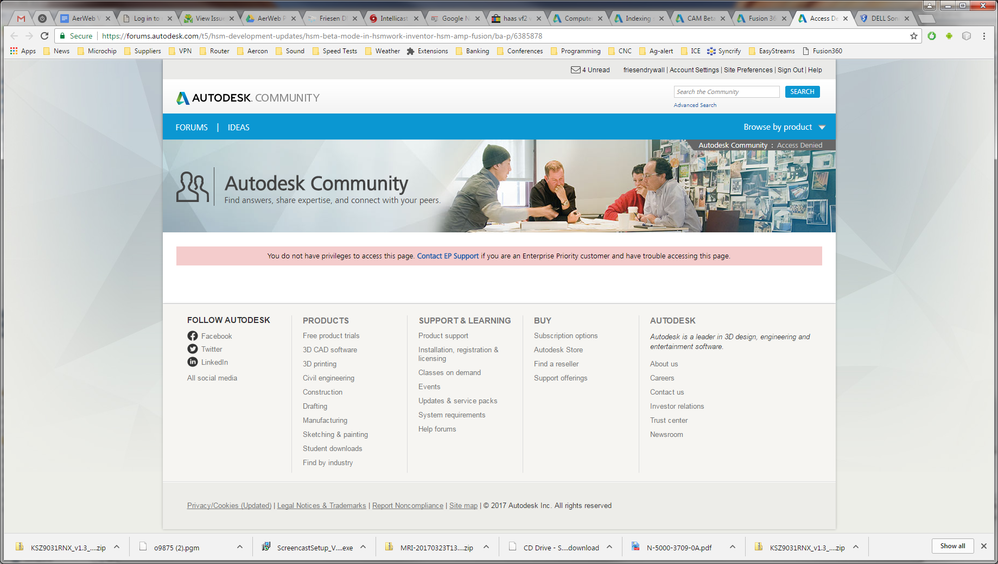
Where is this information located?


This is all I get.


Screenshot 2017-03-28 14.41.58.png

0 Likes
Message 15 of 19

Steinwerks
Mentor
Mentor

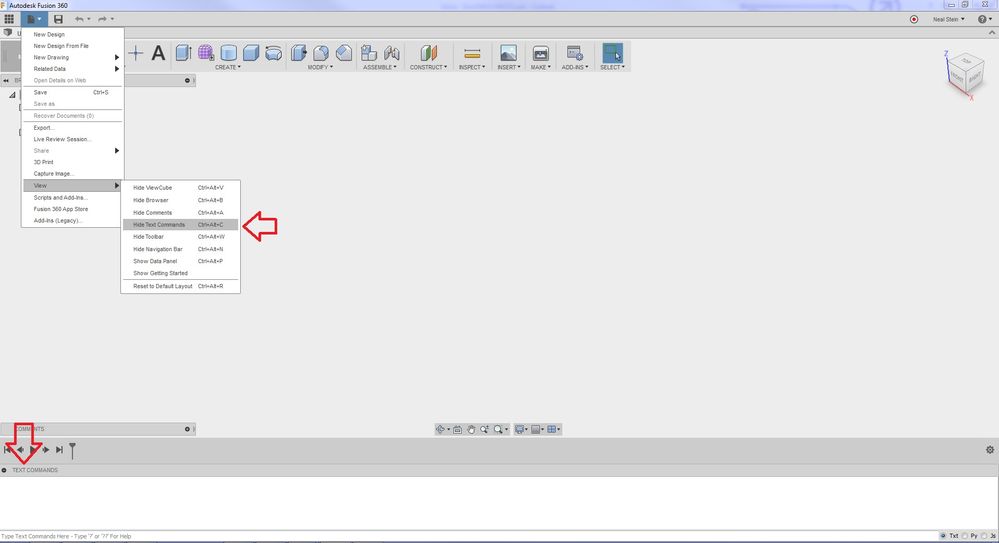
@Trigg3r answered your question, but here's a quick visual. Usually the Text Commands section is minimized at the bottom:


Betamode.jpg

Neal Stein

New to Fusion 360 CAM? Click here for an introduction to 2D Milling, here for 2D Turning.

Find me on:
Instagram and YouTube
0 Likes
Message 16 of 19

fdboswell
Enthusiast
Enthusiast

Thanks, yes CTRL+ALT+X works to get the text box.


My intention in part was to point out that the link in the original post no longer works (for me at least). Maybe someone will be able to fix that for the benefit of the community.

0 Likes
Message 17 of 19

Steinwerks
Mentor
Mentor

@friesendrywall My apologies, I misunderstood.


@brianrepp can we get a working link? Does this even exist anywhere anymore? I haven't found it since (and I have checked several times since this post went up, although not in some time).

Neal Stein

New to Fusion 360 CAM? Click here for an introduction to 2D Milling, here for 2D Turning.

Find me on:
Instagram and YouTube
0 Likes
Message 18 of 19

al.whatmough
Alumni
Alumni
Accepted solution

Updated link here:


http://manufacturinglounge.com/hsm-beta-mode-hsmwork-inventor-hsm-fusion/

---------
AL Whatmough
Director Product Management - Manufacturing

Note, I love to engage on the forums. However, I spend a lot of time in meetings trying to help clear the path for our amazing team of Developers working on Manufacturing at Autodesk. So, if I don't respond immediately, it's not that I don't care.
Message 19 of 19

fdboswell
Enthusiast
Enthusiast

Thanks!

0 Likes