@ashes.man
Couple of questions, one what is the control Mazatrol/Fanuc etc, two does it have "Drip feed " capability.
Lot of years ago I had a similar situation with an old Bridgepor that Had a Fanuc 0M control that had about the same usable memory as you have, when I started with a CAD-CAM software exactly the same issue so I looked into doing "Drip feed" for the code, took a few attempts to get the cable connections right but when it was setup , we are talking I could run a million lines of code or more if I wanted, the machine wasn`t very quick but if I was prepared to wait a few days (Or more) I could do some pretty fancy stuff, we are talking 30 years ago here, old 1989 machine 🙂 🙂 🙂
If it has the capability then worth buying a cheap PC or one of the "emulators" that just sit by the machine and have a lot of memory and you can just put the code on a memory stick and load to the unit and it will feed the code to the control as required, a few ways to do it some not too expensive. The "Shoplink" one has been around for quite a while and you can pick one up online pretty easily, image below and link to one on **** 🙂 🙂 🙂
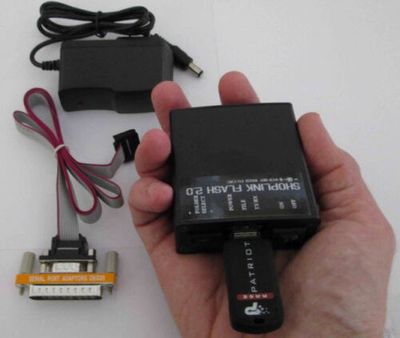
https://www.ebay.co.uk/itm/Haas-USB-FLASH-memory-upgrade-for-Haas-CNC-Send-Receive-DNC-Drip-feed-via...
This link is for one that is for a HAAS just as an example, but they do others, there are a number of other makes out there as well 🙂
An old cheap PC with a Serial Port will do fine as well, you can buy some DNC software, EasyDNC is a good one, not the cheapest but very good and reliable https://www.easydnc.com/ to make the connection or as I did back then just used the built in MS "Hyper Terminal" in Win98 and XP 🙂
You can also run "Subroutines" to say do multiple depths of cut that are not too big and are just repeated by the Subroutines but that will depend on the Post Processor you would be using, might need modifying 🙂 🙂
Hope that`s helpful, the choice is yours 🙂
Stay Safe
Regards
Rob
Stay Safe
Regards
Rob





