4 axis post modifications

4 axis post modifications

kellyBVJL2
Participant Participant
3,457 Views
18 Replies
Message 1 of 19

4 axis post modifications

kellyBVJL2
Participant
Participant
We have a mill/router that has a rotating axis ( C axis that rotates around Y) on the spindle and I'm trying to figure out what I need to do as far as machine setup in fusion as well as post processor tweeks.
 
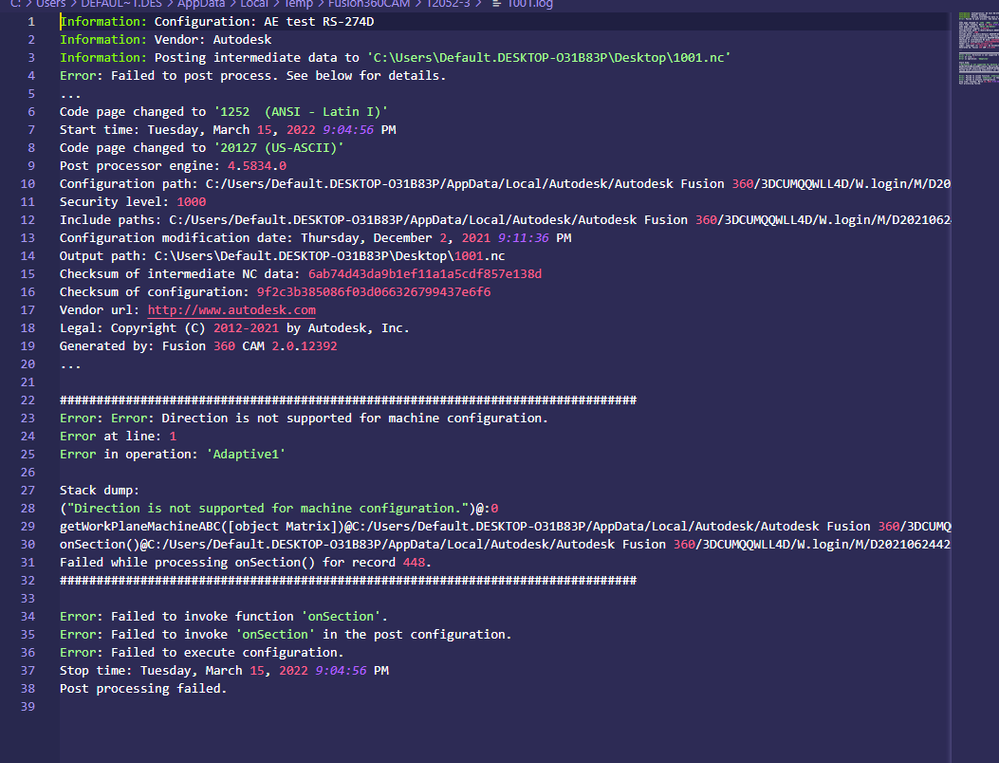
On the programing side, I've managed to do a couple of tests with several toolpaths that simulate ok, but I cannot post code with my usual PP. I've included a screenshot of the error I get upon posting.
 
We are running a no name Chinese 4 axis router that has a Syntec controller. I have been using the RS-274 D post for 3 axis milling so far. From my understanding, this post has 5 axis capabilities but I have not been able to edit the post correctly. Most post edit examples that I have found are based on a different post than what I am using.
 
I'm also curious to know if there are going to be any changes needed to the machine definitions.
 
Hoping that there are people out there who have made the jump from 3 axis to 4/5 axis that have been down the same road.
 
Thanks!Screenshot 2022-03-15 150518.png
0 Likes
3,458 Views
18 Replies
Replies (18)
Message 2 of 19

engineguy
Mentor
Mentor

@kellyBVJL2 


Try the attached Post Processor, it for the Syntec control and should post a C axis rotating around the Y Axis for you.

If it doesn`t work come back and let us know and maybe it can be "tweaked" a little more to get it right. 🙂 🙂 🙂


Does it rotate around the Y axis or does it swing the spindle left/right rotating around the Y axis ? In other words is it the Head that moves and not a 4th axis fixed on the table ??

A photo or a diagram would be helpful 🙂


P.S.


Almost forgot, don`t worry about having a "Machine" in your Setup, it is not required to get code posted 🙂

0 Likes
Message 3 of 19

kellyBVJL2
Participant
Participant

Thanks! I gave it a shot and it didn't work. I've attached a screenshot of the error messagesyntec post.png

0 Likes
Message 4 of 19

kellyBVJL2
Participant
Participant

I forgot to reply to your other question.... It is a spindle that rotates around the y axis. It is not a separate motorized axis.

0 Likes
Message 5 of 19

engineguy
Mentor
Mentor

@kellyBVJL2 


What is the actual physical layout of the machine ???

0 Likes
Message 6 of 19

kellyBVJL2
Participant
Participant

20220315_162655.jpg

The x direction is left and right in this picture. The head has been tilted to show the axis of rotation. 

0 Likes
Message 7 of 19

engineguy
Mentor
Mentor

@kellyBVJL2 


OK, so it is the Head that swings Left/Right, is it 90 Deg each way or 60 Deg ??


I have reset it to do 90 Deg Left/Right at the Head, hopefully this will work 🙂

0 Likes
Message 8 of 19

kellyBVJL2
Participant
Participant

This thing is built pretty cheaply and isn't all that intelligent of a machine. I'm pretty sure it has the ability to swivel 360 degrees. I tried jogging it manually and there was no stop that I could find. The cables were starting to get tension on them and I think the machine will basically keep turning the head until it rips its own wires out.....


I'm done work for the day, but I'll give it a shot tomorrow.


Thanks!

0 Likes
Message 9 of 19

thaont.cnc
Advocate
Advocate

I think, you need "pivot distance" this machine

0 Likes
Message 10 of 19

kellyBVJL2
Participant
Participant

I had replied yesterday but the message didn't come through....


It looks like the machine isn't liking the G68.2...


I've attached pics of the controller type, programming manual description of G68 and a picture of the alarm message.


syntec manual.pngmanual g68.pngResized_20220316_105518_20220316_105538 (1).jpeg

0 Likes
Message 11 of 19

engineguy
Mentor
Mentor

@kellyBVJL2 


OK, does it work if you change the G68.2 to just G68 ??


If so then open your PP in your Text Editor and go to the section shown in the image below and change the (68.2) to just (68) as shown in the image and try that.

Syntec G68.jpg


0 Likes
Message 12 of 19

kellyBVJL2
Participant
Participant

The other code that it didn't like was the g53.1. I tried both changing that to g53 and also deleting the g53 completely. Both programs run, but there is no head tilting.   

0 Likes
Message 13 of 19

engineguy
Mentor
Mentor

@kellyBVJL2 


Apologies for the delay, been scratching my head on this one 😞


Can you try the line of code shown below in your MDI, it seems to Simulate OK here but may need either a G0 or a G1 and a F** at the end, see below.

Try this first:-

G68 X0. Y0. Z0. R45.

If that doesn`t move the head then try this :-

G0 G68 X0. Y0. Z0. R45.

Or maybe :-

G1 G68 X0. Y0. Z0. R45. F20.


Hopefully the first line works 🙂 🙂

0 Likes
Message 14 of 19

kellyBVJL2
Participant
Participant

Still no luck..... I even tried replacing the r values with c but that was still a no go.


I had an idea though.... The 3 lines in bold below are copied from the syntec programming manual and it's from the previous screenshot I posted. The post you had given me is in G17. Do you think switching to a g18 or 19 may cause the work plane and head rotation? It's a terrible manual and I haven't found anything regarding head rotation.


(G17) G68 X_ Y_ R_; // start coordinate rotation

(G18) G68 Z_ X_ R_;

(G19) G68 Y_ Z_ R_;


I can get the head to rotate in MDI using G00 C-45, but it is only rotating the head and not the actual work plane.


0 Likes
Message 15 of 19

kellyBVJL2
Participant
Participant
It doesn't seem to like the g68.2 code.....


0 Likes
Message 16 of 19

engineguy
Mentor
Mentor

@kellyBVJL2 


Downloaded the Syntec Manual, slow going getting through it but as far as I can see there is no mention of a G68.2, only a G68 so that may be correct.

Also there is no G53.1 in the G code list so I have stopped that from being output in the code.

Attached is a small Fusion f3d file with some Operations that Simulate correctly and the code generated looks correct also so I will also attach the Post Processor that I have modified and also the .nc code file.


As I have said above, I don`t see any reason why it doesn`t work, maybe I am mising something obvious but for now my apologies this is all I have 😞

0 Likes
Message 17 of 19

engineguy
Mentor
Mentor

@kellyBVJL2 


I have downloaded the Syntec Manual for Multiaxis operation, for 4 axis operation it says that the Parameters should be set for "Single" spindle rotation and shows the spindle swings left right, this according to the Manual should be either an A or a B axis, a C axis would be a rotating table fixed to the machine bed.

Ihave attached the manual for you, go to page 5 and look at section 1.2..3 Mix Type for the type and page 8 for the Parameter settings.

Attached is the latest attempt at a PP that is set for a B axis.

0 Likes
Message 18 of 19

kellyBVJL2
Participant
Participant

Awesome, thanks a lot! I'll give it a shot first thing on Monday morning!

0 Likes
Message 19 of 19

dcsDHNS6
Enthusiast
Enthusiast

Did the modifications work? 


I'm having a similar endeavour, only that i really use a C-axis. Meaning that it rotates the Spindlehead 360deg. around.


This is used for Aggregates:


What-is-an-aggregate-500-1.jpg

 (source ForsunCNC. com)


Any idea about that?

0 Likes