STEP File is Read Protected?

STEP File is Read Protected?

Anonymous
Not applicable
2,641 Views
13 Replies
Message 1 of 14

STEP File is Read Protected?

Anonymous
Not applicable

I exported a STEP file of my model and sent it to someone else to take a look at.  They said they can't open it and that they get a message that says the file is read protected.  Is it a conversion issue or is this a limitation since I am currently using the trial version of Fusion 360?

0 Likes
Accepted solutions (1)
2,642 Views
13 Replies
Replies (13)
Message 2 of 14

SallyYang
Autodesk
Autodesk

Thanks for posting the issue to us.

As I know, we don't have limitation for the trail versions, so you should be able to share your file freely.

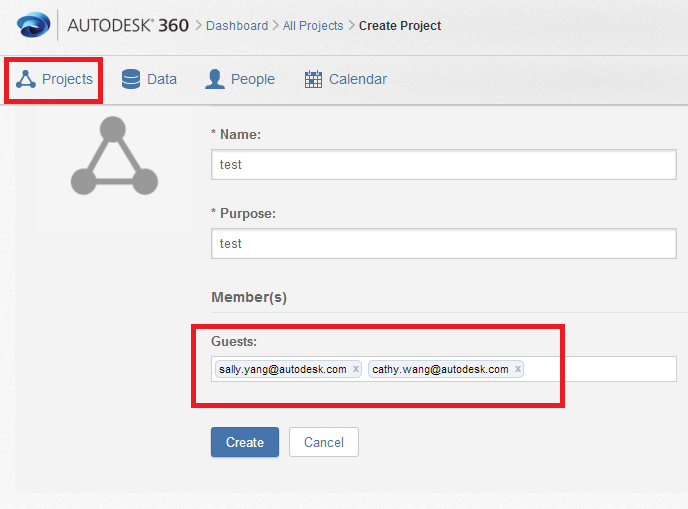
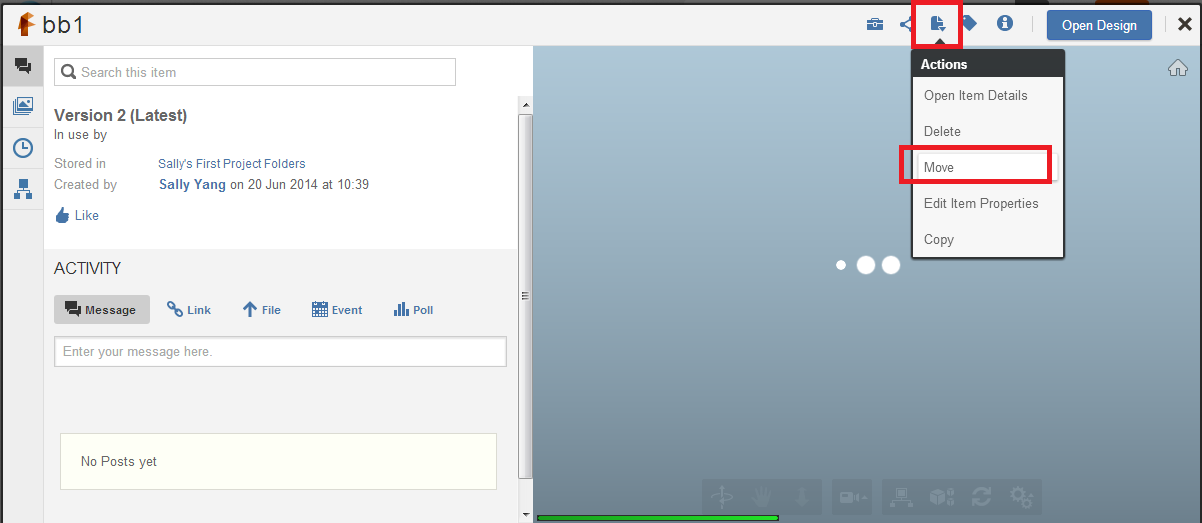
If your Friend also use Fusion 360 as designing program, you can share the file to him with simply 2 steps:

1. Create a shared project

Project Share.png

2. Move your file to that project

Move to Project.png

Then your friend will got all the designs that shared from you very quickly.


If your friend use other software, please let us known the version of it and we will try to find a solution.

Regards,
Sally


Sally Yang
Software QA Engineer
Fusion 360 Quality Assurance Team
Autodesk, Inc.
0 Likes
Message 3 of 14

bespenship
Alumni
Alumni

The only thing I can think of off of the top of my head is that they might be using an application which only supports older versions of the STEP file format.  I'm getting more information on the file versions our translation outputs by default.  Can you send me a STEP file you're having issues with?  I'll try opening it in a couple of applications on my end that read STEP data.  Also, it would be helpful to know what application they are using to import the data.

Brent Espenship
Fusion 360 Quality
Macbook Pro retina - MacOS X 10.11.5 (main)
WIndows 7 Notebook
0 Likes
Message 4 of 14

Anonymous
Not applicable

They are using "Wildfire Pro Engineer 5.0".  I have attached the STEP export.

0 Likes
Message 5 of 14

SallyYang
Autodesk
Autodesk

Thanks for sharing the problematic file here, it's helpful to address the issue.

Currently, we don't have "Wildfire Pro Engineer 5.0" for verification, so we try to open it with "Creo Parametric 2.0", and it could be opened successfully.

I have also reported this issue to our translator team, hope to get some further information soon.

Regards,
Sally


Sally Yang
Software QA Engineer
Fusion 360 Quality Assurance Team
Autodesk, Inc.
0 Likes
Message 6 of 14

AustinLiu
Alumni
Alumni

Hi,


Thanks for providing the feedback and the file.

I tried the STEP you attached on this thread with Pro/ENGINEER Wildfire 5.0 M020 on a Win7 X64 OS, but cannot reproduce the issue; the STEP file can be openned successfully. Sorry to say I have never experienced such a failure "read protected"...

Do you think the issue might be related to some access problem? like a read-only file, or a protected folder/directory?

or, may you please ask him/her to check the Pro/ENGINEER import options when read the STEP file?


Thanks,

-Austin


Austin-Zongjie Liu
[email protected]
Software Quality Assurance Manager
Design, Lifecycle & Simulation
Autodesk, Inc.
0 Likes
Message 7 of 14

RogerMollon
Autodesk
Autodesk

There's also the possibility that their anti-virus software is "read protecting" the file.


Roger Mollon
Forge - Strategic Tech Consultant - Novi
Autodesk, Inc. - Retired
0 Likes
Message 8 of 14

Anonymous
Not applicable

I have forwarded your thoughts to them.  They have also said that when they try to open it, their computers lock up.  I will let you know anything else they tell me about the issue.

0 Likes
Message 9 of 14

Anonymous
Not applicable

I guess they were able to open it at some point, but the model had missing surfaces.  Any idea?

0 Likes
Message 10 of 14

AustinLiu
Alumni
Alumni

I read the STEP files with other CAD applications but it's correct; only Pro/ENGINEER reports this error.

Do you mind sharing the Fusion file to us? Only with the STEP file we cannot dig more into the problem.


Thanks,

-Austin


Austin-Zongjie Liu
[email protected]
Software Quality Assurance Manager
Design, Lifecycle & Simulation
Autodesk, Inc.
Message 11 of 14

Anonymous
Not applicable

Here is the F360 archive of the model.  Thanks so much for working on this problem with me.

0 Likes
Message 12 of 14

AustinLiu
Alumni
Alumni
Accepted solution

Thanks for sharing the file.

We will investigate and update soon. At the same time may you please try to use IGES instead? I got a clean IGES from Fusion 360 and Pro/ENGINEER Wildfire can open it successfully.


Thanks for your patience,

-Austin


Austin-Zongjie Liu
[email protected]
Software Quality Assurance Manager
Design, Lifecycle & Simulation
Autodesk, Inc.
0 Likes
Message 13 of 14

Anonymous
Not applicable

Thank you.  They were able to open the IGES.  So I'll just use that with them for now.

0 Likes
Message 14 of 14

bespenship
Alumni
Alumni

Thank you for closing the loop with us, and Austin for your help - much appreciated.  I'm a dog guy - I should bug you sometime on advice for canine equipment 🙂 .

Brent Espenship
Fusion 360 Quality
Macbook Pro retina - MacOS X 10.11.5 (main)
WIndows 7 Notebook
0 Likes