Spacemouse Enterprise Screen Icons (and MBP Touchbar icons)

Spacemouse Enterprise Screen Icons (and MBP Touchbar icons)

sambirchenough
Advocate Advocate
1,954 Views
8 Replies
Message 1 of 9

Spacemouse Enterprise Screen Icons (and MBP Touchbar icons)

sambirchenough
Advocate
Advocate

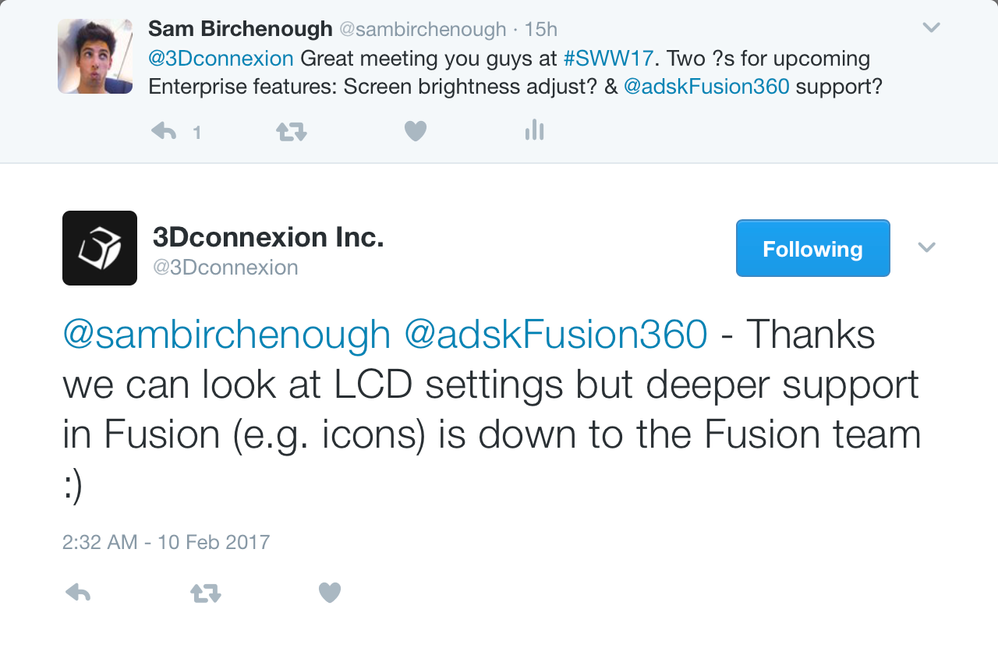
Screen Shot 2017-02-10 at 8.23.14 AM.png


Any chance this stuff will happen soon? Guessing it's not high on the priority list, but as next generation CAD, this "next generation" functionality integration would be great for those of us that employ these tools Smiley Happy

founder @ BRCHN Design House
1,955 Views
8 Replies
Replies (8)
Message 2 of 9

sambirchenough
Advocate
Advocate

Anyone?

founder @ BRCHN Design House
0 Likes
Message 3 of 9

Phil.E
Autodesk
Autodesk

We are aware, this will require for us to implement the 3Dconnexion SDK. Thanks for posting.


Phil Eichmiller
Software Engineer
Quality Assurance
Autodesk, Inc.


0 Likes
Message 4 of 9

sambirchenough
Advocate
Advocate

@Phil.E


Thanks Phil. Any plans for that to happen in the near / far future?

founder @ BRCHN Design House
0 Likes
Message 5 of 9

Phil.E
Autodesk
Autodesk

Not currently.


Implementing it would mean that any Fusion command can be mapped to a 3Dconnexion button. However, a much more popular request, and harder to achieve, would be mapping Fusion commands to keyboard buttons. So we are not sure how to implement one without the other, and both require a lot of resources together.


The other issue is fixing the current limitations of 3Dconnexion on Windows OS. Currently this is the #1 problem and focus of 3DConnexion support on our end. We are waiting for new drivers from them to help with this. So even at the soonest, we are talking months. 


Sorry I don't have better answers at this time.


Thanks,


Phil Eichmiller
Software Engineer
Quality Assurance
Autodesk, Inc.


0 Likes
Message 6 of 9

sambirchenough
Advocate
Advocate

Gotcha, thanks.

founder @ BRCHN Design House
0 Likes
Message 7 of 9

dirk_262
Contributor
Contributor

Are there some news about it?

What is the actual progress? Is Fusion now supported with the spacemouse Enterprise?

thanks 

0 Likes
Message 8 of 9

spark__wire
Explorer
Explorer

Any update on this? would love to have the same kind of integration as 3DS Max has (command lookup integration with fusion, lcd screen button hookup, etc)

0 Likes
Message 9 of 9

Phil.E
Autodesk
Autodesk

@spark__wire Yes there is an update!


I'm sorry I thought I found all the 3Dconnexion related posts about this. 


For Windows* there is a new 3Dconnexion experience in Fusion 360.

  • Constrained orbit
  • Full command support for custom buttons


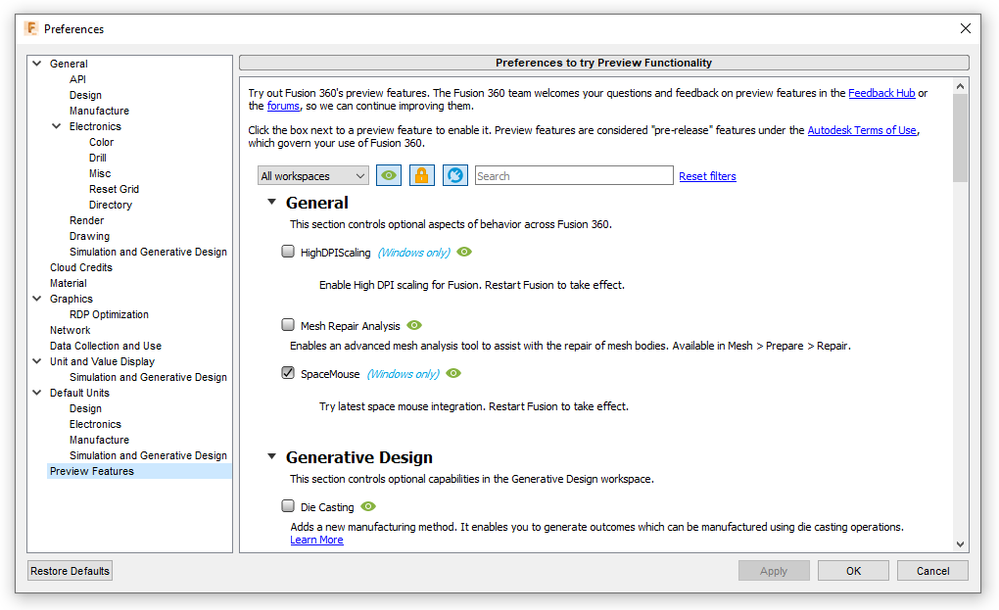
Here's how to enable it:

1. Install the latest 3Dconnexion drivers

2. Start Fusion, open Preferences > Preview

3. Tick Spacemouse (windows only)

4. Restart Fusion 360


PhilE_0-1635269322409.png


For constrained orbit (Lock Horizon)

1. Open 3Dconnexion properties

2. Go to Advanced settings

3. Enable Lock Horizon**

PhilE_1-1636395234235.png


* macOS support is in development

** known issue: currently, changing the view cube "up" direction will not set a new horizon for Lock Horizon


Let us know how you like it!


Phil Eichmiller
Software Engineer
Quality Assurance
Autodesk, Inc.


0 Likes