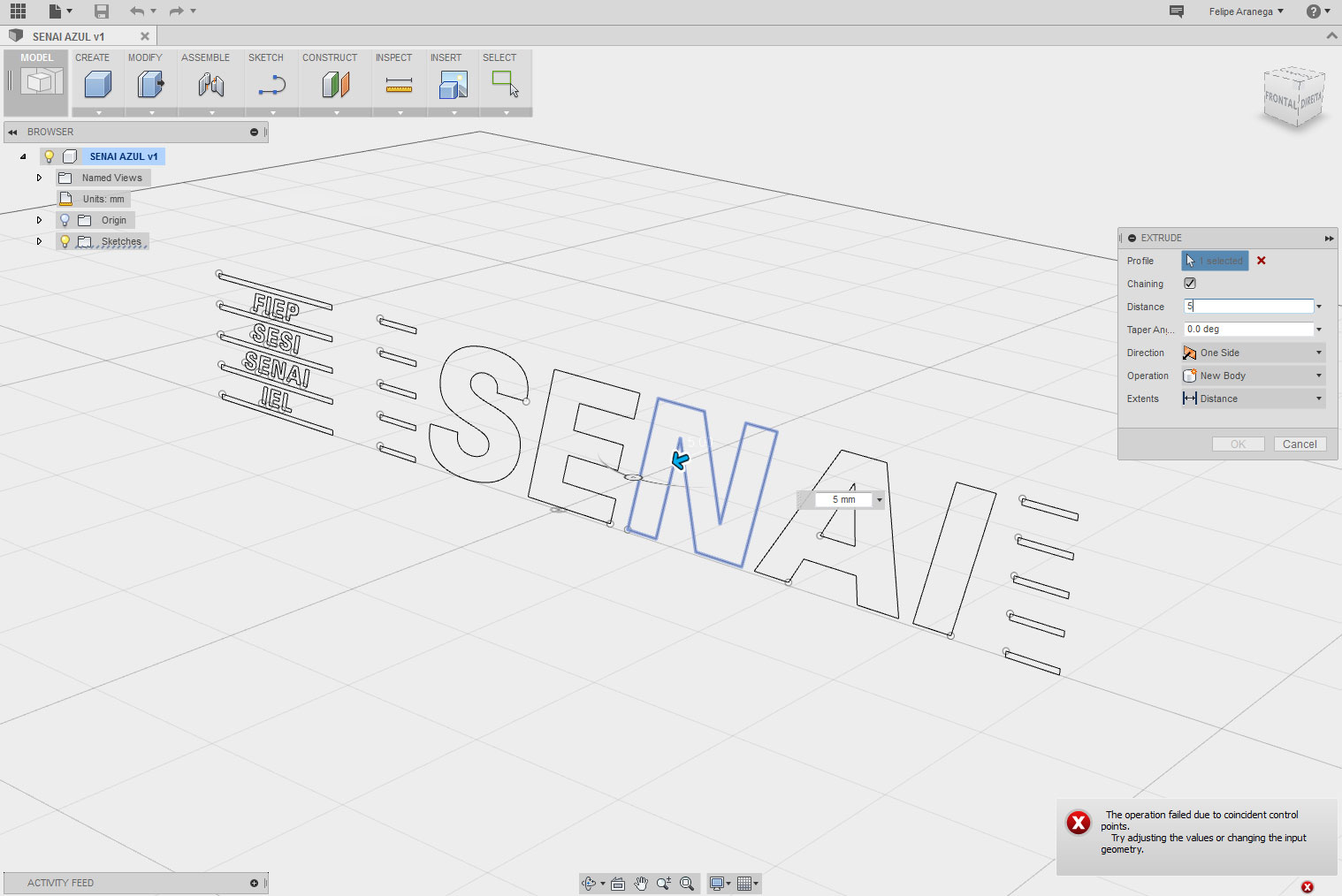
How i can import dwg or dxf file?

How i can import dwg or dxf file?

felipones
Contributor Contributor
2,131 Views
11 Replies
Message 1 of 12

How i can import dwg or dxf file?

felipones
Contributor
Contributor

Hello! I have had some problems when importing DWG or DXF file. I import the file but then I can not extrude it because of error. How should I proceed?

0 Likes
Accepted solutions (1)
2,132 Views
11 Replies
Replies (11)
Message 2 of 12

prabakarm
Alumni
Alumni

Can you share the DWG file and what you are trying to extrude so that we can try it and reproduce the problem.  Also what error are you getting?


Thanks,

Prabakar.

0 Likes
Message 3 of 12

felipones
Contributor
Contributor
0 Likes
Message 4 of 12

adelemm
Community Manager
Community Manager
Hi felipones, thanks for sharing us your file! Would you please turn on "Allow download" option in this share public link? I'm looking at it now but seems can't download this file:)
Fusion 360 Quality Assurance
0 Likes
Message 5 of 12

felipones
Contributor
Contributor
0 Likes
Message 6 of 12

adelemm
Community Manager
Community Manager
Thank you, download link now appears, we have got the file now!
Fusion 360 Quality Assurance
0 Likes
Message 7 of 12

felipones
Contributor
Contributor

I was sending the picture with the problem.


0 Likes
Message 8 of 12

adelemm
Community Manager
Community Manager

Thank you! this is really helpful, it is a problem and we have reported and asked dev to look at it now, the profile seems can't be built correctly. Will try to find any workaround for you.

Fusion 360 Quality Assurance
0 Likes
Message 9 of 12

NicolasXu
Autodesk
Autodesk

Hi felipones,


That the shape cannot be extruded is because there is no profile (i.e. yellow color filled in closed regions).


For this particular file, we got some feedback from the development team that the curves were recognized as a special type of curve and Fusion have some troubles to handle it. We have not found a straightforward workaround yet.


It could be either an import problem or a sketch problem. Could you attach the original dwg or dxf file for our further investigation? May we know in which software the dwg/dxf file is exported?



Nicolas Xu
Sr. SQA Eng.
Fusion 360 Quality Assurance Team
Autodesk, Inc.
0 Likes
Message 10 of 12

felipones
Contributor
Contributor
Accepted solution
Personally I managed to solve the problem. Before I was exporting dwg file from Illustrator.
But I tried exporting direct from Rhinoceros and now the Fusion program recognized the file and could extrude normally.

Thanks for listening!
0 Likes
Message 11 of 12

felipones
Contributor
Contributor
0 Likes
Message 12 of 12

NicolasXu
Autodesk
Autodesk

It’s glad to know you have solved the problem. We will try the workflow of exporting dwg from Illustrator.


Just FYI- As for the workflow from Illustrator to Fusion, Fusion also supports inserting SVG file directly, which would be useful when designing logo contains text. The command is under the Insert drop-down in the toolbar.


Nicolas Xu
Sr. SQA Eng.
Fusion 360 Quality Assurance Team
Autodesk, Inc.
0 Likes