Fusion 360 - Multiple Designs one Drawing

Fusion 360 - Multiple Designs one Drawing

wesley.bonafe
Enthusiast Enthusiast
1,390 Views
3 Replies
Message 1 of 4

Fusion 360 - Multiple Designs one Drawing

wesley.bonafe
Enthusiast
Enthusiast

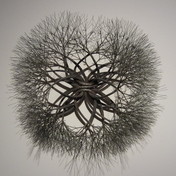
Is it currently possible to place multiple designs in on drawing? I have a curved piece of trakk, Image attached.  I need to indicate how the rails would be built if they were straight.  I can draw what I want but cant figure out how to display it with the attached curve.  If I draw what won't exist (An intermediate step) do I need a completely separate drawing?
0 Likes
1,391 Views
3 Replies
Replies (3)
Message 2 of 4

atherisinnovations
Advocate
Advocate

@wesley.bonafe wrote:

Is it currently possible to place multiple designs in on drawing? I have a curved piece of trakk, Image attached.  I need to indicate how the rails would be built if they were straight.  I can draw what I want but cant figure out how to display it with the attached curve.  If I draw what won't exist (An intermediate step) do I need a completely separate drawing?


By "Drawing" you mean sketch, right? Not inserting a dxf or svg. I also would like my sketches to be more accessible to other projects.


I had suggested a'sketch library' in the Ideastation like 4 months ago but that was shot down..


Just designating a moveable 'handle point' somewhere in the 2D sketch area would make it easy to pull into an existing project and align correctly. I often have designs that can have more than 10 variants and it gets to be a chore with project management to remember where the correct sketches are and if they are contained in the component folder or not.

0 Likes
Message 3 of 4

Maowen_Zhang
Autodesk
Autodesk

@wesley.bonafe, if you want to show sketch curves after creating a feature, could click light bubble to show sketch in browser. One sketch could contains multi curves, and we could use it for creating multi features / bodies. 


showSketch.png


Lori Zhang (Fusion Development)
0 Likes
Message 4 of 4

zhixin.ni
Alumni
Alumni

Hi,

You can place multiple designs in one file by creating one component for one design. You can make the component invisible if needed.

image.png


Regards
Nick Ni
0 Likes