Distributing non-uniform sketch features

Distributing non-uniform sketch features

batchelder_jimmy
Participant Participant
842 Views
3 Replies
Message 1 of 4

Distributing non-uniform sketch features

batchelder_jimmy
Participant
Participant

I am looking to evenly distribute a number of circles of different diameter across a given line. In Solid Works there is a tool specifically for this. I have looked around and it seems that Fusion 360 does not have a feature similar to this. What would be the best to to accomplish this task in a way that will scale gracefully when sizing changes over the course of the design?


I have tried placing lines between the circumferences of the circles and making them all equal, but Fusion can't seem resolve the constraints. I have distributed the the two vertical circles this way.


I will be using this sketch to cut flat bottom holes in a rectangular part. If there is a better way to go about what I am trying to accomplish I would love to hear it.  
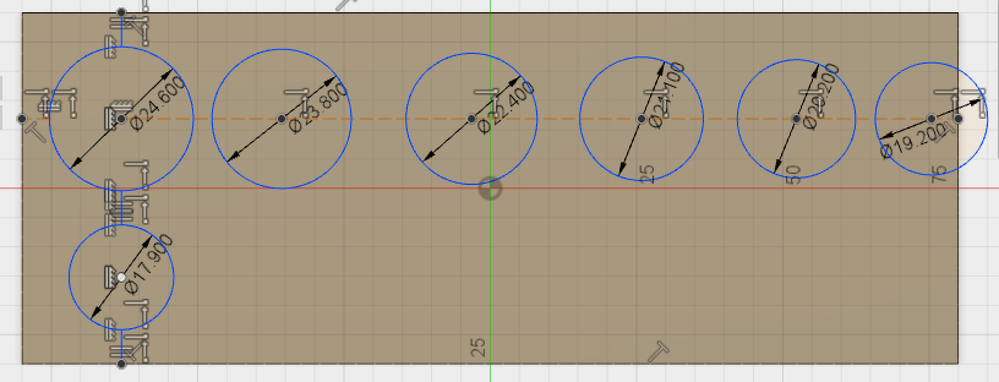


Screen Shot 2017-02-18 at 11.59.00 AM.png

0 Likes
Accepted solutions (1)
843 Views
3 Replies
Replies (3)
Message 2 of 4

HughesTooling
Consultant
Consultant

Seems to work if you do away with the first construction line and just use lines between the circles. Use a coincident constraint between the line and the circle centres it's joined to.


before.png


File attached.


Mark

Mark Hughes
Owner, Hughes Tooling
Did you find this post helpful? Feel free to Like this post.
Did your question get successfully answered? Then click on the ACCEPT SOLUTION button.

EESignature


0 Likes
Message 3 of 4

HughesTooling
Consultant
Consultant
Accepted solution

Here's a screencast I made for someone else to show how to dimension the distance between circles.


Mark

Mark Hughes
Owner, Hughes Tooling
Did you find this post helpful? Feel free to Like this post.
Did your question get successfully answered? Then click on the ACCEPT SOLUTION button.

EESignature


Message 4 of 4

batchelder_jimmy
Participant
Participant

Thank you very much! This is exactly what I was looking for! 

0 Likes
