Best way to model a steel connection (picture attached)

Best way to model a steel connection (picture attached)

Anonymous
Not applicable
2,559 Views
14 Replies
Message 1 of 15

Best way to model a steel connection (picture attached)

Anonymous
Not applicable

Hi all!

I'm a new Fusion User but it works quite well, except this problem:


I tried to create the different axis for the tubes, all with a common focus point, but I couldn't find a way to create them.  i like to have them parametric, so the model can adapt to different situations.


Are there spherical coordinates somewhere hidden? What is your suggestion how to do that? Thank you for your help!


My second step would be to use the simulation tools to connect the tubes with a generative design method, but that's another story 😉

0 Likes
2,560 Views
14 Replies
Replies (14)
Message 2 of 15

davebYYPCU
Consultant
Consultant

For that example it is just a Plane at an Angle, and two Origin planes, parametric construction lines, and the Mirror command.


A more complicated arrangement would require a Circular Pattern.


Might help....


0 Likes
Message 3 of 15

wersy
Mentor
Mentor

Something like this?


Knotenbleche.png

0 Likes
Message 4 of 15

chrisplyler
Mentor
Mentor


I made the connector flange as one component.


I made a pole as one component, which I then copy/paste-new seven times.


So I've got nine components.


Then I just assemble them.


Message 5 of 15

wersy
Mentor
Mentor


If you try to align all rods to meet in one point, you can get something like this:


Knotenbleche Nullpunkt.png


That means it is not possible.
It depends on what structure your construction is to be able to align all in one point as much as possible.
In general you have to make different designs.


I made all parametric so you can play with it trying out several combinations of the rod system.

Message 6 of 15

lichtzeichenanlage
Advisor
Advisor

@chrisplyler: Great work. Perhaps it would make sense to put the flange and two poles in on component. 

0 Likes
Message 7 of 15

chrisplyler
Mentor
Mentor

@lichtzeichenanlagewrote:

@chrisplyler: Great work. Perhaps it would make sense to put the flange and two poles in on component. 


I like to construct inside Fusion as I would in the real world. The connector flange is a single weldment, and the poles are separate weldments. Depending on the required arrangement, the poles would stay the same and you would just change the connector flange, right? So why not set it up that way in Fusion too?

0 Likes
Message 8 of 15

Anonymous
Not applicable

thank you all for your time. I still working on my Fusion skills as I work atm through all the help documentation -> so pls give me a bit more time to try to model that, I will keep you updated 🙂 


@wersy: I have opened your last file, but I cannot see the bodies (screenshot attached). I have activated the lamp in the browser. Any idea what to do?


@chrisplyler: I will try model model my single elements that way! But I think I will have the tube first (based on vectors/lines), and after that I try to model the connection itself with a dependency on the vectors. 


To give you a better understanding about the complete workflow:


Imagine a stadium design (or steel structure, whatever), with hundreds of similar connections like the one in the picture in my first post. And all connections have a slightly different angle to each other and sometimes less or more members.


The framework of lines and points is generated with Dynamo (or grasshopper) and the forces on each member (tubes) are calculated. So I have for each member of the connection, the forces and vectors how they meet. Somewhere I like to type in these parameters and the members adapt to it, to create drawings. And I think because of that, the way to create the tubes should be based on the lines. And also the connector flange should adjust according to the lines. I don't know if this is possible somehow, but that would be a good way, to adjust the connection faster to different situations. Because often the design changes just tiny bit (angles), it would be a lot of work to adjust all manually. 


0 Likes
Message 9 of 15

chrisplyler
Mentor
Mentor

I don't think Fusion is the best tool for all that.


Revit is likely better suited. You could make a structural framing brace family for a pole, having - for example - a thickness or size parameter that is dependent on a load parameter, and having mounting flanges that are set back 8" (or whatever) from your structural "nodes." The connector flanges would be more work, but laying out the poles and using Dynamo to assign them all the right loads should be reasonable.

0 Likes
Message 10 of 15

chrisplyler
Mentor
Mentor


0 Likes
Message 11 of 15

wersy
Mentor
Mentor

@wersy: I have opened your last file, but I cannot see the bodies (screenshot attached). I have activated the lamp in the browser. Any idea what to do?


If you open the file you must zoom in to see the connection.


I made another simple version with shorter rod lengths so you don’t need to zoom.
Furthermore, the distances of the anchor points are editable in the parametric sheet.
Changing a distance the flanges will always be aligned to the rods.
It depends on the constraints in which way the flanges will change their outline.

But no matter what constellation you make, you will never get a reasonable resolution.
In practice you try to get the system in intersection point, but as you can see, in this case it is not possible.
So you have to make compromises. If you look at your picture you will notice that the intersection point of the diagonal rods are underneath of the horizontal rods.
Attached file.


Knotenbleche.jpg


Message 12 of 15

chrisplyler
Mentor
Mentor


Why do you suggest that converging all poles to a single point is impossible? I simply made a 3D sketch of construction lines. Endpoints can be relocated as necessary.


The only thing I think is impossible is automatically generating an acceptable connector flange. Even if you could get that working, I very STRONGLY suggest that a human design/engineer each connector flange for the specific conditions.


Poles converged...


Message 13 of 15

Anonymous
Not applicable

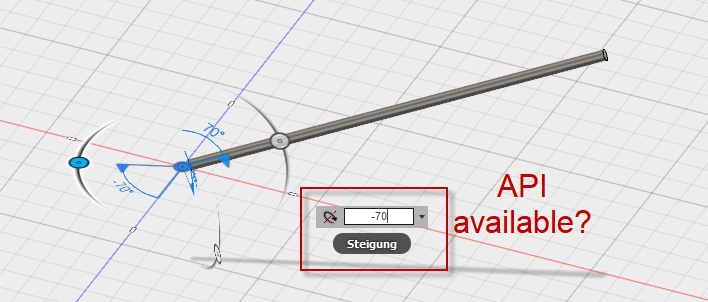
cool stuff guys 😃 After watching most of the tutorials in the fusion help, I think I will have to create a component for the tubes. And create it similar to @chrisplyler have done that with the construction lines. And then fix the end of the construction line (tubes) with a ball joint in the middle. After doing that I can easily move the tube with the mouse and the angles are displayed. Somehow I have to find a way to adjust the angles with API. And the method of adaptive flange created by @wersy has to be integrated somehow. 


Can i display somewhere the angle parameter of the ball joint? In Revit I have lookup tool to look into the database names and values

0 Likes
Message 14 of 15

wersy
Mentor
Mentor

You got me wrong.
I meant exactly the same as you mean.
See my preview post and have a look at my file.

0 Likes
Message 15 of 15

chrisplyler
Mentor
Mentor

@wersywrote:

You got me wrong.


My apologies. I misunderstood.

0 Likes