[Open] Help improve Fusion toggle experience

[Open] Help improve Fusion toggle experience

yirang.choe
Alumni Alumni
6,930 Views
14 Replies
Message 1 of 15

[Open] Help improve Fusion toggle experience

yirang.choe
Alumni
Alumni

Hi All,


The Fusion team wants your feedback as we shape the future of the toggle experience in Fusion. Please help us by sharing your ideas.


If you are interested, please take the quick survey by clicking HERE.


We look forward to your feedback and ideas!


Reply
Reply
0 Likes
6,931 Views
14 Replies
Replies (14)
Message 2 of 15

carl.j.barker
Collaborator
Collaborator

Kind of feel it would be better to fix what you have. 


Like inconsistencies - some times you slow double click to rename, other time you have to right click and select rename.


Broken controls.  I.E the inspector panel in the electronics workspace.  You can pull the divider down but not move it back up.


Click and drag to highlight the entry in dialogue box fields, if your mouse moves down the screen by even a small amount as you swipe the highlight is lost.


Opinion only but put some colour and curves in the dialogue boxes 🙂


Reply
Reply
Message 3 of 15

yirang.choe
Alumni
Alumni

Thanks! This is good feedback. Regarding the divider in the Electronics workspace: This issue will be fixed in the future release. Our developer team is consistently working on enhancing the dialog interaction in Electronics.

Reply
Reply
0 Likes
Message 4 of 15

m.tozzi91
Participant
Participant

Hi,

pe my feedback is on the right place.
1. inserts screws or other standard parts from McMaster the biggest issues is the windows size everytime i have to resize it,, i have no option for favorite screws or anything, the next thing i miss very much automatic filing of screws like inventor (auto drop) 


2. No Parameter file (values) sharing, example is inventor who i can use in a folder a excel sheet for parametric modelling.


3. joint function need a button for auto offset. its again the example from inventor.
Or a notification why your joint have a problem and in wich direction XYZ values or something else that show why its broke. Sometimes its so hard to find out why a joint is not working and in the end its a problem of couple of mm that you can not see, its helpful to have more information why a joint is broke.


4.the template creation for drawings is not even close to a point where you can change them easily and simply. there it would be very helpful if you could draw lines and dimension them to create frames and title blocks.


5.for each menu be it extrusion rotation rip no matter which, an option for templates and / or remember last input.

6. Moving components in the modell tree, and maybe add folder to organize it a little bit more.


But I must also say you are doing a crazy good job keep up the good work
sorry for my bad english .
best regards Marco


Reply
Reply
Message 5 of 15

yirang.choe
Alumni
Alumni

Hi Marco, Thanks for all of your comments. These are great suggestions but I'm afraid I won't be able to act on them immediately and I'm not sure who would be the best person in Autodesk to share your feedback with.


I would recommend re-posting your feedback in Fusion 360 Design, Validate & Document so that others working on relevant projects are also aware of these issues.


My current research focus is on Fusion's toggle experience (turn on/off commands, etc.). I'd be happy to answer any questions or concerns related to that here as well.


Many thanks,

Yirang Choe

Reply
Reply
0 Likes
Message 6 of 15

ECPIRO
Contributor
Contributor

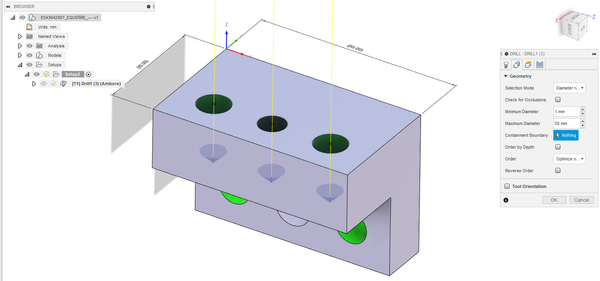
Fusion 360 Manufacture V2.0.12160 Drilling problems :

"Top Height - hole top" is reversed with "Bottom Height - Hole bottom".Captură de ecran 2022-01-27 092250.jpgcap3.jpg

Reply
Reply
0 Likes
Message 7 of 15

stephen_mcmillan
Enthusiast
Enthusiast

Survey complete.

Here's my Toggle feedback:


At the bottom of the screen there is an icon for Free Orbit / Constrained Orbit.

stephen_mcmillan_0-1644107194587.png

This button should be a toggle.

Instead, to change state, you do not click the icon, but the little down arrow next to it.

Clicking the icon DOES NOTHING!

Then you need to pick one of the two options.


And then you are still not done. The screen goes into a weird mode.

Here, I was in Free Orbit, and I have selected Constrained Orbit.

Now my cursor transforms to the Free Orbit symbol (not shown in screen capture below), and there's a weird phantom large circle with 4 quadrants behind my model.

What's the desired purpose of this?

stephen_mcmillan_1-1644107485733.png


and I usually get out of it by clicking ESC. This must be a glitch.

Then I finally get the desired other mode, taking three clicks.


Instead, this button should be a simple toggle.

Click it to change the state. Simple. There are only two states. 

Click it and the icon should change to reflect the new state. 


Thanks.

Reply
Reply
0 Likes
Message 8 of 15

ECPIRO
Contributor
Contributor

I have been using Fusion 360 since 2019. This is a new bug starting with the January 2022 update.

Reply
Reply
0 Likes
Message 9 of 15

ECPIRO
Contributor
Contributor

Capture2.PNGCapture3.PNG

Reply
Reply
0 Likes
Message 10 of 15

yirang.choe
Alumni
Alumni

Hi @ECPIRO, I'm not sure if I understood your issue correctly. Could you elaborate more on it? If it's a bug, I'll share this with the Manufacturing team.

Reply
Reply
0 Likes
Message 11 of 15

yirang.choe
Alumni
Alumni

@stephen_mcmillan Thanks for participating in the survey! Regarding your feedback on toggles, as @ECPIRO mentioned, it's probably just a bug. Clicking on the icon should turn on/off the feature and you can use the dropdown to switch to a different option.


For the light grey circle in your image, it appears on both Free Orbit and Constrained Orbit mode, allowing you to rotate the model in a more precise way (please refer to my video).

2022-02-08_10-25-22 (1).gif


Reply
Reply
0 Likes
Message 12 of 15

ECPIRO
Contributor
Contributor

ECPIRO_0-1644486226382.png

ECPIRO_1-1644486261826.png


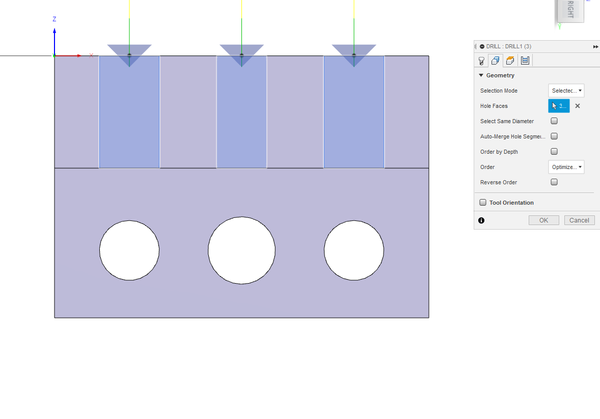
This only happens for: "Selection Mode - diameter range".
If "Selection Mode - Selected face" there is no such problem.

ECPIRO_2-1644486493163.png


Reply
Reply
0 Likes
Message 13 of 15

adam
Enthusiast
Enthusiast

I would love to be able to toggle the visibility of construction lines on or off in sketches!  The same way you can toggle the visibility of projected geometry and dimensions

Reply
Reply
Message 14 of 15

ECPIRO
Contributor
Contributor

New version 2.0.13599 . NC Program Dialog is now the default path to Post Processing (legacy tool library retired*)  . It's a big mistake. At least for me. Nothing is understood from the picture. Only the origin should be seen. How do I do that?

Reply
Reply
0 Likes
Message 15 of 15

rob.blanch
Enthusiast
Enthusiast

You have not defined what you mean by "toggle" but replies seem to be centred on the UI, so I have a suggestion. I guess someone must be very proud of the "automate" function, but maybe let those of us who are not interested in it remove it?! Tab space is precious....


noremove.jpg

Reply
Reply
0 Likes