Modeling the chain conveyor of a paint line

Modeling the chain conveyor of a paint line

patrickABAWF
Collaborator Collaborator
985 Views
6 Replies
Message 1 of 7

Modeling the chain conveyor of a paint line

patrickABAWF
Collaborator
Collaborator

[ FlexSim 17.1.2 ]

I'm modeling a paint line chain conveyor. That's a closed-loop continuous chain with hooks every 12". I'm modeling it as a narrow width, power and free with 12' dog interval.

1 - The conveyor goes through a lot of rises and descents along its path. Is there any way to control the "vertical curve angle" so that I can create smooth rises and descents ? Now it just takes sharp upward and downward turns. I know I could break down the rises and descents into multiple smaller conveyor sections to create smoother curves but I was wondering if there's an easier way.

2 - The parts are hanging vertically below the conveyor chain. But whenever there is a rise or descent I have to manually change the angle of the parts so they keep hanging vertically and not at an angle. Is there a way to automatically set something like: "keep parts vertical all along the conveyor system"?

I'm aware these requests are only for visual purposes.

Thanks,

0 Likes
Accepted solutions (1)
986 Views
6 Replies
Replies (6)
Message 2 of 7

brenton_king
Not applicable
Accepted solution

So, if I understand you correctly, this is what you are currently having to do...I agree, really clunky.

7676-conveyor.gif

Unfortunately there isn't a button you can press and the options you are requesting in the conveyor don't exist yet...I have wanted this myself though so please submit it as a feature request.

Here is my best alternative option for you. It uses the kinematic pick option on a decision point to change the height of the item over time. I think it look pretty cool. You would then just want to hide the conveyor and put in a dummy conveyor for the graphic or some other shape. I think it looks better though.

7678-conveyor-translate.gif

kinematics-on-a-conveyor.fsm

Message 3 of 7

normand_ct
Not applicable

@BrentonKing. How can you hide a conveyor in v18.0.3 ? There is no 'General' tab with flag 'Show 3D Shape' to uncheck. I can make the conveyor invisible by setting all visual dimensions to zero but this is not practical if you want to show the conveyor later during model development. How can I hide all conveyors in the model but not the flowitems they are carrying.

Thanks

0 Likes
Message 4 of 7

chanykE2WUT
Collaborator
Collaborator
@Patrick Cloutier

If you don't mind you can use the legacy conveyor to do that. I have done a platting line using that.

David

0 Likes
Message 5 of 7

mischa_spelt
Advisor
Advisor

@steven.hamoen didn't you build a chain conveyor once?

0 Likes
Message 6 of 7

SCHamoen
Advisor
Advisor

@Mischa Spelt yes but I also build as a power and free just as @Patrick Cloutier but I didn't have the problems with height differences, so this problem was not something I had to solve 😉

0 Likes
Message 7 of 7

cliff_king
Not applicable

Right-click conveyor and uncheck "Show 3D Shape" under Edit menu as shown here:

11157-2018-03-22-14-56-29.jpg

If more than one conveyor is selected, it will apply to all conveyors selected.

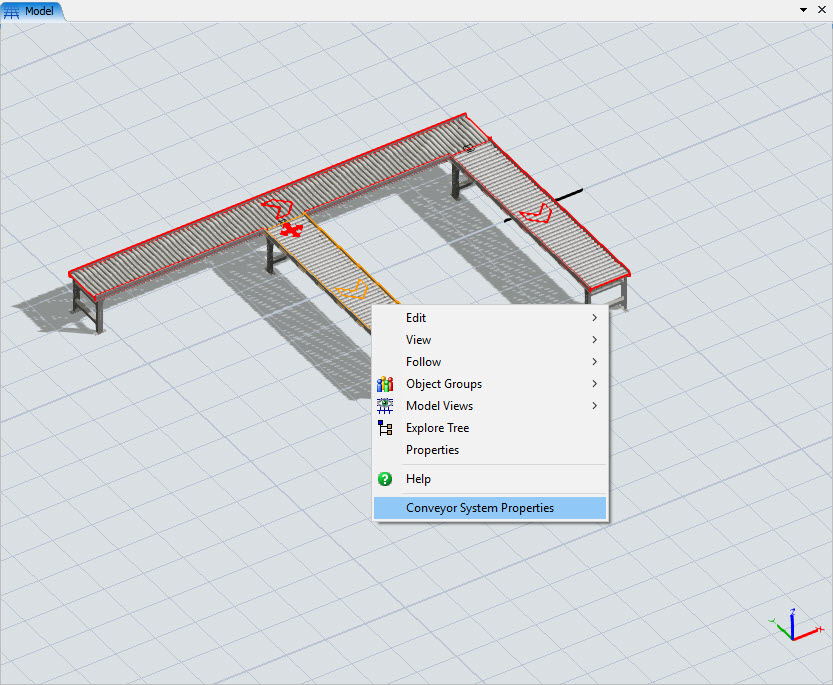
If the "Draw Render Mode" box is checked in Conveyor System Properties (which it is by default), you will have to uncheck it as well, by first right-clicking a conveyor and selecting Conveyor System Properties menu as follows:

11158-2018-03-22-14-57-19.jpg

And then unchecking the "Draw Render Mode" box as follows:

11159-2018-03-22-14-58-44.jpg

To facilitate the turning on/off the display of many conveyors, considering adding all applicable conveyors to a group so they can easily be selected all at once whether they are showing or not. There is also a right-click option to easily create or select groups in your model.