label destination

label destination

alejandra_n2
Not applicable
697 Views
13 Replies
Message 1 of 14

label destination

alejandra_n2
Not applicable

[ FlexSim 17.1.4 ]

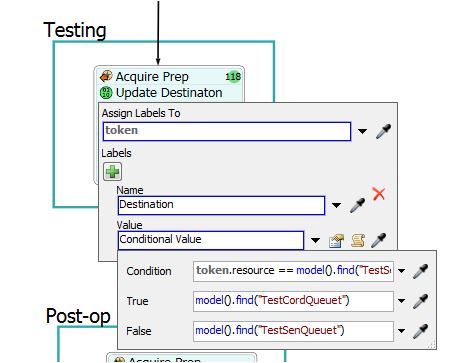
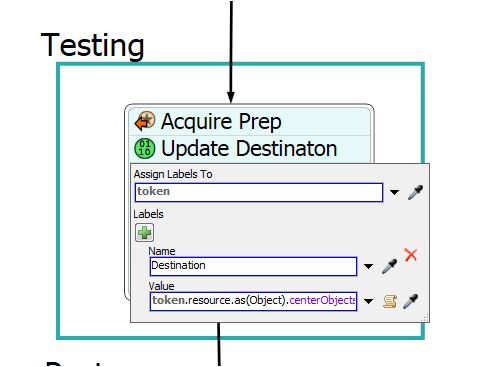
I have a label that updates the destination when its only from one queue. My question is : How do I update the destination when its coming from two queues?

Im getting the error below:

time: 11.847893 exception: FlexScript exception: invalid index at MODEL:/Tools/ProcessFlow/ProcessFlow/Update Destinaton~7>labels/1/2

time: 12.752505 exception: FlexScript exception: invalid index at MODEL:/Tools/ProcessFlow/ProcessFlow/Update Destinaton~7>labels/1/2

7691-rcjjn.png

Thanks!

0 Likes
Accepted solutions (1)
698 Views
13 Replies
Replies (13)
Message 2 of 14

sam_stubbsYXX86
Community Manager
Community Manager

Is there a center port connection to your resource? If you include the model we can take a look at it.

0 Likes
Message 3 of 14

alejandra_n2
Not applicable

cell-2-4.fsm

Yes, there is. Take at look at the process flow that says testing please. I don't know if I need to create another label just to pick from different queues or I could use the existing one(label destination).

I have two operators each one with a designated queue.Thanks!

0 Likes
Message 4 of 14

alejandra_n2
Not applicable

@Sam Stubbs

Sam, sorry to be pushy but I need an update on this. I have a deadline to present the model today at noon.

Thanks!

0 Likes
Message 5 of 14

sam_stubbsYXX86
Community Manager
Community Manager

Sorry I was helping another client. Are you sure this the right model version? I'm running your model and the error that you typed out is not firing.

Message 6 of 14

sam_stubbsYXX86
Community Manager
Community Manager
Accepted solution

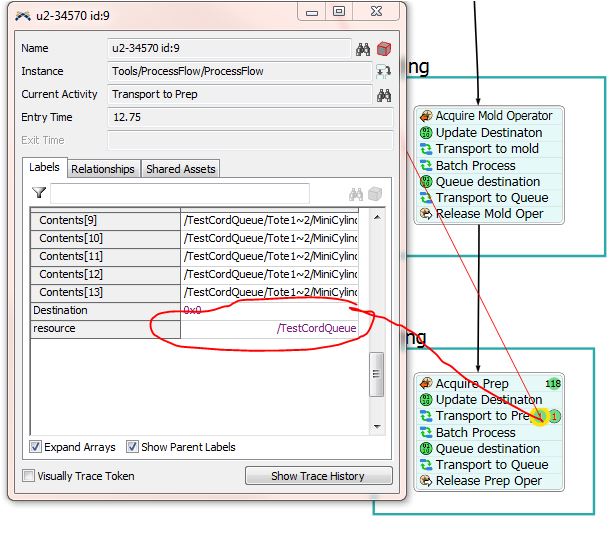
I do notice however that you're model seems to get stuck on testing. Your Test Operator group is actually pointing to a pair of queues, not operators. So when it gets to the Transport to Prep subflow in testing, it gets stuck on the Load Batch Bin activity, because "resource" is a queue, not an operator. Does that make sense? You need to make sure your Load tasks are being performed by operators. So you'll need to change your Test Operator resource to point to a group of operators instead of the TestQueue group, or use a different resource/group instead.

Message 7 of 14

alejandra_n2
Not applicable

3.jpg1.jpg@Sam Stubbs yes that's the same model. you are seeing no errors because I changed the value to a conditional one to see if it works but is not when you see the 3d objects in the simulation for testing they are not moving. Per the Token Information when the token gets stuck in testing its not grabbing the right source its grabbing the queue1.jpg

0 Likes
Message 8 of 14

alejandra_n2
Not applicable

@Sam Stubbs Thanks! that was the issue 🙂

0 Likes
Message 9 of 14

sam_stubbsYXX86
Community Manager
Community Manager

Awesome! So is everything else working now too?

0 Likes
Message 10 of 14

alejandra_n2
Not applicable

@Sam Stubbs Yes! Thank you.

0 Likes
Message 11 of 14

alejandra_n2
Not applicable

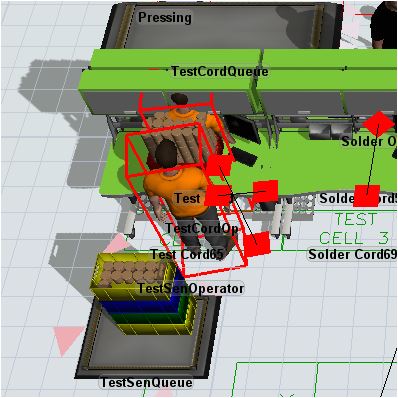
@Sam Stubbs I'm noticing another issue that the operators are not staying on their own work station they are getting to each others table how can I fix this?1.jpg

0 Likes
Message 12 of 14

Jacob_Gillespie
Autodesk
Autodesk

@alejandra.n2 To prevent people from walking through stations, they need to be added as members of the AStarNavigator. That whole line of stations are not members. You can tell an object is a members of the AStarNavigator by the blue square that is drawn beneath the object.

Message 13 of 14

alejandra_n2
Not applicable

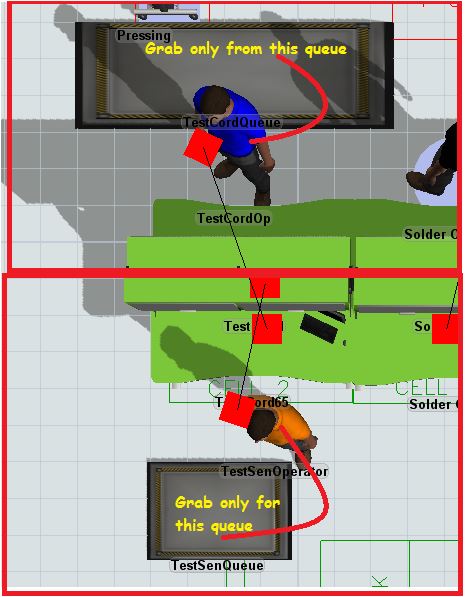
cell-2.fsm@Jacob Gillespie sorry for not explaining properly. The situation that I have is that I have two operators with their designated queue, but when their queue is empty they go and take product from each others queue. How can I fix this? do I need to add another conditional value for this?1.jpg2.jpg

0 Likes
Message 14 of 14

sam_stubbsYXX86
Community Manager
Community Manager

You'll need to see how your groups are set up, and how you acquire resources. If for example you have all of your testers in a group. And you just say, Acquire 1 from X group, then it will just grab the first available member of that group.

If specific stations have specific operators, then you may need to add a label to the Operator that is a reference to the station they are assigned to.

Then make sure you assign a label reference to the station the item is going to on a label in the token. Then you can just write a query to grab the right operator in your Acquire activity.

If set up, the acquire Operator activity's query could look something like this:
WHERE station = Puller.station

(The first 'station' being the name of the label on the operator which is a reference to his assigned station. And the second Puller.station is a reference to the token label 'station' which should be a reference to the same)

This should acquire the operator associated with that station.