How to control Maximum content of objects using ProcessFlow

How to control Maximum content of objects using ProcessFlow

thao_b
Not applicable
378 Views
3 Replies
Message 1 of 4

How to control Maximum content of objects using ProcessFlow

thao_b
Not applicable

[ FlexSim 18.1.2 ]

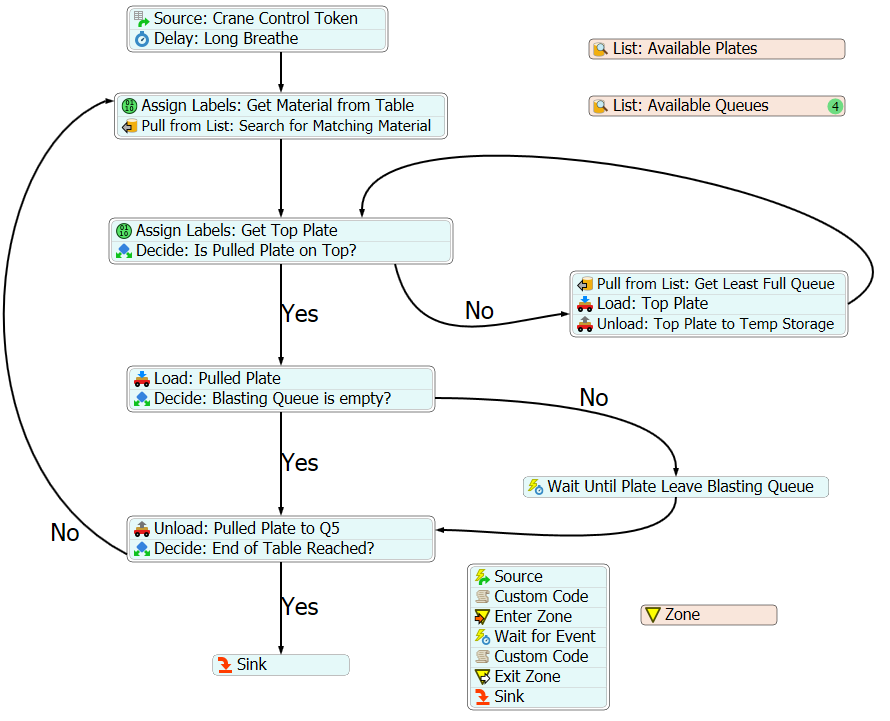
process-flow.pngplate-shuffling-for-horizontal-storage.fsm

Hi,

I have a model here created with the help of @Regan Blackett.

The model make use of Process flow to find, shuffle and load steel plates from Storage Queues 1-4 and unload it at Queue 5. However, I am not able to set the maximum limit of the Queue 5 in 3D modelling. What is way to approach this in Process Flow?

I have also added a conveyor to deliver the steel plates to the processor. The maximum content on the conveyor is set to be "4". However, more than 4 plates are still getting loaded onto the conveyor.

0 Likes
Accepted solutions (1)
379 Views
3 Replies
Replies (3)
Message 2 of 4

Matthew_Gillespie
Autodesk
Autodesk
Accepted solution

I made some changes to your model so the process flow waits for capacity limits.

First, I made it so after it loads the pulled plate it then waits for the content of Queue5 to drop below it's max content value.

Second, I removed the Zone from the Conveyor max content section and just replaced it with a decide.

See the attached model:

maxcontent.fsm

Also, there were some issues with the crane acting strangely because you had the Queue set to Use Transport with the crane. This doesn't work very well because you're mixing control of the crane. The process flow assumes it's the only thing giving the crane instructions, but then the queue was adding in extra instructions on top of that. I turned that off in the attached model because that's beyond the scope of this question.


Matthew Gillespie
FlexSim Software Developer

Message 3 of 4

thao_b
Not applicable

Hi @Matthew Gillespie

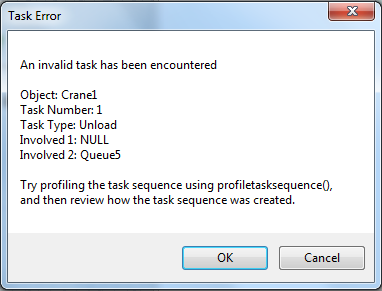
I tried to recreate the changes you have made to the model but I keep receiving an Task Error when the steel plate exits the processor. I have checked the Process Flow thoroughly but couldn't find anything wrong. Could you have a look? Thank you.

task-error.png

plate-shuffling-for-horizontal-storage.fsm

0 Likes
Message 4 of 4

Matthew_Gillespie
Autodesk
Autodesk

@Thao B

It looks like there is some old data stored in the variables of the Wait For Room in Blasting Queue activity. In the Event field of that activity I clicked the dropdown and chose a different event. Then I clicked it again and chose the OnContentChange option again. That cleared out the old data for me.

fixed.fsm


Matthew Gillespie
FlexSim Software Developer

0 Likes